

Using Tags#
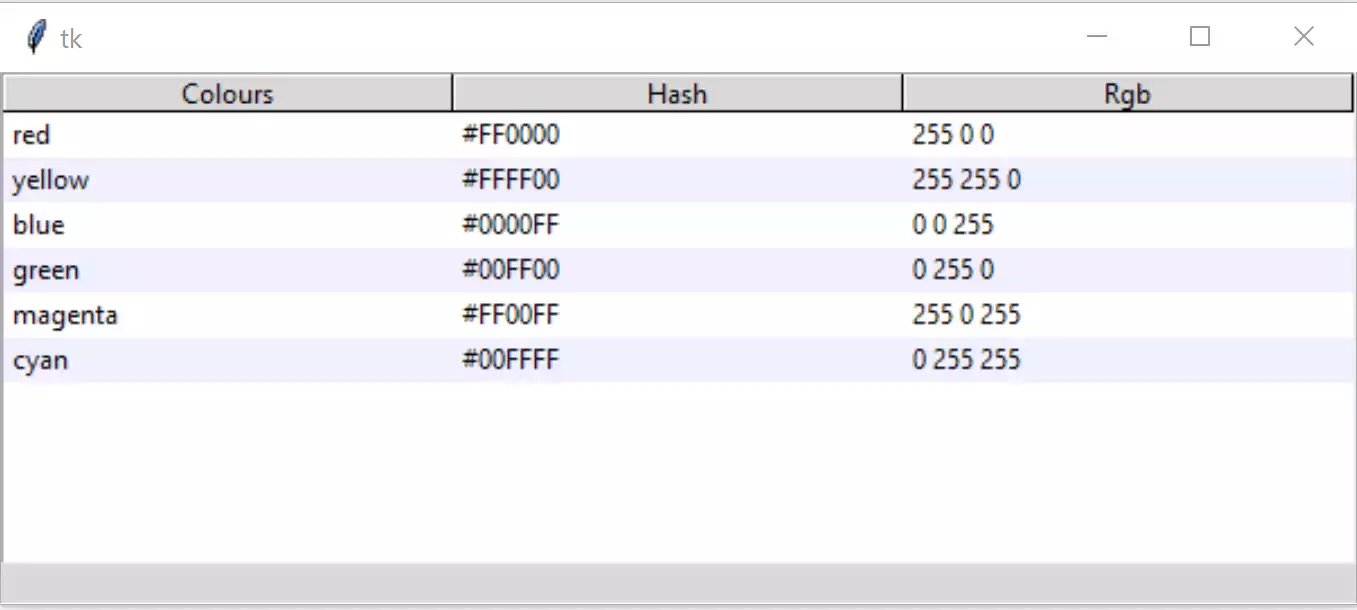
Creating Alternating Stripes#
It is relatively straightforward to create alternate row colours (zebra stripes). The data remains as before, each row is tagged which allows us to change the row properties.
Create the tags while we are inserting data, at this point we need to know whether we have an odd or even row. To do this change the for clause to enumerate which gives us the row number, now add a tag with its identifier and configure its background according to whether it is an even or odd row:
# insert data
for ix, item in enumerate(tree_data):
    item_ID = tree.insert('', 'end', values=item)
    tree.item(item_ID, tags=item_ID)
    tree.tag_configure(item_ID, background=backg[ix%2])
Insert a list of the row background colours, just after the data block:
backg = ["white","#f0f0ff"]
The result should be a data set with alternate coloured rows (zebra stripes).
Important
Python 3.7 seems to have difficulty displaying the background
colours using tags. There is a workaround for this, use if the zebra
stripes do not show. Add the function fixed-map() and the style
mapping on lines 24-25.
Show/Hide Code 03tree_tag_stripes.py
"""tkinter ttk treeview
    Shows data in parallel columns, selection, zebra stripes
    includes workaround for python 3.7 tag colour display
  """

from tkinter import Tk, StringVar
from tkinter.ttk import Frame, Treeview, Style, Label

def fixed_map(option):
    # Fix for setting text colour for Tkinter 8.6.9
    # From: https://core.tcl.tk/tk/info/509cafafae
    #
    # Returns the style map for 'option' with any styles starting with
    # ('!disabled', '!selected', ...) filtered out.

    # style.map() returns an empty list for missing options, so this
    # should be future-safe.
    return [elm for elm in st1.map('Treeview', query_opt=option) if
            elm[:2] != ('!disabled', '!selected')]

root = Tk()
st1 = Style()
st1.theme_use('default')

st1.map('Treeview', foreground=fixed_map('foreground'),
            background=fixed_map('background'))

# function to enable selection
def select_item(evt):
    curItem = tree.focus()
    lvar.set(tree.item(curItem)['values'])

# headings and data
tree_columns = ['Colours', 'Hash', 'RGB']

tree_data = (('red', '#FF0000', (255,0,0)),
            ('yellow', '#FFFF00', (255,255,0)),
            ('blue', '#0000FF', (0,0,255)),
            ('green', '#00FF00', (0,255,0)),
            ('magenta', '#FF00FF', (255,0,255)),
            ('cyan', '#00FFFF', (0,255,255)))

backg = ["white",'#f0f0ff']

fr0 = Frame(root)
fr0.grid(column=0, row=0, sticky='nsew')

# create Treeview widget
tree = Treeview(fr0, column=tree_columns, show='headings')
tree.grid(column=0, row=0, sticky='nsew')
tree.bind("<<TreeviewSelect>>", select_item)

# insert header, data and tag configuration
for col in tree_columns:
    tree.heading(col, text=col.title())

for ix, item in enumerate(tree_data):
    item_ID = tree.insert('', 'end', values=item)
    tree.item(item_ID, tags=item_ID)
    tree.tag_configure(item_ID, background=backg[ix%2])

# display selection
lvar = StringVar()
lbl = Label(fr0, textvariable=lvar, text="Ready")
lbl.grid(column=0, row=1, sticky='nsew')

root.mainloop()