

Importing CSV Files#
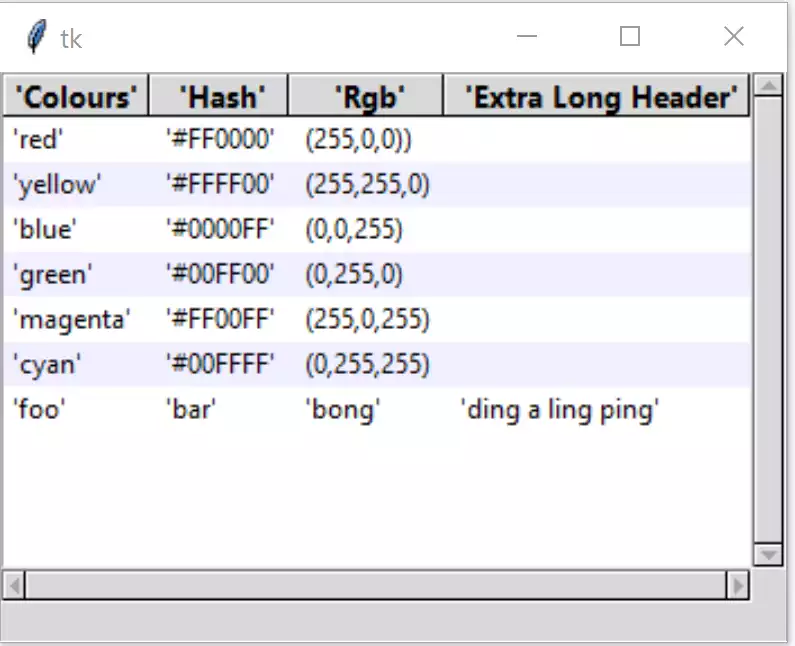
The same Treeview but with imported data#
Notice that the strings are quoted
The next task is to make the treeview more generalised, by using csv files. This means that our python script is no longer tied to any one set of data.
Import the module csv, open and read the csv file, set the delimiter (data separator) and the first line of the csv file is our header data:
import csv
........
tree_data = []
csv_file = '../csv/test.csv'
csv_delimiter = ';'
........
with open(csv_file, newline='', encoding='utf-8-sig') as csvfile:
    treeCsv = csv.reader(csvfile, delimiter=csv_delimiter)

    for ix, row in enumerate(treeCsv):
        if ix == 0:
            tree_columns = row
        else:
            tree_data.append(row)
Use a couple of new variables, the name of csvfile and what delimiter
is being used, by default a comma. Insert these where we had the header and
data list and tuple. Change tree_data to be an empty list. Construct a csv
file, strings have to be quoted, and numbers normally have to use decimal
points (otherwise the delimiter should be a semicolon). If using rgb
values separated by commas, delimiters become semicolons.
Comment out the column names and data.
After all that you should have the following:-
Show/Hide Code 07tree_csv.py
"""tkinter ttk treeview
    Shows data in parallel columns, selection, zebra stripes,
    column sorting, adjusting heading, column widths and row heights,
    scrollbars, importing csv
    includes workaround for python 3.7 tag colour display
  """

from tkinter import Tk, StringVar, font
from tkinter.ttk import Frame, Treeview, Style, Label, Scrollbar
import csv

def fixed_map(option):
    # Fix for setting text colour for Tkinter 8.6.9
    # From: https://core.tcl.tk/tk/info/509cafafae
    #
    # Returns the style map for 'option' with any styles starting with
    # ('!disabled', '!selected', ...) filtered out.

    # style.map() returns an empty list for missing options, so this
    # should be future-safe.
    return [elm for elm in st1.map('Treeview', query_opt=option) if
            elm[:2] != ('!disabled', '!selected')]

root = Tk()
st1 = Style()
st1.theme_use('default')

st1.map('Treeview', foreground=fixed_map('foreground'),
            background=fixed_map('background'))

fact = font.Font(font="TkDefaultFont").metrics('linespace')
st1.configure('font.Treeview', rowheight=fact,
              font=font.nametofont("TkDefaultFont"))

# determine Heading font based on TkDefaultFont
def_font = font.nametofont('TkDefaultFont')
font_family = def_font.actual()['family']
font_size = def_font.actual()['size'] + 1
st1.configure('font.Treeview.Heading', font=(font_family,font_size,'bold'))

# function to enable selection
def select_item(evt):
    cur_item = tree.focus()
    lvar.set(tree.item(cur_item)['values'])

def sort_by(tree, col, descending):
    # When a column is clicked on sort tree contents .
    # grab values to sort
    data = [(tree.set(child, col), child) for child in tree.get_children('')]

    # reorder data
    data.sort(reverse=descending)
    for indx, item in enumerate(data):
        tree.move(item[1], '', indx)

    # switch the heading so that it will sort in the opposite direction
    tree.heading(col, command=lambda col=col: sort_by(tree, col, int(not descending)))

    # reconfigure tags after ordering
    list_of_items = tree.get_children('')
    for i in range(len(list_of_items)):
        tree.tag_configure(list_of_items[i], background=backg[i%2])

'''
# headings and data
tree_columns = ['Colours', 'Hash', 'RGB', 'Extra long header']

tree_data = (('red', '#FF0000', (255,0,0)),
            ('yellow', '#FFFF00', (255,255,0)),
            ('blue', '#0000FF', (0,0,255)),
            ('green', '#00FF00', (0,255,0)),
            ('magenta', '#FF00FF', (255,0,255)),
            ('cyan', '#00FFFF', (0,255,255)),
            ('foo', 'bar', 'bong', 'ding a ling ping'))
'''
tree_data = []
csv_file = '../../csv/test.csv'
csv_delimiter = ';'
backg = ["white",'#f0f0ff']

with open(csv_file, newline='', encoding='utf-8-sig') as csvfile:
    treeCsv = csv.reader(csvfile, delimiter=csv_delimiter)

    for ix, row in enumerate(treeCsv):
        if ix == 0:
            tree_columns = row
        else:
            tree_data.append(row)

fr0 = Frame(root)
fr0.pack(fill='both', expand=False) #grid(column=0, row=0, sticky='nsew')

# create Treeview widget
tree = Treeview(fr0, column=tree_columns, show='headings',style='font.Treeview')
tree.grid(column=0, row=0, sticky='nsew')
tree.bind("<<TreeviewSelect>>", select_item)

vsb = Scrollbar(fr0,orient="vertical", command=tree.yview)
vsb.grid(column=1, row=0, sticky='ns')
hsb = Scrollbar(fr0,orient="horizontal", command=tree.xview)
hsb.grid(column=0, row=1,  sticky='ew')

tree.configure(xscrollcommand=hsb.set,yscrollcommand=vsb.set)
fr0.grid_columnconfigure(0, weight=1)
fr0.grid_rowconfigure(0, weight=1)

# insert header, data and tag configuration
for ix,col in enumerate(tree_columns):
    tree.heading(col, text=col.title(),
       command=lambda c=col: sort_by(tree, c, 0))
    #tree.column(col,stretch=True)
    #tree.column(col,width=font.nametofont('TkHeadingFont').measure(col.title()),
                #stretch=False)
    tree.column(col,width=font.Font(family=font_family,size=font_size, weight="bold").measure(col.title()) + 10,
                stretch=False)
    #print(tree.column(col))

# insert data row by row, then measure each items' width
for ix, item in enumerate(tree_data):
    item_ID = tree.insert('', 'end', values=item)
    tree.item(item_ID, tags=item_ID)
    tree.tag_configure(item_ID, background=backg[ix%2])

    for indx, val in enumerate(item):
        #ilen = font.Font(family="Segoe UI", size=10, weight="normal").measure(val)
        ilen = font.nametofont('TkDefaultFont').measure(val)
        if tree.column(tree_columns[indx], width=None) < ilen +10:
            tree.column(tree_columns[indx], width=ilen + 10)
        # you should see the widths adjust
        #print('col',tree.column(tree_columns[indx]),ilen)

# display selection
lvar = StringVar()
lbl = Label(fr0, textvariable=lvar, text="Ready")
lbl.grid(column=0, row=2, sticky='nsew')

root.mainloop()
Check that the first row of the csv file corresponds to our column names, and the succeeding rows are the data, each row ordered as our columns.