

Convert to Function#
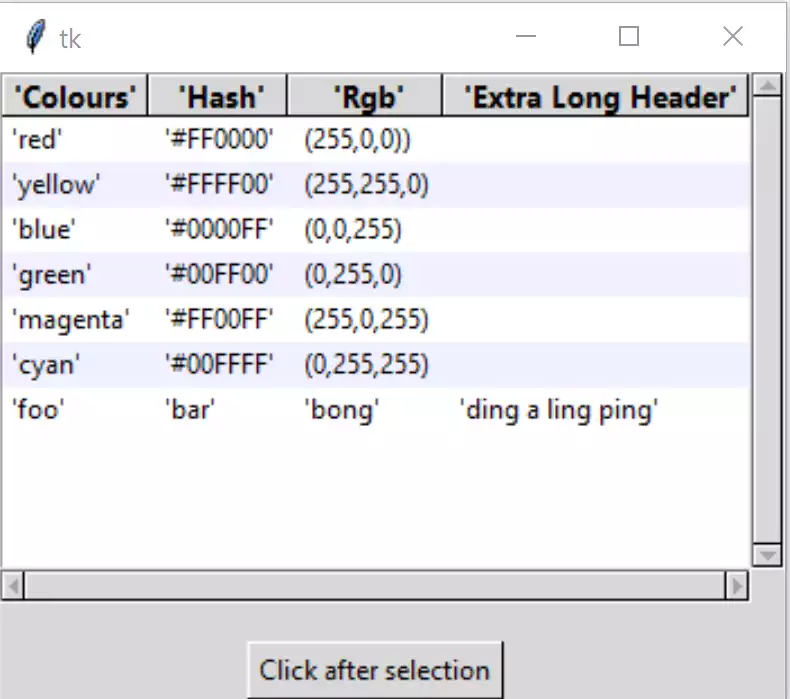
Often we require the treeview to be loaded by an import, rather than explicitly write it out as a script. As the overall script is not too complex it should easily be converted into a function rather than a class.
We can leave the imports as they are, while root and frame can be placed
inside if __name__ == "__main__". As the style is referenced by treeview
it remains where it is. The csv_file and csv_delimiter variables will be moved
to if __name__ == "__main__". The frame will be renamed to page1 to
reflect treeview's use in a notebook. If the treeview is being called by
another program the calling program will be calling Tk() and driving it
using root.mainloop(), so transfer root = Tk() and root.mainloop() to the
conditional part. In the fixed_map function there is a Style
alias as an argument. Finally call the tree function:
def Tree(fr,csv_file,csv_delimiter=','):
.........
if __name__ == "__main__":
    root = Tk()
    csv_file = '../csv/test.csv'
    csv_delimiter = ';'
    page1 = Frame(root)
    page1.pack(fill='both', expand=False)
    Tree(page1,csv_file,csv_delimiter)
    root.mainloop()
The file is named tree_function, when imported it cannot start with a number.
Show/Hide Code tree_function.py
"""ttk tkinter treeview
    displays table of data in columns, loading from csv file,
    sorts data by column, selection of row

  Parameters
  ----------
  fr : str
    The parent tk widget, normally a Frame.
  csv_file : str
    csv file name to be imported
  out_var : str
    Name of tkvariable that contains output
  csv_delimiter : str
    Type of csv delimiter, defaults to ','

  Returns
  -------
  string
    Information in out_var
  """
from tkinter import Tk, StringVar, font
from tkinter.ttk import Frame, Treeview, Style, Label, Scrollbar, Button
import csv

def fixed_map(st1,option):
    # Fix for setting text colour for Tkinter 8.6.9
    # From: https://core.tcl.tk/tk/info/509cafafae ulfalizer
    #
    # Returns the style map for 'option' with any styles starting with
    # ('!disabled', '!selected', ...) filtered out.

    # style.map() returns an empty list for missing options, so this
    # should be future-safe.
    return [elm for elm in st1.map('Treeview', query_opt=option) if
            elm[:2] != ('!disabled', '!selected')]

def Tree(fr0,csv_file,out_var,csv_delimiter=','):
    st1 = Style()
    st1.theme_use('default')

    st1.map('Treeview', foreground=fixed_map(st1,'foreground'),
            background=fixed_map(st1,'background'))

    fact = font.Font(font="TkDefaultFont").metrics('linespace')
    st1.configure('font.Treeview', rowheight=fact,
                  font=font.nametofont("TkDefaultFont"))
    # determine Heading font based on TkDefaultFont
    def_font = font.nametofont('TkDefaultFont')
    font_family = def_font.actual()['family']
    font_size = def_font.actual()['size'] + 1
    st1.configure('font.Treeview.Heading', font=(font_family,font_size,'bold'))

    # function to enable selection
    def select_item(evt):
        curItem = tree.focus()
        lvar.set(tree.item(curItem)['values'])
        out_var.set(tree.item(curItem)['values'])

    def sort_by(tree, col, descending):
        # When a column is clicked on sort tree contents .
        # grab values to sort
        data = [(tree.set(child, col), child) for child in tree.get_children('')]

        # reorder data
        data.sort(reverse=descending)
        for indx, item in enumerate(data):
            tree.move(item[1], '', indx)

        # switch the heading so that it will sort in the opposite direction
        tree.heading(col, command=lambda col=col: sort_by(tree, col, int(not descending)))

        # reconfigure tags after ordering
        list_of_items = tree.get_children('')
        for i in range(len(list_of_items)):
            tree.tag_configure(list_of_items[i], background=backg[i%2])

    tree_data = []

    backg = ["white",'#f0f0ff']

    with open(csv_file, newline='', encoding='utf-8-sig') as csvfile:
        treeCsv = csv.reader(csvfile, delimiter=csv_delimiter)

        for ix, row in enumerate(treeCsv):
            if ix == 0:
                tree_columns = row
            else:
                tree_data.append(row)

    # create Treeview widget
    tree = Treeview(fr0, column=tree_columns, show='headings',style='font.Treeview')
    tree.grid(column=0, row=0, sticky='nsew')
    tree.bind("<<TreeviewSelect>>", select_item)

    vsb = Scrollbar(fr0,orient="vertical", command=tree.yview)
    vsb.grid(column=1, row=0, sticky='ns')
    hsb = Scrollbar(fr0,orient="horizontal", command=tree.xview)
    hsb.grid(column=0, row=1,  sticky='ew')

    tree.configure(xscrollcommand=hsb.set,yscrollcommand=vsb.set)
    fr0.grid_columnconfigure(0, weight=1)
    fr0.grid_rowconfigure(0, weight=1)

    # insert header, data and tag configuration
    for ix,col in enumerate(tree_columns):
        tree.heading(col, text=col.title(),
            command=lambda c=col: sort_by(tree, c, 0))
        #tree.column(col,stretch=True)
        #tree.column(col,width=font.nametofont('TkHeadingFont').measure(col.title()),
                #stretch=False)
        tree.column(col,width=font.Font(family=font_family,size=font_size, weight="bold").measure(col.title()) + 10,
                stretch=False)
        #print(tree.column(col))

    # insert data row by row, then measure each items' width
    for ix, item in enumerate(tree_data):
        item_ID = tree.insert('', 'end', values=item)
        tree.item(item_ID, tags=item_ID)
        tree.tag_configure(item_ID, background=backg[ix%2])

        for indx, val in enumerate(item):
            #ilen = font.Font(family="Segoe UI", size=10, weight="normal").measure(val)
            ilen = font.nametofont('TkDefaultFont').measure(val)
            if tree.column(tree_columns[indx], width=None) < ilen +10:
                tree.column(tree_columns[indx], width=ilen + 10)
            # you should see the widths adjust
            #print('col',tree.column(tree_columns[indx]),ilen)

    # display selection
    lvar = StringVar()
    lbl = Label(fr0, textvariable=lvar, text="Ready")
    lbl.grid(column=0, row=2, sticky='nsew')

if __name__ == "__main__":
    root = Tk()
    csv_file = '../../csv_data/test.csv'
    csv_delimiter = ';'
    page1 = Frame(root)
    page1.pack(fill='both', expand=False)
    out_var = StringVar()
    Tree(page1,csv_file,out_var,csv_delimiter)
    b2=Button(page1,text='Click after selection', command=lambda:print(out_var.get()))
    b2.grid(column=0, row=3)

    root.mainloop()
Note
Almost every line has been changed due to indentation, only those lines that have a content change or have been transposed have been highlighted.
We will be using tree_function in the chapter on Notebook.