

Set Header and Column Widths#
You will notice that the header and column sizes are not set, therefore they display a default width of 200 for an IDE or 450 in Idle (python 3.7). See what happens when stretch is set to 'yes', add a tree.column clause just after the tree.heading clause when creating the headings:
tree.column(col,stretch=True)
By itself this had no discernable effect, measure the header widths and set these manually - first change the for clause to enumerate to give a row variable:
for ix,col in enumerate(tree_columns):
    tree.heading(col, text=col.title(),
        command=lambda c=col: sort_by(tree, c, 0))
    tree.column(col,width=100+ix*50,stretch=False)
Measure again and we see that the columns changed but the values were 220, 340 and 450. Is this a display problem or are these the actual values? Add a print statement just after tree.column(..:
print(tree.column(col))
This should return:
{'width': 100, 'minwidth': 20, 'stretch': 0, 'anchor': 'w', 'id': 'Colours'}
{'width': 150, 'minwidth': 20, 'stretch': 0, 'anchor': 'w', 'id': 'Hash'}
{'width': 200, 'minwidth': 20, 'stretch': 0, 'anchor': 'w', 'id': 'RGB'}
Use an IDE such as Thonny or Spyder then the result will have the correct widths, but the rows would be unreadable since the row heights were too small. So Idle and running python from the console has a width problem but the row height is better (Python 3.7 in Windows).
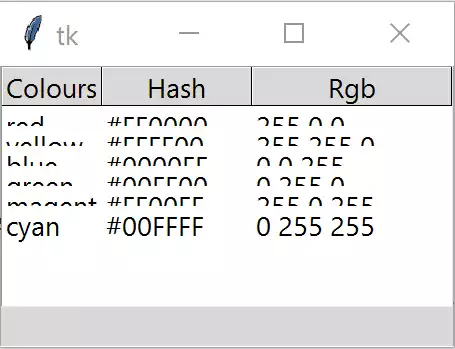
Tree width on Thonny (Windows Python3.7)#
Width seems correct but row height is a problem
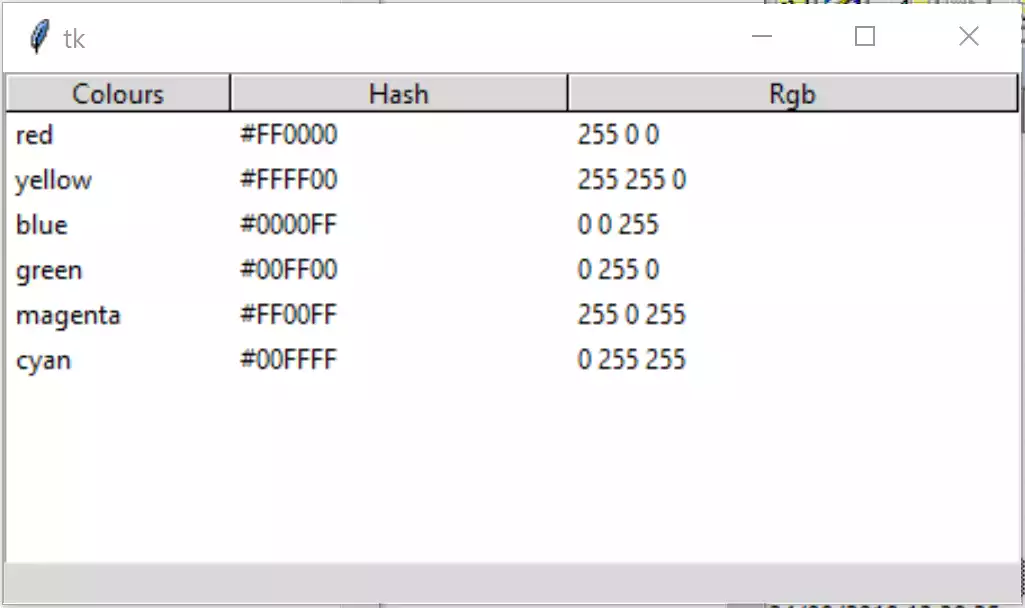
Tree width on Idle or command line (Windows Python3.7)#
Width seems too large but row height is better
Since there is no property of rowheight in Treeview (height is the overall
height of the widget in rows), we are forced to use rowheight in Style.
Add the following line just after st1.theme_use('default'):
st1.configure('Treeview', rowheight=45)
This sorts out the row problem, but looking at the magenta row we see that width of 100 is not large enough. Staying with our IDE let's automatically adjust the widths. Change the column line to make it remove the manual settings and stretch:
tree.column(col, stretch=True)
None of the columns were larger than 200 so this did not show any adjustment.
Measure the width. Import font from tkinter and change
the column attributes:
from tkinter import Tk, StringVar, font
....
tree.column(col, width=font.Font().measure(col.title()) + 10,stretch=True)
Both the IDE and console measured wrongly, but because Idle and the console
incorrectly displayed much larger widths it did not look too bad. The
measured width for the column Colours was 67 in the IDE, but Idle had
200.
Note
10 pixels have been added to our measure to give a clearance between columns.
Set up the header and column styles. Add the following after the generic Treeview style configuration, to change the style property:
st1.configure('font.Treeview', font=("DejaVu Sans Mono",'10'))
st1.configure('font.Treeview.Heading', font=("DejaVu Sans Mono",'12'))
.....
tree = Treeview(fr0, column=tree_columns, show='headings',style='font.Treeview')
Note
the font DejaVu is normally supplied in Linux but must be imported into Windows or Mac.
This had no effect on the measured width.
Thinking about this it would seem logical to use the default fonts provided
by tkinter. The column can use TkDefaultFont and the header TkHeadingFont.
The width requires a different command nametofont when taking the
measurement with TkDefaultFont or TkHeadingFont:
st1.configure('font.Treeview', font='TkDefaultFont')
st1.configure('font.Treeview.Heading', font='TkHeadingFont')
.....
tree.column(col,width=font.nametofont('TkHeadingFont').measure(col.title()) + 10,
            stretch=False)
The appearances of the IDE and Idle displays now look similar, but notice
that the measurements are different, the IDE had 91 for Colours while
Idle had 41. This bodes well. The IDE is accurate, so continue to work with
this.
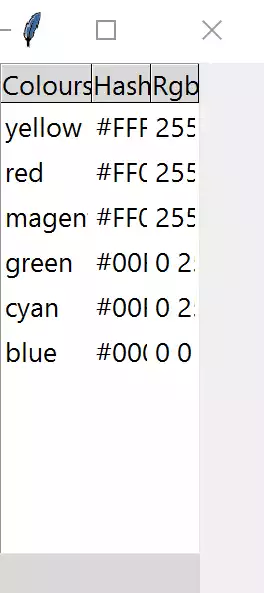
Tree width with TkHeadingFont on Thonny (Windows Python3.7)#
Heading correct but data is truncated
Now tackle the truncated data. There will be several data entries, store the largest value and compare. Add the following just after the data insertion:
for indx, val in enumerate(item):
    ilen = font.nametofont('TkDefaultFont').measure(val)
    if tree.column(tree_columns[indx], width=None) < ilen + 10:
        tree.column(tree_columns[indx], width=ilen + 10)
Add an extra entry to the header data 'Extra long header', and an extra
column of data ('foo', 'bar', 'bong', 'ding a ling ping pong').
It was noticed that Windows 10 had used Segoe UI 9 font for both the heading and default fonts. In the IDE widths and height look reasonable, but switching to the command line the spacing between rows looks too large. Provided there is a valid font, TkDefaultFont will do, we can test the font metrics for linespace, this varies according to the type of IDE. For instance Windows TkDefaultFont Idle has a linespace of 15 and Thonny 37.:
fact = font.Font(font="TkDefaultFont").metrics('linespace')
st1.configure('fact.Treeview', rowheight=fact,
              font=font.nametofont("TkDefaultFont"))
When the Treeview style is configured change the rowheight to the linespace size and the font is changed to that required.
Replace the rowheight statement with the above test. Since we require cross
platform compatability our column font should always be TkDefaultFont and
the heading should be TkHeadingFont. In my Windows 10 box this gives the same
font for both - since in most cases the columns will be wider than the
headings we can chance our arm and use a user specified font for the heading.
This can be based on TkDefaultFont, using the same family as the data,
increase the size by 1 and use a bold weight:
st1.configure('font.Treeview', font='TkDefaultFont')
# determine Heading font based on TkDefaultFont
st1.configure('font.Treeview', font='TkDefaultFont')
def_font = font.nametofont('TkDefaultFont')
font_family = def_font.actual()['family']
font_size = def_font.actual()['size'] + 1
st1.configure('font.Treeview.Heading', font=(font_family,font_size,'bold'))
.......
tree.column(col,width=font.Font(family=font_family,size=font_size,weight='bold').measure(col.title()) + 10,
            stretch=False)

Treeview with Adjusted Width, Height and Bold Header#
There are some optional commented lines used for testing.
Show/Hide Code 05tree_widths_height.py
"""tkinter ttk treeview
    Shows data in parallel columns, selection, zebra stripes,
    column sorting, adjusting heading, column widths and row heights
    includes workaround for python 3.7 tag colour display
  """

from tkinter import Tk, StringVar, font
from tkinter.ttk import Frame, Treeview, Style, Label

def fixed_map(option):
    # Fix for setting text colour for Tkinter 8.6.9
    # From: https://core.tcl.tk/tk/info/509cafafae
    #
    # Returns the style map for 'option' with any styles starting with
    # ('!disabled', '!selected', ...) filtered out.

    # style.map() returns an empty list for missing options, so this
    # should be future-safe.
    return [elm for elm in st1.map('Treeview', query_opt=option) if
            elm[:2] != ('!disabled', '!selected')]

root = Tk()
st1 = Style()
st1.theme_use('default')

st1.map('Treeview', foreground=fixed_map('foreground'),
            background=fixed_map('background'))

fact = font.Font(font="TkDefaultFont").metrics('linespace')
st1.configure('font.Treeview', rowheight=fact,
              font=font.nametofont("TkDefaultFont"))

# determine Heading font based on TkDefaultFont
def_font = font.nametofont('TkDefaultFont')
font_family = def_font.actual()['family']
font_size = def_font.actual()['size'] + 1
# st1.configure('font.Treeview.Heading', font='TkHeadingFont')
st1.configure('font.Treeview.Heading', font=(font_family,font_size,'bold'))

# function to enable selection
def select_item(evt):
    cur_item = tree.focus()
    lvar.set(tree.item(cur_item)['values'])

def sort_by(tree, col, descending):
    # When a column is clicked on sort tree contents .
    # grab values to sort
    data = [(tree.set(child, col), child) for child in tree.get_children('')]

    # reorder data
    data.sort(reverse=descending)
    for indx, item in enumerate(data):
        tree.move(item[1], '', indx)

    # switch the heading so that it will sort in the opposite direction
    tree.heading(col, command=lambda col=col: sort_by(tree, col, int(not descending)))

    # reconfigure tags after ordering
    list_of_items = tree.get_children('')
    for i in range(len(list_of_items)):
        tree.tag_configure(list_of_items[i], background=backg[i%2])

# headings and data
tree_columns = ['Colours', 'Hash', 'RGB', 'Extra long header']

tree_data = (('red', '#FF0000', (255,0,0)),
            ('yellow', '#FFFF00', (255,255,0)),
            ('blue', '#0000FF', (0,0,255)),
            ('green', '#00FF00', (0,255,0)),
            ('magenta', '#FF00FF', (255,0,255)),
            ('cyan', '#00FFFF', (0,255,255)),
            ('foo', 'bar', 'bong', 'ding a ling ping'))

backg = ["white",'#f0f0ff']

fr0 = Frame(root)
fr0.grid(column=0, row=0, sticky='nsew')

# create Treeview widget
tree = Treeview(fr0, column=tree_columns, show='headings',style='font.Treeview')
tree.grid(column=0, row=0, sticky='nsew')
tree.bind("<<TreeviewSelect>>", select_item)

# insert header, data and tag configuration
for ix,col in enumerate(tree_columns):
    tree.heading(col, text=col.title(),
       command=lambda c=col: sort_by(tree, c, 0))
    #tree.column(col,stretch=True)
    #tree.column(col,width=font.nametofont('TkHeadingFont').measure(col.title()),
                #stretch=False)
    tree.column(col,width=font.Font(family=font_family,size=font_size,weight='bold').measure(col.title()) + 10,
                stretch=False)
    #print(tree.column(col))

# insert data row by row, then measure each items' width
for ix, item in enumerate(tree_data):
    item_ID = tree.insert('', 'end', values=item)
    tree.item(item_ID, tags=item_ID)
    tree.tag_configure(item_ID, background=backg[ix%2])

    for indx, val in enumerate(item):
        #ilen = font.Font(family="Segoe UI", size=10, weight="normal").measure(val)
        ilen = font.nametofont('TkDefaultFont').measure(val)
        if tree.column(tree_columns[indx], width=None) < ilen +10:
            tree.column(tree_columns[indx], width=ilen + 10)
        # you should see the widths adjust
        #print('col',tree.column(tree_columns[indx]),ilen)

# display selection
lvar = StringVar()
lbl = Label(fr0, textvariable=lvar, text="Ready")
lbl.grid(column=0, row=1, sticky='nsew')

root.mainloop()