

Sorting Rows by Column#
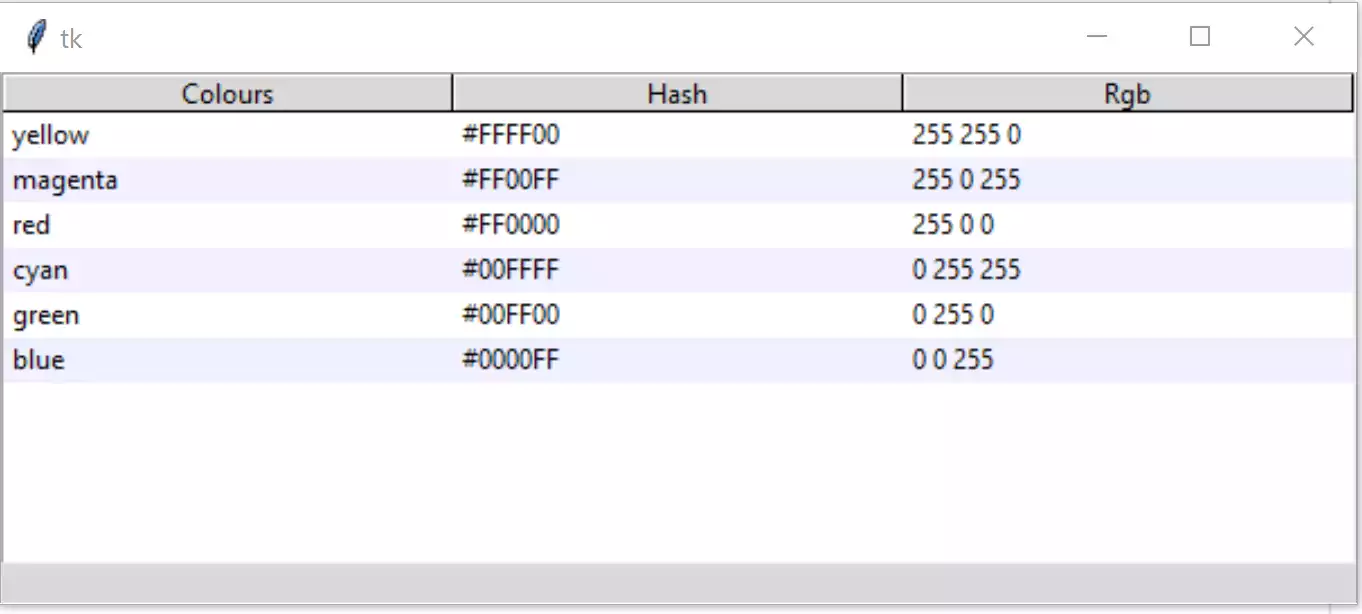
The Column is Clicked to Sort and Reverse Sort#
See how the header background changes colour when clicked
Say we now wish to add the capability of sorting the rows according to which heading has been clicked, the sort has to maintain all row data, so this is slightly more complicated than a normal sort. A sort_by function is made and placed just after the function select_item. Clicking on the header selects which column's data will be used for sorting:
def sort_by(tree, col, descending):
    # When a column is clicked on sort tree contents .
    # grab values to sort
    data = [(tree.set(child, col), child) for child in tree.get_children('')]

    # reorder data
    data.sort(reverse=descending)
    for indx, item in enumerate(data):
        tree.move(item[1], '', indx)

    # switch the heading so that it will sort in the opposite direction
    tree.heading(col, command=lambda col=col: sort_by(tree, col, int(not descending)))
When inserting the headings add a command option, this
has been extended by a lambda function so that the command can give the
necessary column information to the sort_by:
#insert headings
for col in tree_columns:
    tree.heading(col, text=col.title(),
        command=lambda c=col: sort_by(tree, c, 0))
When testing this it will sort correctly but the zebra stripes will not be ordered in alternate rows. Add the following lines to the sort_by function.:
# reconfigure tags after ordering
list_of_items = tree.get_children('')
for i in range(len(list_of_items)):
    tree.tag_configure(list_of_items[i], background=backg[i%2])
Click on the column headers and the zebra stripes will remain in one position while the columns change.
Show/Hide Code 04tree_sort.py
"""tkinter ttk treeview
    Shows data in parallel columns, selection, zebra stripes,
    column sorting
    includes workaround for python 3.7 tag colour display
  """

from tkinter import Tk, StringVar
from tkinter.ttk import Frame, Treeview, Style, Label

def fixed_map(option):
    # Fix for setting text colour for Tkinter 8.6.9
    # From: https://core.tcl.tk/tk/info/509cafafae
    #
    # Returns the style map for 'option' with any styles starting with
    # ('!disabled', '!selected', ...) filtered out.

    # style.map() returns an empty list for missing options, so this
    # should be future-safe.
    return [elm for elm in st1.map('Treeview', query_opt=option) if
            elm[:2] != ('!disabled', '!selected')]

root = Tk()
st1 = Style()
st1.theme_use('default')

st1.map('Treeview', foreground=fixed_map('foreground'),
            background=fixed_map('background'))

# function to enable selection
def select_item(evt):
    cur_item = tree.focus()
    lvar.set(tree.item(cur_item)['values'])

def sort_by(tree, col, descending):
    # When a column is clicked on sort tree contents .
    # grab values to sort
    data = [(tree.set(child, col), child) for child in tree.get_children('')]

    # reorder data
    data.sort(reverse=descending)
    for indx, item in enumerate(data):
        tree.move(item[1], '', indx)

    # switch the heading so that it will sort in the opposite direction
    tree.heading(col, command=lambda col=col: sort_by(tree, col, int(not descending)))

    # reconfigure tags after ordering
    list_of_items = tree.get_children('')
    for i in range(len(list_of_items)):
        tree.tag_configure(list_of_items[i], background=backg[i%2])

# headings and data
tree_columns = ['Colours', 'Hash', 'RGB']

tree_data = (('red', '#FF0000', (255,0,0)),
            ('yellow', '#FFFF00', (255,255,0)),
            ('blue', '#0000FF', (0,0,255)),
            ('green', '#00FF00', (0,255,0)),
            ('magenta', '#FF00FF', (255,0,255)),
            ('cyan', '#00FFFF', (0,255,255)))

backg = ["white",'#f0f0ff']

fr0 = Frame(root)
fr0.grid(column=0, row=0, sticky='nsew')

# create Treeview widget
tree = Treeview(fr0, column=tree_columns, show='headings')
tree.grid(column=0, row=0, sticky='nsew')
tree.bind("<<TreeviewSelect>>", select_item)

# insert header, data and tag configuration
for col in tree_columns:
    tree.heading(col, text=col.title(),
       command=lambda c=col: sort_by(tree, c, 0))

for ix, item in enumerate(tree_data):
    item_ID = tree.insert('', 'end', values=item)
    tree.item(item_ID, tags=item_ID)
    tree.tag_configure(item_ID, background=backg[ix%2])

# display selection
lvar = StringVar()
lbl = Label(fr0, textvariable=lvar, text="Ready")
lbl.grid(column=0, row=1, sticky='nsew')

root.mainloop()