

Using the Tkinter Widgets#
You might be thinking - "Hang on a minute, drawing gradients is not so simple". Rest assured most of the necessary tools are at our fingertips, gradients were used when making our themes in Putting on the Style! at the section on Gradients. As we are displaying our results in the Canvas widget, it is sensible to first draw the gradient on the canvas, rather than drawing in PIL then importing the image into tkinter and putting it into the canvas. To do this modify the Lerp function (linear interpolation) which interperpolates in RGB and results with a hash value:
def LerpHex(colour1, colour2, fraction):
# colour1 start colour, colour2 end colour, fraction 0 to 1
# convert to hex
return '#%02x%02x%02x' % (int(colour1[0] + (colour2[0] - colour1[0]) * fraction),
                          int(colour1[1] + (colour2[1] - colour1[1]) * fraction),
                          int(colour1[2] + (colour2[2] - colour1[2]) * fraction))
Make a simple gradient, with a canvas size of 300*e x 26*e, and start with white finishing with black. The lerp function is called whilst drawing the gradient, and colours each small rectangle with a slightly differing colour at each step within a loop.
We can then include these as follows:-
Show/Hide Code 01gradient_canvas.py
""" Construction simple gradient"""

from tkinter import Tk, Canvas


def lerp_hex(colour1, colour2, fraction):
    """linear gradient

    Parameters
    ----------
    colour1 : tuple of int
        start colour
    colour2 : tuple of int
        end colour
    fraction : float
        normalised colour fraction

    Results
    -------
    string
        hexadecimal colour
    """

    return '#%02x%02x%02x' % (int(colour1[0] + (colour2[0] - colour1[0]) * fraction),
                              int(colour1[1] + (colour2[1] - colour1[1]) * fraction),
                              int(colour1[2] + (colour2[2] - colour1[2]) * fraction))


COLOUR1 = (255, 255, 255)
COLOUR2 = (0, 0, 0)
STEPS = 256
WIDTH = 300
HEIGHT = 26

root = Tk()
winsys = root.tk.call("tk", "windowingsystem")
BASELINE = 1.33398982438864281 if winsys != 'aqua' else 1.000492368291482
scaling = root.tk.call("tk", "scaling")
enlargement = int(scaling / BASELINE + 0.5)
WIDTH = 300
HEIGHT = 26
we = WIDTH * enlargement
he = HEIGHT * enlargement
can = Canvas(root)
can.pack(fill='both', expand=1)

for i in range(STEPS):
    x0 = int((we * i) / STEPS)
    x1 = int((we * (i + 1)) / STEPS)

    can.create_rectangle((x0, 0, x1, he), fill=lerp_hex(
        COLOUR1, COLOUR2, i / (STEPS - 1)), outline='')

root.mainloop()
and see the following:-

Simple Gradient Drawn on Canvas#
Now create the Scale and Spinbox linked to IntVar for each of the colours. If we use tkinter widgets, as opposed to the themed widgets, there are more options immediately available. Note how the logic needs to work. Change the gradient into a function, so that it can be called for each of the components. When creating the scales and spinboxes they need to be tied to the IntVars, additionally the command option redraws the gradient whenever an IntVar changes. The resulting colour from all three components can then be displayed on a Label.
Each pair of Scales and Spinboxes have a common command function, red uses the function rhandle(), each command function need only redraw the relevant gradients. Only the gradients of the component not being changed need to be updated - so if red changes the red gradient remains unchanged but the blue and green gradients will change. Whenever a command function is called it first must find out the actual value of each tk variable. Since each tk variable needs to communicate directly with various functions and widgets it makes sense that they are all in one class.
Show/Hide Code 02all3colours.py
""" Construction three gradients in rgb"""

from tkinter import Tk, Canvas, Spinbox, Scale, Label, IntVar, Frame


def lerp_hex(colour1, colour2, fraction):
    """linear gradient

    Parameters
    ----------
    colour1 : tuple of int
        start colour
    colour2 : tuple of int
        end colour
    fraction : float
        normalised colour fraction

    Results
    -------
    string
        hexadecimal colour
    """

    return '#%02x%02x%02x' % (int(colour1[0] + (colour2[0] - colour1[0]) * fraction),
                              int(colour1[1] + (colour2[1] -
                                                colour1[1]) * fraction),
                              int(colour1[2] + (colour2[2] - colour1[2]) * fraction))


def draw_gradient(canvas, colour1, colour2, steps=256, width=300, height=26):
    """Draw gradient in tkinter

    Parameters
    ----------
    canvas : str
        parent widget
    colour1 : tuple of int
        start colour
    colour2 : tuple of int
        end colour
    steps : int
        number steps in gradient
    width : int
        canvas width
    height : int
        canvas height

    Returns
    -------
    None
    """

    for i in range(steps):
        x0 = int((width * i) / steps)
        x1 = int((width * (i + 1)) / steps)

        canvas.create_rectangle((x0, 0, x1, height), fill=lerp_hex(
            colour1, colour2, i / (steps - 1)), outline='')


class RgbSelect:
    """Class to construct rgb gradients

    Parameters
    ----------
    parent : str
        parent widget
    Returns
    -------
    None
    """

    def __init__(self, parent, enlargement):
        self.parent = parent
        self.e = enlargement

        self.rvar = IntVar()
        self.gvar = IntVar()
        self.bvar = IntVar()

        self.red = self.rvar.get()
        self.green = self.gvar.get()
        self.blue = self.bvar.get()

        self.build()

    def rhandle(self, evt=None):
        """command callback for red

        Parameters
        ----------
        None

        Results
        -------
        None
        """

        red = self.rvar.get()
        green = self.gvar.get()
        blue = self.bvar.get()
        draw_gradient(self.gcan, (red, 0, blue), (red, 255, blue), width=300*self.e,
                      height=26*self.e)
        draw_gradient(self.bcan, (red, green, 0), (red, green, 255), width=300*self.e,
                      height=26*self.e)
        self.lab['background'] = self.rgbhash(red, green, blue)

    def ghandle(self, evt=None):
        """command callback for green

        Parameters
        ----------
        None

        Results
        -------
        None
        """

        red = self.rvar.get()
        green = self.gvar.get()
        blue = self.bvar.get()
        draw_gradient(self.rcan, (0, green, blue),
                      (255, green, blue), width=300*self.e, height=26*self.e)
        draw_gradient(self.bcan, (red, green, 0), (red, green, 255),
                        width=300*self.e, height=26*self.e)
        self.lab['background'] = self.rgbhash(red, green, blue)

    def bhandle(self, evt=None):
        """command callback for blue

        Parameters
        ----------
        None

        Results
        -------
        None
        """

        red = self.rvar.get()
        green = self.gvar.get()
        blue = self.bvar.get()
        draw_gradient(self.rcan, (0, green, blue),
                      (255, green, blue), width=300*self.e, height=26*self.e)
        draw_gradient(self.gcan, (red, 0, blue), (red, 255, blue),
                        width=300*self.e, height=26*self.e)
        self.lab['background'] = self.rgbhash(red, green, blue)

    def build(self):
        """widget construction

        Parameters
        ----------
        None

        Results
        -------
        None
        """

        rl1 = Label(self.parent, text='red  ')
        rl1.grid(column=0, row=0)

        self.rcan = Canvas(self.parent, width=300*self.e, height=26*self.e)
        self.rcan.grid(column=1, row=0, sticky='n')

        rsc = Scale(
            self.parent,
            from_=0,
            to=255,
            variable=self.rvar,
            orient='horizontal',
            length=300*self.e,
            command=self.rhandle,
            tickinterval=20,
            showvalue=0,
            width=15*self.e,
            sliderlength=30*self.e)

        rsc.grid(column=1, row=1, sticky='nw')

        rsb = Spinbox(self.parent, from_=0, to=255, textvariable=self.rvar,
                      command=self.rhandle, width=5*self.e)
        rsb.grid(column=2, row=0, sticky='nw')

        gl1 = Label(self.parent, text='green')
        gl1.grid(column=0, row=2)

        self.gcan = Canvas(self.parent, width=300*self.e, height=26*self.e)
        self.gcan.grid(column=1, row=2, sticky='n')

        gsc = Scale(
            self.parent,
            from_=0,
            to=255,
            variable=self.gvar,
            orient='horizontal',
            length=300*self.e,
            command=self.ghandle,
            tickinterval=20,
            showvalue=0,
            width=15*self.e,
            sliderlength=30*self.e)

        gsc.grid(column=1, row=3, sticky='nw')

        gsb = Spinbox(self.parent, from_=0, to=255, textvariable=self.gvar,
                      command=self.ghandle, width=5*self.e)
        gsb.grid(column=2, row=2, sticky='nw')

        bl1 = Label(self.parent, text='blue ')
        bl1.grid(column=0, row=4)

        self.bcan = Canvas(self.parent, width=300*self.e, height=26*self.e)
        self.bcan.grid(column=1, row=4, sticky='n')

        bsc = Scale(
            self.parent,
            from_=0,
            to=255,
            variable=self.bvar,
            orient='horizontal',
            length=300*self.e,
            command=self.bhandle,
            tickinterval=20,
            showvalue=0,
            width=15*self.e,
            sliderlength=30*self.e)

        bsc.grid(column=1, row=5, sticky='nw')

        bsb = Spinbox(self.parent, from_=0, to=255, textvariable=self.bvar,
                      command=self.bhandle, width=5*self.e)
        bsb.grid(column=2, row=4, sticky='nw')

        self.lab = lab = Label(self.parent, height=4, width=10)
        lab.grid(column=1, row=6)
        lab.grid_propagate(0)
        lab['background'] = self.rgbhash(self.red, self.green, self.blue)

    def rgbhash(self, red, green, blue):
        """Convert rgb to hexadecimal

        Parameters
        ----------
        red : int
            red component
        green : int
            green component
        blue : int
            blue component
        Results
        -------
        string
            hexadecimal colour
        """

        rgb = (red, green, blue)
        return '#%02x%02x%02x' % rgb


if __name__ == "__main__":
    root = Tk()
    winsys = root.tk.call("tk", "windowingsystem")
    BASELINE = 1.33398982438864281 if winsys != 'aqua' else 1.000492368291482
    scaling = root.tk.call("tk", "scaling")
    enlargement = int(scaling / BASELINE + 0.5)
    fra1 = Frame(root)
    fra1.grid(row=0, column=0)
    RgbSelect(fra1, enlargement)
    root.mainloop()
and see the following:-

Three Components of Colour#
Try moving the scale on all three components, the gradients should change as with your color picker example. Try changing the Spinboxes, the arrows change the slider position and change the gradients as with the scale, but if you enter a number the corresponding scale slider changes its position but there is no corresponding change in the gradient. The variable has changed but the command has not been triggered.
The numbers below the scale correspond to the scale position, but the
canvas needs to align with the cursor in the scale. The default slider
length is 30*e pixels, so either the Scale should be enlarged or the canvas
should be reduced. As the canvas is reduced we need to add width=270*e to
both the canvases and the draw_gradient function.
Timing Gradient Drawing#
Before progressing let's check out the comparative speeds to draw rectangles and lines when making a gradient. So as to give comparable test conditions we'll use timeit functions with a decorator, then we can create a made-up function that contains all the drawing elements to make gradients. At the end of the test we should have times for different methods to draw a gradient on a canvas.
Our timeit function:
def timefunc(f):
    def f_timer(*args, **kwargs):
        start = time.time()
        result = f(*args, **kwargs)
        end = time.time()
        print (f.__name__, 'took', end - start, 'time')
        return result
    return f_timer
Create a timing function:
@timefunc
def exp():
    arr=draw_gradient(canvas,(0,0,0),(255,255,255),26,270)
return 'testing rectangles!'
used on the gradient function:
def draw_gradient(canvas,c1,c2,steps=256,width=300,height=26):
    for i in range(steps):
        x0 = int((width * i)/steps)
        x1 = int((width * (i+1))/steps)
        canvas.create_rectangle((x0, 0, x1, height),
            fill=LerpHex(c1,c2,i/(steps-1)),outline='')
show the result:
result = exp()
this can then be compared to drawing directly with lines:
def draw_gradient2(canvas,c1,c2,steps=256,width=300,height=26):
    for i in range(steps):
        canvas.create_line((i, 0, i, height),
            fill=LerpHex(c1,c2,i/(steps-1)))
According to some sources PIL should be quicker than drawing directly to canvas. The actual drawing part probably is quicker, but we have to have a final image loaded and converted to tkinter before it can be displayed on the canvas:
def draw_gradient3(rcan,c1,c2,steps=256,width=300,height=26):
    image = Image.new("RGB", (width, height), "#FFFFFF")
    draw = ImageDraw.Draw(image)
    for i in range(steps):
        x0 = int(float(width * i)/steps)
        x1 = int(float(width * (i+1))/steps)
        draw.rectangle((x0, 0, x1, height),fill=LerpColour(c1,c2,i/(steps-1)))
    gradient=ImageTk.PhotoImage(image)
    rcan.create_image(0, 0, anchor="nw", image=gradient)
    rcan.image=gradient
Note
The image reference is repeated otherwise it vanishes.
rcan.create_image(0, 0, anchor="nw", image=gradient)
rcan.image=gradient
First of all drawing with a line is marginally faster than with rectangles, while using PIL took longer, probably due to the image manipulation:
def draw_gradient3(rcan,c1,c2,steps=256,width=300,height=26):
    image = Image.new("RGB", (width, height), "#FFFFFF")
    draw = ImageDraw.Draw(image)
    for i in range(steps):
        draw.line([i,0,i,height],fill=LerpColour(c1,c2,i/(steps-1)))
gradient=ImageTk.PhotoImage(image)
rcan.create_image(0, 0, anchor="nw", image=gradient)
rcan.image=gradient
This led me onto numpy, after all it's meant to be the bee's knees in speed. Numpy can create an array of pixels, which is captured in PIL and converted to an image then loaded into tkinter before being displayed:
def generate_gradient(from_color, to_color, height, width):
    new_ch=[np.tile(np.linspace(from_color[i], to_color[i],width,
    dtype=np.uint8),[height, 1]) for i in range(len(from_color))]
    return np.dstack(new_ch)
Note
numpy works in reverse order height then width.
def exparr():
    graddata=generate_gradient((0,0,0),(255,255,255),26,270)
    graddata=Image.fromarray(arr)
    gradient=ImageTk.PhotoImage(graddata)
    rcan.create_image(0, 0, anchor="nw", image=gradient)
    rcan.image=gradient
    return 'testing numpy!'
Still not quite so fast as drawing directly.
Before giving up, one last shot. Still using the numpy array convert
it directly into a PPM image file. All we need create is a header
P6 270 26 255 that has the code P6 indicating that we have byte data,
270 26 (width and height), followed by 255 showing the colour depth. The
array is converted to bytes, then loaded directly into
PhotoImage as a PPM image:
def exparr():
    arr=generate_gradient((0,0,0),(255,255,255),26,270)
    xdata = b'P6 270 26 255 ' + arr.tobytes()
    gradient = PhotoImage(width=300, height=26, data=xdata, format='PPM')
    rcan.create_image(0, 0, anchor="nw", image=gradient)
    rcan.image=gradient
    return 'testing PPM!'
This took about a third of the time that it took to draw directly in tkinter. We have saved loading the array data into PIL, which in turn loads the image into Tkinter, compared to just loading the array data directly into Tkinter.
Make Some Changes#
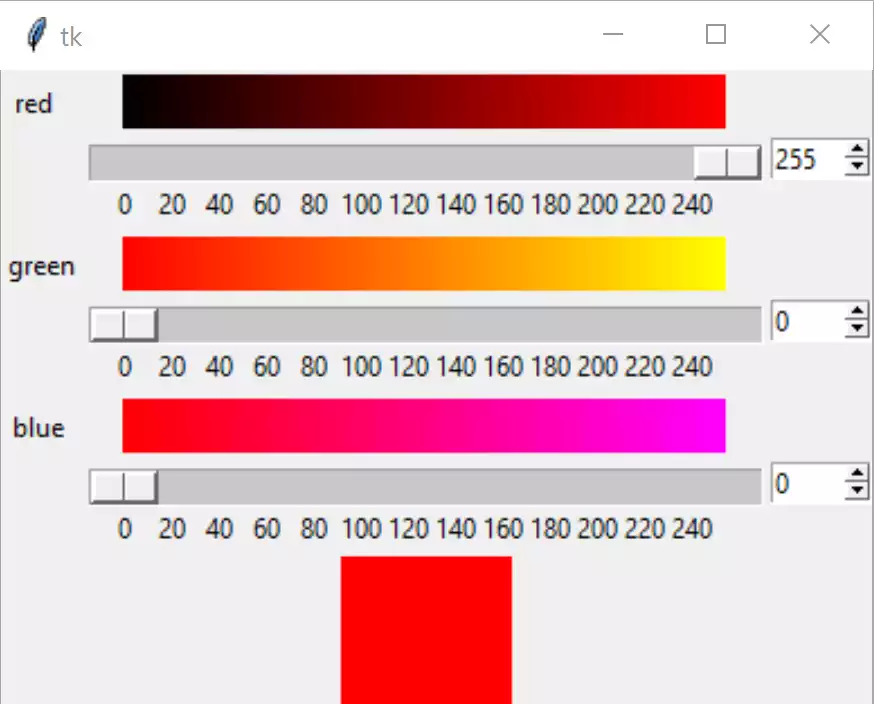
Using PPM to make Gradients#
We are now in a position to change 02all3colours.py to 03all3coloursPPM.py,
not forgetting the width changes and importing numpy and PhotoImage. Add
initial settings for our tk variables,
use the variables self.scale_l, self.canvas_w or self.canvas_h
for height, length and width .
When creating the PPM image, rather than using constant sizes, use the string
format method to be able to adjust the sizes as required:
xdata = 'P6 {} {} 255 '.format(width, height).encode() + arr.tobytes()
Show/Hide Code 03all3coloursPPM.py
""" Construction three gradients in rgb using PPM image"""

from tkinter import Tk, Canvas, Spinbox, Scale, Label, IntVar, Frame, PhotoImage
import numpy as np


def generate_gradient(from_colour, to_colour, height, width):
    """Draw gradient in numpy as array

    Parameters
    ----------
    from_colour : tuple of int
        start colour
    to_colour : tuple of int
        end colour
    height : int
        canvas height
    width : int
        canvas width

    Returns
    -------
    array of integers
    """
    new_ch = [
        np.tile(
            np.linspace(
                from_colour[i], to_colour[i], width, dtype=np.uint8), [
                    height, 1]) for i in range(
                        len(from_colour))]
    return np.dstack(new_ch)


def draw_gradient(canvas, colour1, colour2, width=300, height=26):
    """Import gradient into tkinter

    Parameters
    ----------
    canvas : str
        parent widget
    colour1 : tuple of int
        start colour
    colour2 : tuple of int
        end colour
    enlargement : int
        dpi enlargement factor
    width : int
        canvas width
    height : int
        canvas height

    Returns
    -------
    None
    """
    arr = generate_gradient(colour1, colour2, height, width)
    xdata = 'P6 {} {} 255 '.format(width, height).encode() + arr.tobytes()
    gradient = PhotoImage(width=width, height=height, data=xdata, format='PPM')
    canvas.create_image(0, 0, anchor="nw", image=gradient)
    canvas.image = gradient


class RgbSelect:
    """Class to construct rgb gradients

    Parameters
    ----------
    fr0 : str
        parent widget
    Returns
    -------
    None
    """

    def __init__(self, fr0, enlargement):
        self.fr0 = fr0
        self.e = enlargement
        self.rvar = IntVar()
        self.gvar = IntVar()
        self.bvar = IntVar()

        self.scale_l = 300 * self.e
        self.canvas_w = self.scale_l - 30 * self.e
        self.canvas_h = 26 * self.e
        self.build()

        self.rvar.set(255)
        self.gvar.set(0)
        self.bvar.set(0)

    def rhandle(self, evt=None):
        """command callback for red

        Parameters
        ----------
        None

        Results
        -------
        None
        """

        red = self.rvar.get()
        green = self.gvar.get()
        blue = self.bvar.get()
        draw_gradient(self.gcan, (red, 0, blue), (red, 255, blue),
                      width=self.canvas_w, height=self.canvas_h)
        draw_gradient(self.bcan, (red, green, 0), (red, green, 255),
                      width=self.canvas_w, height=self.canvas_h)
        self.lab['background'] = self.rgbhash(red, green, blue)

    def ghandle(self, evt=None):
        """command callback for green

        Parameters
        ----------
        None

        Results
        -------
        None
        """

        red = self.rvar.get()
        green = self.gvar.get()
        blue = self.bvar.get()
        draw_gradient(self.rcan, (0, green, blue), (255, green, blue),
                      width=self.canvas_w, height=self.canvas_h)
        draw_gradient(self.bcan, (red, green, 0), (red, green, 255),
                      width=self.canvas_w, height=self.canvas_h)
        self.lab['background'] = self.rgbhash(red, green, blue)

    def bhandle(self, evt=None):
        """command callback for blue

        Parameters
        ----------
        None

        Results
        -------
        None
        """

        red = self.rvar.get()
        green = self.gvar.get()
        blue = self.bvar.get()
        draw_gradient(self.rcan, (0, green, blue), (255, green, blue),
                      width=self.canvas_w, height=self.canvas_h)
        draw_gradient(self.gcan, (red, 0, blue), (red, 255, blue),
                      width=self.canvas_w, height=self.canvas_h)
        self.lab['background'] = self.rgbhash(red, green, blue)

    def build(self):
        """widget construction

        Parameters
        ----------
        None

        Results
        -------
        None
        """

        rl1 = Label(self.fr0, text='red  ')
        rl1.grid(column=0, row=0)

        self.rcan = Canvas(self.fr0, width=self.canvas_w, height=self.canvas_h)
        self.rcan.grid(column=1, row=0, sticky='n')

        rsc = Scale(
            self.fr0,
            from_=0,
            to=255,
            variable=self.rvar,
            orient='horizontal',
            length=self.scale_l,
            command=self.rhandle,
            tickinterval=20,
            showvalue=0,
            width=15*self.e,
            sliderlength=30*self.e)

        rsc.grid(column=1, row=1, sticky='nw')

        rsb = Spinbox(self.fr0, from_=0, to=255, textvariable=self.rvar,
                      command=self.rhandle, width=5)
        rsb.grid(column=2, row=1, sticky='nw')

        gl1 = Label(self.fr0, text='green')
        gl1.grid(column=0, row=2)

        self.gcan = Canvas(self.fr0, width=self.canvas_w, height=self.canvas_h)
        self.gcan.grid(column=1, row=2, sticky='n')

        gsc = Scale(
            self.fr0,
            from_=0,
            to=255,
            variable=self.gvar,
            orient='horizontal',
            length=self.scale_l,
            command=self.ghandle,
            tickinterval=20,
            showvalue=0,
            width=15*self.e,
            sliderlength=30*self.e)

        gsc.grid(column=1, row=3, sticky='nw')

        gsb = Spinbox(self.fr0, from_=0, to=255, textvariable=self.gvar,
                      command=self.ghandle, width=5)
        gsb.grid(column=2, row=3, sticky='nw')

        bl1 = Label(self.fr0, text='blue ')
        bl1.grid(column=0, row=4)

        self.bcan = Canvas(self.fr0, width=self.canvas_w, height=self.canvas_h)
        self.bcan.grid(column=1, row=4, sticky='n')

        bsc = Scale(
            self.fr0,
            from_=0,
            to=255,
            variable=self.bvar,
            orient='horizontal',
            length=self.scale_l,
            command=self.bhandle,
            tickinterval=20,
            showvalue=0,
            width=15*self.e,
            sliderlength=30*self.e)

        bsc.grid(column=1, row=5, sticky='nw')

        bsb = Spinbox(self.fr0, from_=0, to=255, textvariable=self.bvar,
                      command=self.bhandle, width=5)
        bsb.grid(column=2, row=5, sticky='nw')

        self.lab = lab = Label(self.fr0, height=4, width=10)
        lab.grid(column=1, row=6)
        lab.grid_propagate(0)
        lab['background'] = self.rgbhash(self.rvar.get(), self.gvar.get(),
                                         self.bvar.get())

    def rgbhash(self, red, green, blue):
        """Convert rgb to hexadecimal

        Parameters
        ----------
        red : int
            red component
        green : int
            green component
        blue : int
            blue component
        Results
        -------
        string
            hexadecimal colour
        """

        rgb = (red, green, blue)
        return '#%02x%02x%02x' % rgb


if __name__ == "__main__":
    root = Tk()
    winsys = root.tk.call("tk", "windowingsystem")
    BASELINE = 1.33398982438864281 if winsys != 'aqua' else 1.000492368291482
    scaling = root.tk.call("tk", "scaling")
    enlargement = int(scaling / BASELINE + 0.5)
    fra1 = Frame(root)
    fra1.grid(row=0, column=0)
    RgbSelect(fra1, enlargement)
    root.mainloop()
Note
Methods or Functions
In general decide whether a function should be a method or not by its content. A function that acts as a procedure or builds widgets would be a method candidate. A function that converts would stay as an external function. If all the local function variables can be defined by its attributes, without further reference to variables prefixed by self., then the function can be external .