

Adding Alpha and Colour Result#
Alpha Selector#
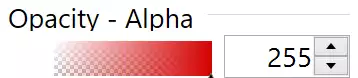
The Alpha gradient with a red colour and 255 Alpha from paint.net#
Add the alpha (opacity) to the colour components. As an example look at Opacity - Alpha in paint.net. The gradient is different from the RGB gradients. The alpha gradient starts from white and ends with the selected colour. At the white end are blocks of grey and white, while at the coloured end the gradient is full colour. One method to produce this effect is to create two images and combine them using the PIL alpha-composite method, as we saw before, using PIL is not so fast, and we can surmise with so many image manipulations it will be comparitively slow. It would pay to work in arrays add them together, then convert to a PPM format and import into tkinter.
Chequered Gradient |
Light End |
Coloured End |
|---|---|---|
Gradient |
White |
Colour |
Dark Chequer |
Grey |
Black |
Light Chequer |
White |
Black |
Bear in mind that PPM cannot have an alpha component, so the array manipulation has to replicate the effect of having an alpha component. This means that we have to have a strong showing of the chequer at the gradient white end, whilst we want a weak chequer showing at the coloured end of the gradient. The basic gradient changes from white to the required colour. The chequer should produce a mid grey at the white end, to zero at the coloured end. Remember white is (255,255,255) whereas black is (0,0,0), when adding arrays we are adding the contents of each pixel to the corresponding pixel in the other array. Thus adding black has no effect on the composite array (which is probably hard to imagine based on our own painting experience).
This means that our chequer also needs to change in colour, with black being the end point for both dark and light squares at the coloured end. If the dark squares are always black, we need only alter the light squares.
One way would be to make the light squares white at the white end, then the gradient needs to be black at the white end. A second way would be to make both the gradient and light chequer squares mid grey, which added together with the grey gradient produces white and the dark chequer grey squares at the white end (dark chequer square are black but become grey when added to the gradient).
Chequered Gradient |
Light End |
Coloured End |
|---|---|---|
Gradient |
Grey |
Colour |
Dark Chequer |
Black |
Black |
Light Chequer |
Grey |
Black |
Testing both methods, there was not much to choose between them, except it was easier to prevent the dark banding when both the chequer and gradient were grey at the white end.
Graded Chequer |
Red Gradient and Chequer |
Banded Result |
|
|
|



Resulting Colour with Alpha#
Full Alpha |
Mid Alpha |
No Alpha |
|
|
|
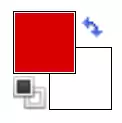
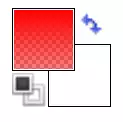
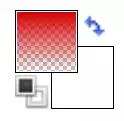
With paint.net when the opacity was reduced to zero none of the other gradients changed, but the resulting colour box changed from a block colour to a vertical grid starting from the bottom. This means that we need a vertical colour gradient for the resulting colour, which varies with the alpha value, and a chequer that changes with the alpha value, becoming lighter as the alpha increases. Look at the mid alpha value, the squares at the lower end are coloured whereas they are white and grey when there is no alpha.
We need a slightly more complicated method to replicate this. It borrows heavily on the alpha method above. The chequers are no longer static, they vary with alpha, such that at full alpha they become black, in effect no longer to be seen, while at no alpha they become visible in the lower half, and vanish in the upper half. The gradient at full alpha is the resulting colour throughout, at mid alpha the gradient increases in colour vertically. At no alpha there is no colour in the lowest level then increases to full colour.
Full Alpha |
Mid Alpha |
No Alpha |
|
|
|


Full Alpha |
Mid Alpha |
No Alpha |
|
|
|


Full Alpha |
Mid Alpha |
No Alpha |
|
|
|


Both chequers and gradient functions need to create a vertically changing result as opposed to the horizontally changing result used in the alpha gradient. It was found that the horizontal system has to be transposed, which means, it is sufficient to change the variables from the x to the y axis in loops. The chequer function shows this transformation process. The colour of the chequer squares changes with height. The amount of colour change depends on the alpha component as well as the ratio of the y step to height. The alpha value has been transformed so that when the alpha is 255 the variable is 0, giving a black colour, and when alpha is 0 we have 127, a mid grey:
def vcheck(width,height,alpha,square_size=4):
    # Set check value to grey or black depending on y position and alpha
    al0 = 127 - alpha // 2
    ah0 = al0 / height
    array = np.zeros([height, width, 3], dtype=np.uint8)
    for y in range(height):
        for x in range(width):
            if (x % square_size * 2) // square_size == (y % square_size * 2) \
                // square_size:
                array[y, x] = int(0.5 + ah0 * y)
return array
The gradient function is also transposed, but in a numpy way, at the end of
the numpy instructions append .T:
def vgenerate_gradient(to_colour, alpha, height, width):
    al0 = alpha / 255
    res0 = 1 - al0
    from_colour = (int(to_colour[0] * al0 + 127 * res0),
                  int(to_colour[1] * al0 + 127 * res0),
                  int(to_colour[2] * al0 + 127 * res0))  # changing from_colour
    new_ch = [np.tile(np.linspace(to_colour[i], from_colour[i], height,
                                  dtype=np.uint8),
                    [width, 1]).T for i in range(3)]
    return np.dstack(new_ch)
Adding Alpha#
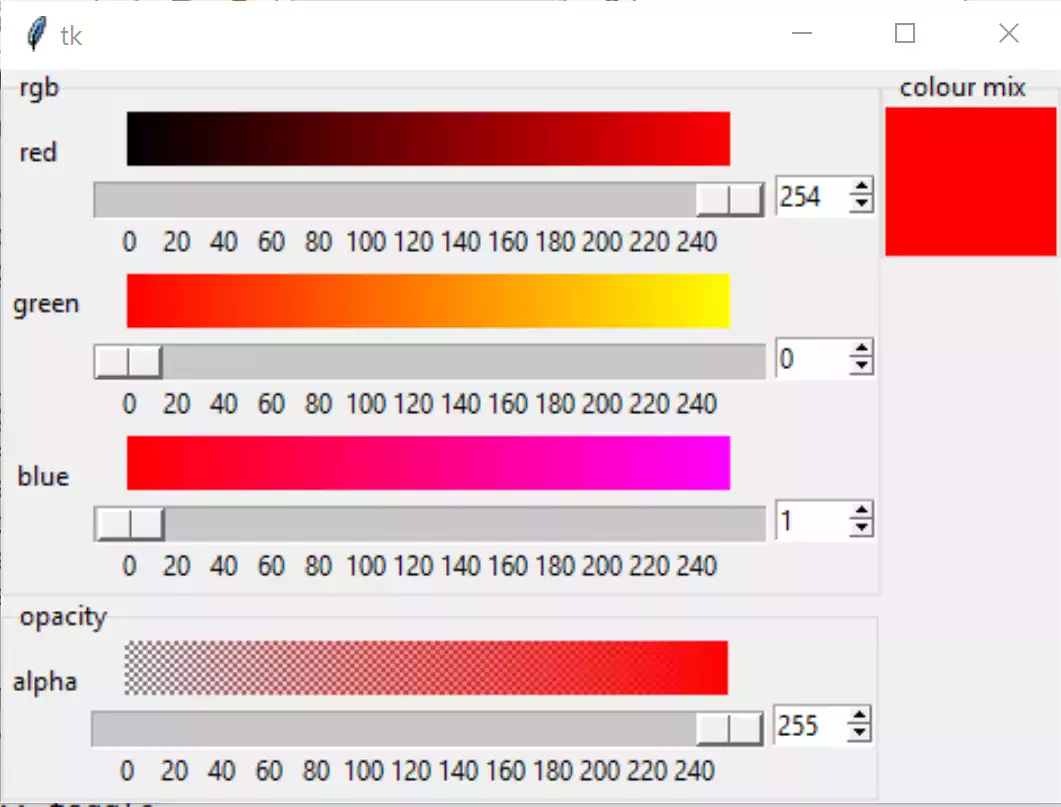
Place the alpha component directly below the rgb values, and move the final result label to just right of the red component. Enclose the rgb in a labelframe, place opacity in its own labelframe, while we are at it put the final result in its own labelframe. Add a check function:
def check(width,height,square_size=4):
    # Set check value to grey or white depending on x position
    array = np.zeros([height, width,3],dtype=np.uint8)
    for x in range(width):
        for y in range(height):
            if (x % square_size*2) // square_size ==
               (y % square_size*2) // square_size:
                array[y, x] = 127-int(0.5 + 127 / width * x)
    return array
Using the chequers drawing function change the chequer array to include with our gradient. A separate alpha drawing is made, then it is easy to call this rather than modifying the original gradient drawing function:
def draw_agradient(canvas,c1,c2,steps=256,width=300,height=26):
    arr = generate_gradient(colour1, colour2, height, width)
    arr1 = check(width, height)
    xdata = 'P6 {} {} 255 '.format(
        width, height).encode() + (arr + arr1).tobytes()
    gradient = PhotoImage(width=width, height=height, data=xdata, format='PPM')
    canvas.create_image(0, 0, anchor="nw", image=gradient)
    canvas.image = gradient
Add an alpha tk variable set this to 255. Every rgb component needs to redraw the alpha gradient when it changes. At this stage the alpha handle is just a placeholder, until we add an alpha component to the resulting colour.
Show/Hide Code 04addingalpha.py
""" Construction four gradients in rgba using PPM image"""


from tkinter import Tk, Canvas, Spinbox, Scale, Label, IntVar, Frame
from tkinter.ttk import LabelFrame
from colourTools import   draw_gradient, draw_agradient


class RgbSelect:
    """Class to construct rgba gradients

    Parameters
    ----------
    parent : str
        parent widget
    Returns
    -------
    None
    """

    def __init__(self, parent, enlargement):
        self.parent = parent
        self.e = enlargement
        self.rvar = IntVar()
        self.gvar = IntVar()
        self.bvar = IntVar()
        self.avar = IntVar()

        self.scale_l = 300 * self.e
        self.canvas_w = self.scale_l - 30 * self.e
        self.canvas_h = 26 * self.e
        self.build()

        self.rvar.set(255)
        self.gvar.set(0)
        self.bvar.set(0)
        self.avar.set(255)

    def rhandle(self, evt=None):
        """command callback for red

        Parameters
        ----------
        None

        Results
        -------
        None
        """

        red = self.rvar.get()
        green = self.gvar.get()
        blue = self.bvar.get()
        draw_gradient(self.gcan, (red, 0, blue), (red, 255, blue),
                      width=self.canvas_w, height=self.canvas_h)
        draw_gradient(self.bcan, (red, green, 0), (red, green, 255),
                      width=self.canvas_w, height=self.canvas_h)
        draw_agradient(self.acan, (127, 127, 127), (red, green, blue),
                       self.e, width=self.canvas_w, height=self.canvas_h)
        self.lab['background'] = self.rgbhash(red, green, blue)

    def ghandle(self, evt=None):
        """command callback for green

        Parameters
        ----------
        None

        Results
        -------
        None
        """

        red = self.rvar.get()
        green = self.gvar.get()
        blue = self.bvar.get()
        draw_gradient(self.rcan, (0, green, blue), (255, green, blue),
                      width=self.canvas_w, height=self.canvas_h)
        draw_gradient(self.bcan, (red, green, 0), (red, green, 255),
                      width=self.canvas_w, height=self.canvas_h)
        draw_agradient(self.acan, (127, 127, 127), (red, green, blue),
                       self.e, width=self.canvas_w, height=self.canvas_h)
        self.lab['background'] = self.rgbhash(red, green, blue)

    def bhandle(self, evt=None):
        """command callback for blue

        Parameters
        ----------
        None

        Results
        -------
        None
        """

        red = self.rvar.get()
        green = self.gvar.get()
        blue = self.bvar.get()
        draw_gradient(self.rcan, (0, green, blue), (255, green, blue),
                      width=self.canvas_w, height=self.canvas_h)
        draw_gradient(self.gcan, (red, 0, blue), (red, 255, blue),
                      width=self.canvas_w, height=self.canvas_h)
        draw_agradient(self.acan, (127, 127, 127), (red, green, blue),
                       self.e, width=self.canvas_w, height=self.canvas_h)
        self.lab['background'] = self.rgbhash(red, green, blue)

    def ahandle(self, evt=None):
        """command callback for alpha

        Parameters
        ----------
        None

        Results
        -------
        None
        """
        # red=self.rvar.get()
        # green=self.gvar.get()
        # blue=self.bvar.get()
        #draw_agradient(self.acan,(127,127,127),(red, green, blue),width=self.canvas_w)
        #self.lab['background'] = self.rgbhash(red, green, blue)
        pass

    def build(self):
        """widget construction

        Parameters
        ----------
        None

        Results
        -------
        None
        """

        fr1 = LabelFrame(self.parent, text='rgb')
        fr1.grid(column=0, row=0)

        rl0 = Label(fr1, text='red  ')
        rl0.grid(column=0, row=0, sticky='s')

        self.rcan = Canvas(
            fr1,
            width=self.canvas_w,
            height=self.canvas_h,
            bd=0,
            highlightthickness=0)
        self.rcan.grid(column=1, row=0, sticky='s')

        rsc = Scale(
            fr1,
            from_=0,
            to=255,
            variable=self.rvar,
            orient='horizontal',
            length=self.scale_l,
            command=self.rhandle,
            tickinterval=20,
            showvalue=0,
            width=15*self.e,
            sliderlength=30*self.e)
        rsc.grid(column=1, row=1, sticky='nw')

        rsb = Spinbox(fr1, from_=0, to=255, textvariable=self.rvar,
                      command=self.rhandle, width=5)
        rsb.grid(column=2, row=1, sticky='nw')

        gl0 = Label(fr1, text='green')
        gl0.grid(column=0, row=2)

        self.gcan = Canvas(
            fr1,
            width=self.canvas_w,
            height=self.canvas_h,
            bd=0,
            highlightthickness=0)
        self.gcan.grid(column=1, row=2, sticky='s')

        gsc = Scale(
            fr1,
            from_=0,
            to=255,
            variable=self.gvar,
            orient='horizontal',
            length=self.scale_l,
            command=self.ghandle,
            tickinterval=20,
            showvalue=0,
            width=15*self.e,
            sliderlength=30*self.e)
        gsc.grid(column=1, row=3, sticky='nw')

        gsb = Spinbox(fr1, from_=0, to=255, textvariable=self.gvar,
                      command=self.ghandle, width=5)
        gsb.grid(column=2, row=3, sticky='nw')

        bl0 = Label(fr1, text='blue ')
        bl0.grid(column=0, row=4, sticky='s')

        self.bcan = Canvas(
            fr1,
            width=self.canvas_w,
            height=self.canvas_h,
            bd=0,
            highlightthickness=0)
        self.bcan.grid(column=1, row=4, sticky='n')

        bsc = Scale(
            fr1,
            from_=0,
            to=255,
            variable=self.bvar,
            orient='horizontal',
            length=self.scale_l,
            command=self.bhandle,
            tickinterval=20,
            showvalue=0,
            width=15*self.e,
            sliderlength=30*self.e)
        bsc.grid(column=1, row=5, sticky='nw')

        bsb = Spinbox(fr1, from_=0, to=255, textvariable=self.bvar,
                      command=self.bhandle, width=5)
        bsb.grid(column=2, row=5, sticky='nw')

        fr3 = LabelFrame(self.parent, text='colour mix')
        fr3.grid(column=1, row=0, sticky='nw')

        self.lab = lab = Label(fr3, height=4, width=10)
        lab.grid(column=0, row=0, sticky='nw')
        lab.grid_propagate(0)
        lab['background'] = self.rgbhash(self.rvar.get(), self.gvar.get(),
                                         self.bvar.get())

        fr2 = LabelFrame(self.parent, text='opacity')
        fr2.grid(column=0, row=1, sticky='w')

        al0 = Label(fr2, text='alpha')
        al0.grid(column=0, row=0, sticky='s')

        self.acan = Canvas(fr2, width=self.canvas_w, height=self.canvas_h)
        self.acan.grid(column=1, row=0, sticky='n')

        asc = Scale(
            fr2,
            from_=0,
            to=255,
            variable=self.avar,
            orient='horizontal',
            length=self.scale_l,
            command=self.ahandle,
            tickinterval=20,
            showvalue=0,
            width=15*self.e,
            sliderlength=30*self.e)
        asc.grid(column=1, row=1, sticky='nw')

        asb = Spinbox(fr2, from_=0, to=255, textvariable=self.avar,
                      command=self.ahandle, width=5)
        asb.grid(column=2, row=1, sticky='nw')

    def rgbhash(self, red, green, blue):
        """Convert rgb to hexadecimal

        Parameters
        ----------
        red : int
            red component
        green : int
            green component
        blue : int
            blue component
        Results
        -------
        string
            hexadecimal colour
        """

        rgb = (red, green, blue)
        return '#%02x%02x%02x' % rgb


if __name__ == "__main__":
    root = Tk()
    winsys = root.tk.call("tk", "windowingsystem")
    BASELINE = 1.33398982438864281 if winsys != 'aqua' else 1.000492368291482
    scaling = root.tk.call("tk", "scaling")
    enlargement = int(scaling / BASELINE + 0.5)
    fra1 = Frame(root)
    fra1.grid(row=0, column=0)
    RgbSelect(fra1, enlargement)
    root.mainloop()
So far the rgb should look like this.
The layout change when alpha is introduced#
Adding Alpha to Resulting Colour#
As there is no appreciable difference in the resulting colour in the upper alpha band, only draw a background colour when alpha is above 240. If this is done using a label the units of size measurement are width in characters and height in lines, potentially a problem when switching between background and image. So the resulting colour is displayed on a canvas, which always uses the one measurement - pixels.
Our functions to generate vertical chequers and draw a gradient are as tested above, now add a vertical drawing function:
def vdraw_gradient(canvas, colour1, alpha=255, width=30, height=30):
    if alpha > 240:
    hash_value = rgbhash(colour1[0], colour1[1], colour1[2])
    canvas['background'] = hash_value
    canvas.background = hash_value
else:
    arr = vgenerate_gradient(colour1, alpha, height, width)
    arr1 = vcheck(width, height, alpha)
    xdata = 'P6 {} {} 255 '.format(
        width, height).encode() + (arr + arr1).tobytes()
    gradient = PhotoImage(
        width=width,
        height=height,
        data=xdata,
        format='PPM')
    canvas.create_image(0, 0, anchor="nw", image=gradient)
    canvas.image = gradient
Notice that even just giving the canvas a background colour needs an extra reference to it or else it is just ignored (garbage collected).
Change all references from the label having a background colour to the new vertical gradient. Change the label to a canvas.
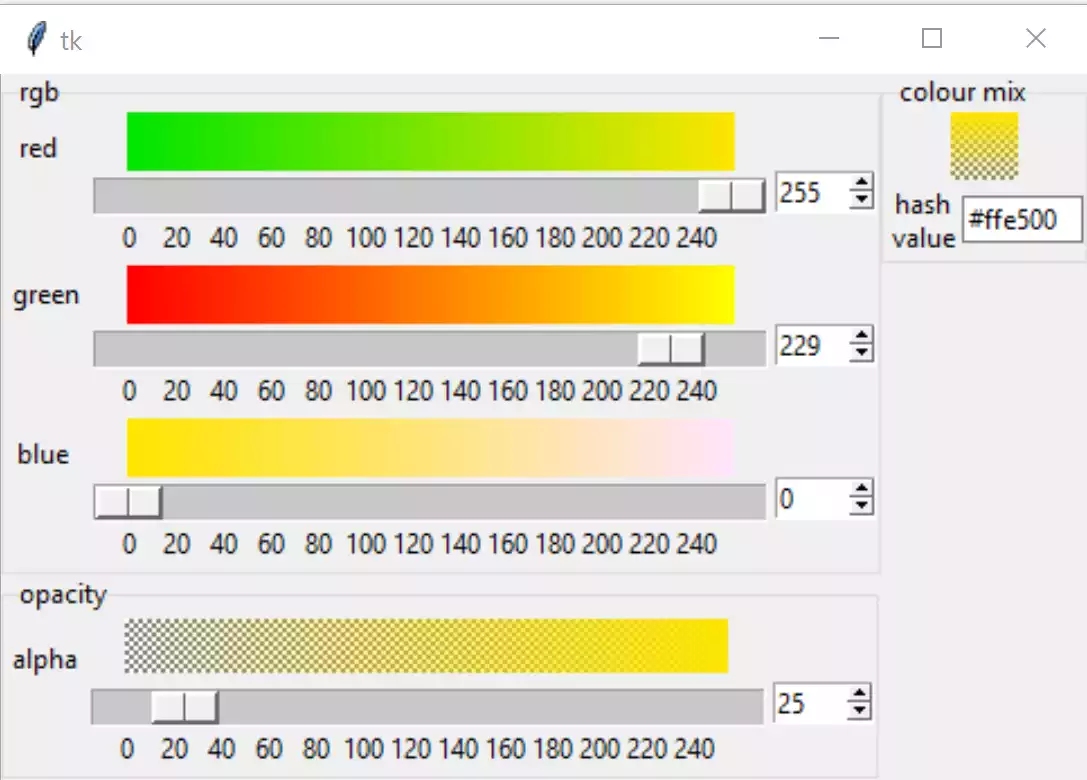
Since there is now a colour mix container, add an entry widget, tie this to a tk variable to show the colour hash value. This needs to be a string variable for hexadecimal values. Add an explanatory label.
At the end of build draw all the gradients, so that they appear when opening the application. On startup show red, which is set at 255 while blue and green are 0. Show full alpha, no transparency, so set alpha to 255.
Show/Hide Code 05addingalphatofinalcolour.py
""" Construction four gradients in rgba using PPM image, added final colour"""

from tkinter import Tk, Canvas, Spinbox, Scale, Label, IntVar, StringVar, Frame
from tkinter.ttk import LabelFrame, Entry
from colourTools import rgb2hash, draw_gradient, draw_agradient, vdraw_gradient

class RgbSelect:
    """Class to construct rgba gradients and final colour

    Parameters
    ----------
    fr : str
        parent widget
    """

    def __init__(self, parent, enlargement):
        self.parent = parent
        self.e = enlargement
        self.rvar = IntVar()
        self.gvar = IntVar()
        self.bvar = IntVar()
        self.avar = IntVar()
        self.evar = StringVar()

        self.scale_l = 300 * self.e
        self.canvas_w = self.scale_l - 30 * self.e
        self.canvas_h = 26 * self.e
        self.build()

        self.rvar.set(255)
        self.gvar.set(0)
        self.bvar.set(0)
        self.avar.set(255)
        self.evar.set('#ff0000')

    def rhandle(self, *args):
        """command callback for red

        Parameters
        ----------
        None

        Results
        -------
        None
        """

        red = self.rvar.get()
        green = self.gvar.get()
        blue = self.bvar.get()
        alpha = self.avar.get()
        draw_gradient(self.gcan, (red, 0, blue), (red, 255, blue),
                      width=self.canvas_w, height=self.canvas_h)
        draw_gradient(self.bcan, (red, green, 0), (red, green, 255),
                      width=self.canvas_w, height=self.canvas_h)
        draw_agradient(self.acan, (127, 127, 127), (red, green, blue),
                       self.e, width=self.canvas_w, height=self.canvas_h)
        vdraw_gradient(self.cmcan, (red, green, blue), self.e, alpha=alpha,
                        width=30*self.e, height=30*self.e)
        self.evar.set(rgb2hash(red, green, blue))

    def ghandle(self, *args):
        """command callback for green

        Parameters
        ----------
        None

        Results
        -------
        None
        """

        red = self.rvar.get()
        green = self.gvar.get()
        blue = self.bvar.get()
        alpha = self.avar.get()
        draw_gradient(self.rcan, (0, green, blue), (255, green, blue),
                      width=self.canvas_w, height=self.canvas_h)
        draw_gradient(self.bcan, (red, green, 0), (red, green, 255),
                      width=self.canvas_w, height=self.canvas_h)
        draw_agradient(self.acan, (127, 127, 127), (red, green, blue), self.e,
                       width=self.canvas_w, height=self.canvas_h)
        vdraw_gradient(self.cmcan, (red, green, blue), self.e, alpha=alpha,
                        width=30*self.e, height=30*self.e)
        self.evar.set(rgb2hash(red, green, blue))

    def bhandle(self, *args):
        """command callback for blue

        Parameters
        ----------
        None

        Results
        -------
        None
        """

        red = self.rvar.get()
        green = self.gvar.get()
        blue = self.bvar.get()
        alpha = self.avar.get()
        draw_gradient(self.rcan, (0, green, blue), (255, green, blue),
                      width=self.canvas_w, height=self.canvas_h)
        draw_gradient(self.gcan, (red, 0, blue), (red, 255, blue),
                      width=self.canvas_w, height=self.canvas_h)
        draw_agradient(self.acan, (127, 127, 127), (red, green, blue),
                       self.e, width=self.canvas_w, height=self.canvas_h)
        vdraw_gradient(self.cmcan, (red, green, blue), self.e, alpha=alpha,
                        width=30*self.e, height=30*self.e)
        self.evar.set(rgb2hash(red, green, blue))

    def ahandle(self, *args):
        """command callback for opacity

        Parameters
        ----------
        None

        Results
        -------
        None
        """

        red = self.rvar.get()
        green = self.gvar.get()
        blue = self.bvar.get()
        alpha = self.avar.get()
        vdraw_gradient(self.cmcan, (red, green, blue), self.e, alpha=alpha,
                        width=30*self.e, height=30*self.e)

    def build(self):
        """widget construction

        Parameters
        ----------
        None

        Results
        -------
        None
        """

        fr1 = LabelFrame(self.parent, text='rgb')
        fr1.grid(column=0, row=0)

        rl1 = Label(fr1, text='red  ')
        rl1.grid(column=0, row=0, sticky='s')

        self.rcan = Canvas(
            fr1,
            width=self.canvas_w,
            height=self.canvas_h,
            bd=0,
            highlightthickness=0)
        self.rcan.grid(column=1, row=0, sticky='s')

        rsc = Scale(
            fr1,
            from_=0,
            to=255,
            variable=self.rvar,
            orient='horizontal',
            length=self.scale_l,
            command=self.rhandle,
            tickinterval=20,
            showvalue=0,
            width=15*self.e,
            sliderlength=30*self.e)
        rsc.grid(column=1, row=1, sticky='nw')

        rsb = Spinbox(fr1, from_=0, to=255, textvariable=self.rvar,
                      command=self.rhandle, width=5)
        rsb.grid(column=2, row=1, sticky='nw')

        gl1 = Label(fr1, text='green')
        gl1.grid(column=0, row=2)

        self.gcan = Canvas(
            fr1,
            width=self.canvas_w,
            height=self.canvas_h,
            bd=0,
            highlightthickness=0)
        self.gcan.grid(column=1, row=2, sticky='s')

        gsc = Scale(
            fr1,
            from_=0,
            to=255,
            variable=self.gvar,
            orient='horizontal',
            length=self.scale_l,
            command=self.ghandle,
            tickinterval=20,
            showvalue=0,
            width=15*self.e,
            sliderlength=30*self.e)
        gsc.grid(column=1, row=3, sticky='nw')

        gsb = Spinbox(fr1, from_=0, to=255, textvariable=self.gvar,
                      command=self.ghandle, width=5)
        gsb.grid(column=2, row=3, sticky='nw')

        bl1 = Label(fr1, text='blue ')
        bl1.grid(column=0, row=4, sticky='s')

        self.bcan = Canvas(
            fr1,
            width=self.canvas_w,
            height=self.canvas_h,
            bd=0,
            highlightthickness=0)
        self.bcan.grid(column=1, row=4, sticky='n')

        bsc = Scale(
            fr1,
            from_=0,
            to=255,
            variable=self.bvar,
            orient='horizontal',
            length=self.scale_l,
            command=self.bhandle,
            tickinterval=20,
            showvalue=0,
            width=15*self.e,
            sliderlength=30*self.e)
        bsc.grid(column=1, row=5, sticky='nw')

        bsb = Spinbox(fr1, from_=0, to=255, textvariable=self.bvar,
                      command=self.bhandle, width=5)
        bsb.grid(column=2, row=5, sticky='nw')

        fr3 = LabelFrame(self.parent, text='colour mix')
        fr3.grid(column=1, row=0, sticky='nw')

        self.cmcan = cmcan = Canvas(fr3, width=30*self.e, height=30*self.e, bd=0,
                                    highlightthickness=0)
        cmcan.grid(column=0, row=0, sticky='n', columnspan=2)
        cmcan.grid_propagate(0)
        vdraw_gradient(self.cmcan, (255, 0, 0), self.e, alpha=255,
                        width=30*self.e, height=30*self.e)

        cml = Label(fr3, text='hash\nvalue')
        cml.grid(column=0, row=1)

        ent1 = Entry(fr3, width=8, textvariable=self.evar)
        ent1.grid(column=1, row=1)

        fr2 = LabelFrame(self.parent, text='opacity')
        fr2.grid(column=0, row=1, sticky='w')

        al1 = Label(fr2, text='alpha')
        al1.grid(column=0, row=0, sticky='s')

        self.acan = Canvas(fr2, width=self.canvas_w, height=self.canvas_h)
        self.acan.grid(column=1, row=0, sticky='n')

        asc = Scale(
            fr2,
            from_=0,
            to=255,
            variable=self.avar,
            orient='horizontal',
            length=self.scale_l,
            command=self.ahandle,
            tickinterval=20,
            showvalue=0,
            width=15*self.e,
            sliderlength=30*self.e)
        asc.grid(column=1, row=1, sticky='nw')

        asb = Spinbox(fr2, from_=0, to=255, textvariable=self.avar,
                      command=self.ahandle, width=5)
        asb.grid(column=2, row=1, sticky='nw')

        draw_gradient(self.rcan, (0, 0, 0), (255, 0, 0),
                      width=self.canvas_w, height=self.canvas_h)
        draw_gradient(self.gcan, (255, 0, 0), (255, 255, 0),
                      width=self.canvas_w, height=self.canvas_h)
        draw_gradient(self.bcan, (255, 0, 0), (255, 0, 255),
                      width=self.canvas_w, height=self.canvas_h)
        draw_agradient(self.acan, (127, 127, 127), (255, 0, 0),
                       self.e, width=self.canvas_w, height=self.canvas_h)


if __name__ == "__main__":
    root = Tk()
    winsys = root.tk.call("tk", "windowingsystem")
    BASELINE = 1.33398982438864281 if winsys != 'aqua' else 1.000492368291482
    scaling = root.tk.call("tk", "scaling")
    enlargement = int(scaling / BASELINE + 0.5)
    fra1 = Frame(root)
    fra1.grid(row=0, column=0)
    RgbSelect(fra1, enlargement)
    root.mainloop()

root.mainloop()
This should produce:-
The layout after final colour has alpha#
The next part addresses the scale, at last! Also see what does or does not happen when the entry or the spinboxes are used.