

Modifying Scale, Spinbox and Entry#
Change the Scale#
At present the scale has that stuck on feeling, it does not sit in with the application. There are two real choices, either go the whole hog and change the scale to a canvas which combines the gradient and cursor, or just change the appearance of the cursor using a theme. The first choice would slow down the whole application, by how much is not really known until tested on the full application when rgb is combined with hsv. The second choice allows a scale to operate just as before. When switching to a themed scale we will need to make provision to display the range values which were included in the tkinter widget.
Changing the Scale Cursor#
tkinter |
styled ttk |
|---|---|
scale cursor |
scale cursor |
|
|
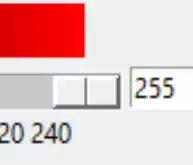
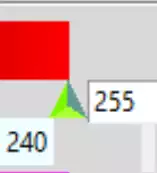
Create a small super class for our scale, purely so that we can use inheritance. First of all create a cursor on an invisible trough, a bit like those in paint.net, but larger so that it is easier to click on the cursor. Using state, cChange its appearance when pressed. Place this in the __init__ of RgbSelect we can change the ttk scale and make changes to entry and spinboxes as required:
img=Image.new("RGBA",(16,10),'#00000000')
trough=ImageTk.PhotoImage(img)
# constants for creating upward pointing arrow
WIDTH = 17*e
HEIGHT = 17*e
OFFSET = 5*e
ST0 = WIDTH // 2, HEIGHT - 1 - OFFSET
LIGHT = 'GreenYellow'
MEDIUM = 'LawnGreen'
DARK = '#5D9B90'

# normal state
im = Image.new("RGBA", (WIDTH, HEIGHT), '#00000000')
rdraw = ImageDraw.Draw(im)
rdraw.polygon([ST0[0], ST0[1], 0, HEIGHT - 1,
               WIDTH - 1, HEIGHT - 1], fill=LIGHT)
rdraw.polygon([ST0[0], ST0[1], ST0[0], 0, 0, HEIGHT - 1], fill=MEDIUM)
rdraw.polygon([ST0[0], ST0[1], WIDTH - 1,
               HEIGHT - 1, ST0[0], 0], fill=DARK)
slider = ImageTk.PhotoImage(im)

#pressed state
imp = Image.new("RGBA", (WIDTH, HEIGHT), '#00000000')
draw = ImageDraw.Draw(imp)
draw.polygon([ST0[0], ST0[1], 0, HEIGHT - 1,
              WIDTH - 1, HEIGHT - 1], fill=LIGHT)
draw.polygon([ST0[0], ST0[1], ST0[0], 0, 0, HEIGHT - 1], fill=DARK)
draw.polygon([ST0[0], ST0[1], WIDTH - 1,
              HEIGHT - 1, ST0[0], 0], fill=MEDIUM)
sliderp = ImageTk.PhotoImage(imp)

style = Style()
style.theme_settings('default', {
    'Horizontal.Scale.trough': {"element create":
                                ('image', trough,
                                 {'border': 0, 'sticky': 'wes'})},
    'Horizontal.Scale.slider': {"element create":
                                ('image', slider,
                                 ('pressed', sliderp),
                                 {'border': 3, 'sticky': 'n'})}})
PIL has been loaded for the Scale cursor drawing, this will only affect the start-up time.
Checking out our requirements for the scale, note that the length of the
Scale is the movement length of the cursor plus the cursor width, plus any
trough borders. The external trough length is the actual Scale length. The
centre of the cursor should correspond to the measurement on the range. If
the calculations are correct then when the cursor is at its minimum from_
it should show 0 and the corresponding to value is at its maximum.
Adding Range Values#
As usual I'm indebted to some clever programmer for the method in stackoverflow
that can be used in our application. We only require a
horizontal scale where the range is in positive integers, so after
simplification it becomes more manageable. It would be nice to pass the
tick_interval to the widget since we require an easy way to change the range
appearance whenever different ranges are being used. Possibly digits
may be useful (the number of digits passed to the tk variable).
- We are taking over the following Scale options:-
parent
from_
to
command
length
orient
variable
- We are using the following from the old style scale:-
digits
tickinterval
sliderlength
This should give us:
class TtkScale(Scale):
    def __init__(self, parent, from_=0, to=255, length=300, orient='horizontal',
             variable=0, digits=None, tickinterval=None, sliderlength=16,
             command=None):
        self.from_=from_
        self.to=to
        self.variable=variable

        super().__init__(parent, length=length + sliderlength,
                     variable=variable, from_=from_, to=to, command=command)

        self.digits=digits
        self.length=length

        self.build(parent,from_,to,sliderlength,tickinterval, length)
Position the range values just below the trough,
build them as part of the scale widget and use the place
layout manager, so these act as a built-in feature of the widget:
def build(self, parent, from_, to, sliderlength, tickinterval, length):
    # create ticks
    scRange = to-from_

    if tickinterval:
        for i in range(from_, to + 2, tickinterval):
            item = Label(parent, text=i, bg='#EFFEFF')
            item.place(in_=self, bordermode='outside',
                       relx=sliderlength / length / 2 + i /
                       sc_range * (1 - sliderlength / length),
                       rely=1, anchor='n')
The first tick value is positioned just below the centre of the slider when it is hard up against the left hand border, whilst the final tick is below the centre of the slider when it is hard up against the right hand border. This means that the first tick is half a slider length inside the border, and the last tick is half a slider length inside the opposite border. Other ticks are equally spaced between these two extremes.
Now change all the Scales to TtkScale, altering any attributes as necessary.
After the scale range values are made, notice that they are mostly hidden by the canvas. Place empty labels one row below the Spinboxes to give the values enough space to show - do not use pady in the grid as we want the scale and canvas to abut. Lower widgets have to be shifted down to accommodate these labels.
As the cursor is not showing try placing the style information in the main
part. That's better, but it is obvious that the gradients are too short.
Reinstate the 30 pixels subtracted in __init__ of RgbSelect. Better, now
remove the border and highlightthickness from the alpha canvas. Wait until
after hsv has been installed before changing the labels to ttk type, so we
can easily see the empty labels.
Show/Hide Code 06scalemod.py
""" Construction four gradients in rgba using PPM image
    added final colour
    working with modified Scale
"""

from tkinter import Tk, Canvas, Label, IntVar, Frame, StringVar
from tkinter.ttk import LabelFrame, Scale, Style, Entry, Spinbox
from PIL import Image, ImageDraw, ImageTk
from colourTools import rgb2hash, draw_gradient, \
    draw_agradient, vdraw_gradient


class TtkScale(Scale):
    """Class to draw themed Scale widget

    Parameters
    ----------
    parent : str
        parent widget
    enlargement : int
        dpi enlargement factor
    from_ : int
        start of scale
    to : int
        end of scale
    length : int
        length in pixels
    orient : str
        orientation
    variable : str
        tk variable
    digits : int
        length variable when converted to string
    tickinterval : float or int
        how many digits show up in tick interval
    sliderlength : int
        what it says
    command : str
        procedure called when slider moves
    """

    def __init__(self, parent, from_=0, to=255, length=300, orient='horizontal',
                 variable=0, digits=None, tickinterval=None, sliderlength=16,
                 command=None, enlargement=1):

        self.from_ = from_
        self.to = to
        self.variable = variable

        super().__init__(parent, length=length + sliderlength,
                         variable=variable, from_=from_, to=to, command=command)
        self.e = enlargement
        self.digits = digits
        self.length = length

        self.build(parent, from_, to, sliderlength, tickinterval, length)

    def build(self, parent, from_, to, sliderlength, tickinterval, length):
        """Create ticks

        Parameters
        ----------
        parent : str
            parent widget
        from_ : int
            start of scale
        to : int
            end of scale
        length : int
            length in pixels
        tickinterval : float or int

        """

        sc_range = to - from_

        if tickinterval:
            for i in range(from_, to + 2, tickinterval):
                item = Label(parent, text=i, bg='#EFFEFF')
                item.place(in_=self, bordermode='outside',
                           relx=sliderlength*self.e / length*self.e / 2 + i /
                           sc_range * (1 - sliderlength*self.e / length*self.e),
                           rely=1, anchor='n')


class RgbSelect:
    """Class to construct rgba gradients and final colour

    Parameters
    ----------
    fr0 : str
        parent widget

    Returns
    -------
    None
    """

    def __init__(self, fr0, enlargement):
        self.fr0 = fr0
        self.e = enlargement

        self.cursor_w = 16 * self.e

        self.rvar = IntVar()
        self.gvar = IntVar()
        self.bvar = IntVar()
        self.avar = IntVar()
        self.evar = StringVar()

        self.scale_l = 300 * self.e
        self.canvas_w = self.scale_l
        self.canvas_h = 26 * self.e
        self.canvas_b = 30 * self.e
        self.build()

        self.rvar.set(255)
        self.gvar.set(0)
        self.bvar.set(0)
        self.avar.set(255)
        self.evar.set('#ff0000')

    def rhandle(self, *args):
        """command callback for red

        Parameters
        ----------
        None

        Results
        -------
        None
        """

        red = self.rvar.get()
        green = self.gvar.get()
        blue = self.bvar.get()
        alpha = self.avar.get()
        draw_gradient(self.gcan, (red, 0, blue), (red, 255, blue),
                      width=self.canvas_w, height=self.canvas_h)
        draw_gradient(self.bcan, (red, green, 0), (red, green, 255),
                      width=self.canvas_w, height=self.canvas_h)
        draw_agradient(self.acan, (127, 127, 127), (red, green, blue),
                       self.e, width=self.canvas_w, height=self.canvas_h)
        vdraw_gradient(self.cmcan, (red, green, blue), self.e, alpha=alpha,
                        width=self.canvas_b, height=self.canvas_b)
        self.evar.set(rgb2hash(red, green, blue))

    def ghandle(self, *args):
        """command callback for green

        Parameters
        ----------
        None

        Results
        -------
        None
        """

        red = self.rvar.get()
        green = self.gvar.get()
        blue = self.bvar.get()
        alpha = self.avar.get()
        draw_gradient(self.rcan, (0, green, blue), (255, green, blue),
                      width=self.canvas_w, height=self.canvas_h)
        draw_gradient(self.bcan, (red, green, 0), (red, green, 255),
                      width=self.canvas_w, height=self.canvas_h)
        draw_agradient(self.acan, (127, 127, 127), (red, green, blue), self.e,
                       width=self.canvas_w, height=self.canvas_h)
        vdraw_gradient(self.cmcan, (red, green, blue), self.e, alpha=alpha,
                        width=self.canvas_b, height=self.canvas_b)
        self.evar.set(rgb2hash(red, green, blue))

    def bhandle(self, *args):
        """command callback for blue

        Parameters
        ----------
        None

        Results
        -------
        None
        """

        red = self.rvar.get() #round(self.rvar.get(),0)
        green = self.gvar.get()
        blue = self.bvar.get()
        alpha = self.avar.get()
        draw_gradient(self.rcan, (0, green, blue), (255, green, blue),
                      width=self.canvas_w, height=self.canvas_h)
        draw_gradient(self.gcan, (red, 0, blue), (red, 255, blue),
                      width=self.canvas_w, height=self.canvas_h)
        draw_agradient(self.acan, (127, 127, 127), (red, green, blue),
                       self.e, width=self.canvas_w, height=self.canvas_h)
        vdraw_gradient(self.cmcan, (red, green, blue), self.e, alpha=alpha,
                        width=self.canvas_b, height=self.canvas_b)
        self.evar.set(rgb2hash(red, green, blue))

    def ahandle(self, *args):
        """command callback for alpha

        Parameters
        ----------
        None

        Results
        -------
        None
        """

        red = self.rvar.get()
        green = self.gvar.get()
        blue = self.bvar.get()
        alpha = self.avar.get()
        vdraw_gradient(self.cmcan, (red, green, blue), self.e, alpha=alpha,
                        width=self.canvas_b, height=self.canvas_b)

    def build(self):
        """widget construction

        Parameters
        ----------
        None

        Results
        -------
        None
        """

        fr1 = LabelFrame(self.fr0, text='rgb')
        fr1.grid(column=0, row=0, sticky='news')

        rl0 = Label(fr1, text='red  ')
        rl0.grid(column=0, row=0, sticky='s')

        self.rcan = Canvas(fr1, width=self.canvas_w, height=self.canvas_h, bd=0,
                           highlightthickness=0)
        self.rcan.grid(column=1, row=0, sticky='s')

        rsc = TtkScale(fr1, from_=0, to=255, variable=self.rvar, orient='horizontal',
                       length=self.scale_l, command=self.rhandle, tickinterval=20,
                       enlargement=self.e)
        rsc.grid(column=1, row=1, sticky='news')

        rsb = Spinbox(fr1, from_=0, to=255, textvariable=self.rvar,
                      command=self.rhandle, width=5)
        rsb.grid(column=2, row=1, sticky='nw')

        rel = Label(fr1, height=1)
        rel.grid(column=2, row=2)

        gl0 = Label(fr1, text='green')
        gl0.grid(column=0, row=3)

        self.gcan = Canvas(fr1, width=self.canvas_w, height=self.canvas_h, bd=0,
                           highlightthickness=0)
        self.gcan.grid(column=1, row=3, sticky='s')

        gsc = TtkScale(fr1, from_=0, to=255, variable=self.gvar, orient='horizontal',
                       length=self.scale_l, command=self.ghandle, tickinterval=20,
                       enlargement=self.e)
        gsc.grid(column=1, row=4, sticky='news')

        gsb = Spinbox(fr1, from_=0, to=255, textvariable=self.gvar,
                      command=self.ghandle, width=5)
        gsb.grid(column=2, row=4, sticky='nw')

        gel = Label(fr1, height=1)
        gel.grid(column=2, row=5)

        bl0 = Label(fr1, text='blue ')
        bl0.grid(column=0, row=6, sticky='s')

        self.bcan = Canvas(fr1, width=self.canvas_w, height=self.canvas_h, bd=0,
                           highlightthickness=0)
        self.bcan.grid(column=1, row=6, sticky='n')

        bsc = TtkScale(fr1, from_=0, to=255, variable=self.bvar, orient='horizontal',
                       length=self.scale_l, command=self.bhandle, tickinterval=20,
                       enlargement=self.e)
        bsc.grid(column=1, row=7, sticky='news')

        bsb = Spinbox(fr1, from_=0, to=255, textvariable=self.bvar,
                      command=self.bhandle, width=5)
        bsb.grid(column=2, row=7, sticky='nw')

        bel = Label(fr1, height=1)
        bel.grid(column=2, row=8)

        fr3 = LabelFrame(self.fr0, text='colour mix')
        fr3.grid(column=1, row=0, sticky='nw')

        self.cmcan = cmcan = Canvas(fr3, width=30*self.e, height=30*self.e, bd=0,
                                    highlightthickness=0)
        cmcan.grid(column=0, row=0, sticky='n', columnspan=2)
        cmcan.grid_propagate(0)
        vdraw_gradient(self.cmcan, (255, 0, 0), self.e, alpha=255)

        cml = Label(fr3, text='hash\nvalue')
        cml.grid(column=0, row=1)

        ent0 = Entry(fr3, width=8, textvariable=self.evar)
        ent0.grid(column=1, row=1)

        fr2 = LabelFrame(self.fr0, text='opacity')
        fr2.grid(column=0, row=1, sticky='news')

        al0 = Label(fr2, text='alpha')
        al0.grid(column=0, row=0, sticky='s')

        self.acan = Canvas(fr2, width=self.canvas_w, height=self.canvas_h, bd=0,
                           highlightthickness=0)
        self.acan.grid(column=1, row=0, sticky='n')

        asc = TtkScale(fr2, from_=0, to=255, variable=self.avar, orient='horizontal',
                       length=self.scale_l, command=self.ahandle, tickinterval=20,
                       enlargement=self.e)
        asc.grid(column=1, row=1, sticky='news')

        asb = Spinbox(fr2, from_=0, to=255, textvariable=self.avar,
                      command=self.ahandle, width=5)
        asb.grid(column=2, row=1, sticky='nw')

        ael = Label(fr2, text=' ', height=1)
        ael.grid(column=2, row=2, sticky='s')

        draw_gradient(self.rcan, (0, 0, 0), (255, 0, 0),
                      width=self.canvas_w, height=self.canvas_h)
        draw_gradient(self.gcan, (255, 0, 0), (255, 255, 0),
                      width=self.canvas_w, height=self.canvas_h)
        draw_gradient(self.bcan, (255, 0, 0), (255, 0, 255),
                      width=self.canvas_w, height=self.canvas_h)
        draw_agradient(self.acan, (127, 127, 127), (255, 0, 0),
                       self.e, width=self.canvas_w, height=self.canvas_h)


if __name__ == "__main__":
    root = Tk()
    winsys = root.tk.call("tk", "windowingsystem")
    BASELINE = 1.33398982438864281 if winsys != 'aqua' else 1.000492368291482
    scaling = root.tk.call("tk", "scaling")
    enlargement = e = int(scaling / BASELINE + 0.5)

    img = Image.new("RGBA", (16*e, 10*e), '#00000000')
    trough = ImageTk.PhotoImage(img)

    # constants for creating upward pointing arrow
    WIDTH = 17*e
    HEIGHT = 17*e
    OFFSET = 5*e
    ST0 = WIDTH // 2, HEIGHT - 1 - OFFSET
    LIGHT = 'GreenYellow'
    MEDIUM = 'LawnGreen'
    DARK = '#5D9B90'

    # normal state
    im = Image.new("RGBA", (WIDTH, HEIGHT), '#00000000')
    rdraw = ImageDraw.Draw(im)
    rdraw.polygon([ST0[0], ST0[1], 0, HEIGHT - 1,
                   WIDTH - 1, HEIGHT - 1], fill=LIGHT)
    rdraw.polygon([ST0[0], ST0[1], ST0[0], 0, 0, HEIGHT - 1], fill=MEDIUM)
    rdraw.polygon([ST0[0], ST0[1], WIDTH - 1,
                   HEIGHT - 1, ST0[0], 0], fill=DARK)
    slider = ImageTk.PhotoImage(im)

    # pressed state
    imp = Image.new("RGBA", (WIDTH, HEIGHT), '#00000000')
    draw = ImageDraw.Draw(imp)
    draw.polygon([ST0[0], ST0[1], 0, HEIGHT - 1,
                  WIDTH - 1, HEIGHT - 1], fill=LIGHT)
    draw.polygon([ST0[0], ST0[1], ST0[0], 0, 0, HEIGHT - 1], fill=DARK)
    draw.polygon([ST0[0], ST0[1], WIDTH - 1,
                  HEIGHT - 1, ST0[0], 0], fill=MEDIUM)
    sliderp = ImageTk.PhotoImage(imp)

    style = Style()
    style.theme_settings('default', {
        'Horizontal.Scale.trough': {"element create":
                                    ('image', trough,
                                     {'border': 0, 'sticky': 'wes'})},
        'Horizontal.Scale.slider': {"element create":
                                    ('image', slider,
                                     ('pressed', sliderp),
                                     {'border': 3, 'sticky': 'n'})}})

    style.theme_use('default')
    style.configure('TSpinbox', arrowsize=10*e)
    fra0 = Frame(root)
    root.columnconfigure(0, weight=1)
    fra0.grid(row=0, column=0, sticky='nsew')
    fra0.columnconfigure(0, weight=1)
    RgbSelect(fra0, enlargement)
    root.mainloop()
This should produce:-
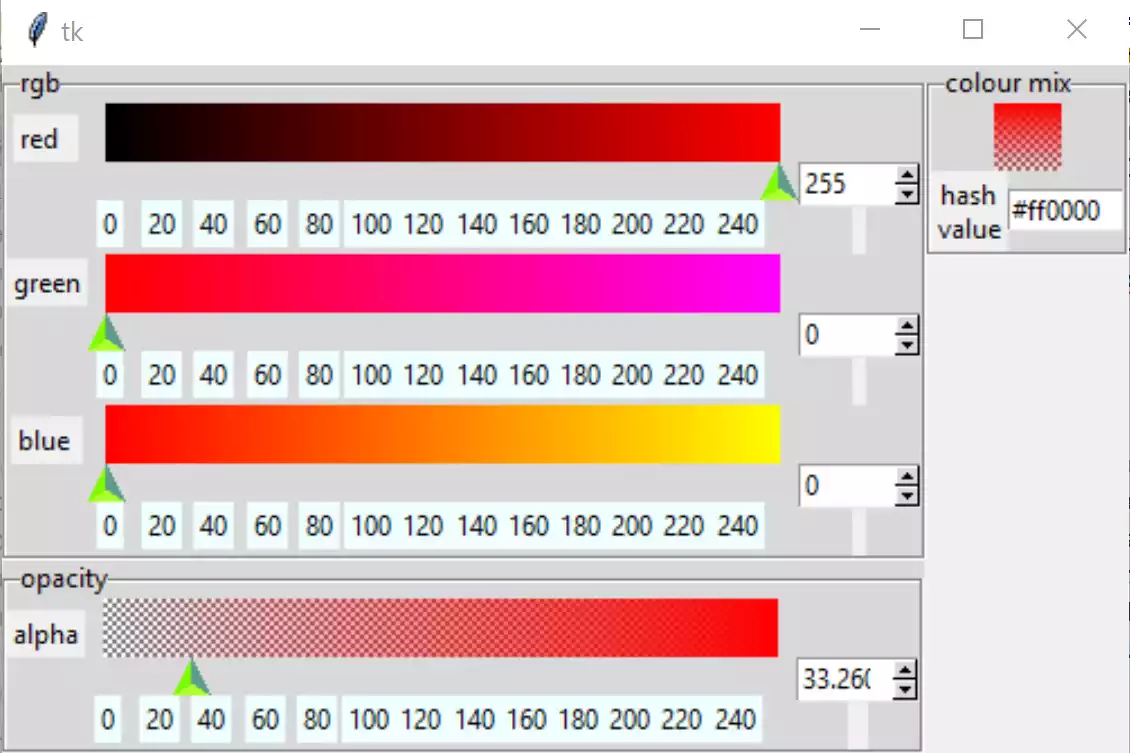
The layout after modifying scale#
Move the cursors, and we see that the output in all the spinboxes is a float, no longer an integer.
User Input in Entry and Spinboxes#
User validation on both entry and spinboxes is necessary to ensure that input is correct, spinboxes allow integer input up to 3 figures with an upper and lower limit, whereas entry deals with a hash and hexadecimal input. When adding validation to both the entry and spinboxes some of our automatic adjustment is lost, therefore add a bind to each of these widgets, so that any changes in values are reflected in our gradients and shown value in entry:
def sb_okay(action, text, input):  # '%d', '%P','%S'
    if action == "1":
        if input.isdigit():
            return bool(0 <= int(text) <= 255)
        return False
    return True
Each spinbox requires to register the above function, which is the same for each colour component RGBA. Validate on keystroke, action, current input and text. The bind handler is common for the colour components RGB, and slightly less complicated for the alpha component, since we are only updating the final colour, whereas a standard component must update all the other component gradients, the alpha component and the final colour and its hash value. As these changes occur during user input to the entry or spinbox, speed is not so critical, whenever possible use common validation and handler functions.
The validation for the entry is a bit more complicated. First check that the first character is a hash, then all the subsequent input is checked as hexadecimal. Finally limit it to 6 hexadecimal units using a bool function in the return clause of the try clause, which is equivalent to range checking:
def isOkay(index, text, input_):  # '%i','%P','%S'
    # hash cannot be removed, hex check on input after hash
    index = int(index)  # index is string!
    if index == 0 and text == '#':
        return True
    try:
        int(input_, 16)
        return bool(0 < index < 7)
    except ValueError:  # not a hex
        return False
The validation otherwise is similar to the spinboxes, but also use the index, that must be called as well. When initialising the entry the tk variable is set to the default value, otherwise validation prevents an update.
The bind handler gets the new hash value from which it determines each colour component that in turn sets the colour component of the tk variable. Each of the colour gradients then is drawn.
After all that you should see something like the following:-
Show/Hide Code 07entryscalemod.py
""" Construction four gradients in rgba using PPM image
    added final colour, added entry and spinbox validation
    working with modified Scale
"""

from tkinter import Tk, Canvas, Label, IntVar, Frame, StringVar
from tkinter.ttk import LabelFrame, Scale, Style, Entry, Spinbox
from PIL import Image, ImageDraw, ImageTk
from colourTools import rgb2hash, draw_gradient, \
    draw_agradient, vdraw_gradient, hash2rgb


def is_okay(index, text, input_):  # '%i','%P','%S'
    """Validation for hash, which cannot be removed,
        hex check on input after hash

    Parameters
    ----------
    index : str
        index
    text : str
        text if accepted
    input_ : str
        current input

    Returns
    -------
    boolean
    """
    index = int(index)  # index is string!
    if index == 0 and text == '#':
        return True
    try:
        int(input_, 16)
        return bool(0 < index < 7)
    except ValueError:  # not a hex
        return False

    '''
    if index == 1:
        try:
            int(input, 16)  # checks text being inserted or deleted
            return True
        except ValueError:
            return False

    elif index > 1 and index < 7:
        try:
            int(text[1:], 16)
            return True     # accept hexadecimal
        except ValueError:  # not a hex
            return False
    else:
        return False
    '''

def sb_okay(action, text, input_):  # '%i', '%P','%S'
    """Validation for colour components

    Parameters
    ----------
    text : str
        text if accepted
    input : str
        current input

    Returns
    -------
    boolean
    """

    if action == "1":
        if input.isdigit():
            return bool(0 <= int(text) <= 255)
        return False
    return True


class TtkScale(Scale):
    """Class to draw themed Scale widget

    Parameters
    ----------
    parent : str
        parent widget
    from_ : int
        start of scale
    to : int
        end of scale
    length : int
        length in pixels
    orient : str
        orientation
    variable : str
        tk variable
    digits : int
        length variable when converted to string
    tickinterval : float or int
        how many digits show up in tick interval
    sliderlength : int
        what it says
    command : str
        procedure called when slider moves
    """

    def __init__(self, parent, from_=0, to=255, length=300, orient='horizontal',
                 variable=0, digits=None, tickinterval=None, sliderlength=16,
                 command=None, enlargement=1):
        self.from_ = from_
        self.to = to
        self.variable = variable

        super().__init__(parent, length=length + sliderlength,
                         variable=variable, from_=from_, to=to, command=command)

        self.digits = digits
        self.length = length
        self.e = enlargement

        self.build(parent, from_, to, sliderlength, tickinterval, length)

    def build(self, parent, from_, to, sliderlength, tickinterval, length):
        """Create ticks

        Parameters
        ----------
        parent : str
            parent widget
        from_ : int
            start of scale
        to : int
            end of scale
        length : int
            length in pixels
        tickinterval : float or int

        """

        # create ticks
        sc_range = to - from_

        if tickinterval:
            for i in range(from_, to + 2, tickinterval):
                item = Label(parent, text=i, bg='#EFFEFF')
                item.place(in_=self, bordermode='outside',
                           relx=sliderlength*self.e / length*self.e / 2 + i /
                           sc_range * (1 - sliderlength*self.e / length*self.e),
                           rely=1, anchor='n')


class RgbSelect:
    """Class to construct rgba gradients and final colour

    Parameters
    ----------
    fr : str
        parent widget

    Returns
    -------
    None
    """

    def __init__(self, parent, enlargement):
        self.parent = parent
        self.e = enlargement

        self.cursor_w = 16 * self.e

        self.rvar = IntVar()
        self.gvar = IntVar()
        self.bvar = IntVar()
        self.avar = IntVar()
        self.evar = StringVar()

        self.scale_l = 300 * self.e
        self.canvas_w = self.scale_l
        self.canvas_h = 26 * self.e
        self.build()

        self.rvar.set(255)
        self.gvar.set(0)
        self.bvar.set(0)
        self.avar.set(255)
        self.evar.set('#ff0000')

    def rhandle(self, *args):
        """command callback for red

        Parameters
        ----------
        None

        Results
        -------
        None
        """

        red = self.rvar.get()
        self.rvar.set(red)
        green = self.gvar.get()
        blue = self.bvar.get()
        alpha = self.avar.get()
        draw_gradient(self.gcan, (red, 0, blue), (red, 255, blue),
                      width=self.canvas_w, height=self.canvas_h)
        draw_gradient(self.bcan, (red, green, 0), (red, green, 255),
                      width=self.canvas_w, height=self.canvas_h)
        draw_agradient(self.acan, (127, 127, 127), (red, green, blue),
                       self.e, width=self.canvas_w, height=self.canvas_h)
        vdraw_gradient(self.cmcan, (red, green, blue), self.e, alpha=alpha,
                        width=30*self.e, height=30*self.e)
        self.evar.set(rgb2hash(red, green, blue))

    def ghandle(self, *args):
        """command callback for green

        Parameters
        ----------
        None

        Results
        -------
        None
        """

        red = self.rvar.get()
        green = self.gvar.get()
        self.gvar.set(green)
        blue = self.bvar.get()
        alpha = self.avar.get()
        draw_gradient(self.rcan, (0, green, blue), (255, green, blue),
                      width=self.canvas_w, height=self.canvas_h)
        draw_gradient(self.bcan, (red, green, 0), (red, green, 255),
                      width=self.canvas_w, height=self.canvas_h)
        draw_agradient(self.acan, (127, 127, 127), (red, green, blue), self.e,
                       width=self.canvas_w, height=self.canvas_h)
        vdraw_gradient(self.cmcan, (red, green, blue), self.e, alpha=alpha,
                        width=30*self.e, height=30*self.e)
        self.evar.set(rgb2hash(red, green, blue))

    def bhandle(self, *args):
        """command callback for blue

        Parameters
        ----------
        None

        Results
        -------
        None
        """

        red = self.rvar.get()
        green = self.gvar.get()
        blue = self.bvar.get()
        self.bvar.set(blue)
        alpha = self.avar.get()
        draw_gradient(self.rcan, (0, green, blue), (255, green, blue),
                      width=self.canvas_w, height=self.canvas_h)
        draw_gradient(self.gcan, (red, 0, blue), (red, 255, blue),
                      width=self.canvas_w, height=self.canvas_h)
        draw_agradient(self.acan, (127, 127, 127), (red, green, blue),
                       self.e, width=self.canvas_w, height=self.canvas_h)
        vdraw_gradient(self.cmcan, (red, green, blue), self.e, alpha=alpha,
                        width=30*self.e, height=30*self.e)
        self.evar.set(rgb2hash(red, green, blue))

    def ahandle(self, *args):
        """command callback for opacity

        Parameters
        ----------
        None

        Results
        -------
        None
        """

        red = self.rvar.get()
        green = self.gvar.get()
        blue = self.bvar.get()
        alpha = self.avar.get()
        self.avar.set(alpha)
        vdraw_gradient(self.cmcan, (red, green, blue), self.e, alpha=alpha,
                        width=30*self.e, height=30*self.e)

    def build(self):
        """widget construction

        Parameters
        ----------
        None

        Results
        -------
        None
        """

        fr1 = LabelFrame(self.parent, text='rgb')
        fr1.grid(column=0, row=0)

        rl0 = Label(fr1, text='red  ')
        rl0.grid(column=0, row=0, sticky='s')

        self.rcan = Canvas(fr1, width=self.canvas_w, height=self.canvas_h, bd=0,
                           highlightthickness=0)
        self.rcan.grid(column=1, row=0, sticky='s')

        rsc = TtkScale(fr1, from_=0, to=255, variable=self.rvar, orient='horizontal',
                       length=self.scale_l, command=self.rhandle, tickinterval=20,
                       enlargement=self.e)
        rsc.grid(column=1, row=1, sticky='nw')

        vcmdsb = root.register(sb_okay)

        rsb = Spinbox(fr1, from_=0, to=255, textvariable=self.rvar, validate='key',
                      validatecommand=(vcmdsb, '%i', '%P', '%S'),
                      command=self.rhandle, width=5)
        rsb.grid(column=2, row=1, sticky='nw')
        rsb.bind('<KeyRelease>', self.checksb)

        rel = Label(fr1, height=1)
        rel.grid(column=2, row=2)

        gl0 = Label(fr1, text='green')
        gl0.grid(column=0, row=3)

        self.gcan = Canvas(fr1, width=self.canvas_w, height=self.canvas_h, bd=0,
                           highlightthickness=0)
        self.gcan.grid(column=1, row=3, sticky='s')

        gsc = TtkScale(fr1, from_=0, to=255, variable=self.gvar, orient='horizontal',
                       length=self.scale_l, command=self.ghandle, tickinterval=20,
                       enlargement=self.e)
        gsc.grid(column=1, row=4, sticky='nw')

        gsb = Spinbox(fr1, from_=0, to=255, textvariable=self.gvar, validate='key',
                      validatecommand=(vcmdsb, '%i', '%P', '%S'),
                      command=self.ghandle, width=5)
        gsb.grid(column=2, row=4, sticky='nw')
        gsb.bind('<KeyRelease>', self.checksb)

        gel = Label(fr1, height=1)
        gel.grid(column=2, row=5)

        bl0 = Label(fr1, text='blue ')
        bl0.grid(column=0, row=6, sticky='s')

        self.bcan = Canvas(fr1, width=self.canvas_w, height=self.canvas_h, bd=0,
                           highlightthickness=0)
        self.bcan.grid(column=1, row=6, sticky='n')

        bsc = TtkScale(fr1, from_=0, to=255, variable=self.bvar, orient='horizontal',
                       length=self.scale_l, command=self.bhandle, tickinterval=20,
                       enlargement=self.e)
        bsc.grid(column=1, row=7, sticky='nw')

        bsb = Spinbox(fr1, from_=0, to=255, textvariable=self.bvar, validate='key',
                      validatecommand=(vcmdsb, '%i', '%P', '%S'),
                      command=self.bhandle, width=5)
        bsb.grid(column=2, row=7, sticky='nw')
        bsb.bind('<KeyRelease>', self.checksb)

        bel = Label(fr1, height=1)
        bel.grid(column=2, row=8)

        fr3 = LabelFrame(self.parent, text='colour mix')
        fr3.grid(column=1, row=0, sticky='nw')

        self.cmcan = cmcan = Canvas(fr3, width=30*self.e, height=30*self.e, bd=0,
                                    highlightthickness=0)
        cmcan.grid(column=0, row=0, sticky='n', columnspan=2)
        cmcan.grid_propagate(0)
        vdraw_gradient(self.cmcan, (255, 0, 0), self.e, alpha=255)

        cml = Label(fr3, text='hash\nvalue')
        cml.grid(column=0, row=1)

        vcmd = root.register(is_okay)
        self.ent0 = ent0 = Entry(fr3, width=8, validate='key',
                                 validatecommand=(vcmd, '%i', '%P', '%S'), textvariable=self.evar)
        ent0.grid(column=1, row=1)
        ent0.bind('<KeyRelease>', self.checkhash)

        fr2 = LabelFrame(self.parent, text='opacity')
        fr2.grid(column=0, row=1, sticky='nsw')

        al0 = Label(fr2, text='alpha')
        al0.grid(column=0, row=0, sticky='s')

        self.acan = Canvas(fr2, width=self.canvas_w, height=self.canvas_h, bd=0,
                           highlightthickness=0)
        self.acan.grid(column=1, row=0, sticky='n')

        asc = TtkScale(fr2, from_=0, to=255, variable=self.avar, orient='horizontal',
                       length=self.scale_l, command=self.ahandle, tickinterval=20,
                       enlargement=self.e)
        asc.grid(column=1, row=1, sticky='nw')

        asb = Spinbox(fr2, from_=0, to=255, textvariable=self.avar, validate='key',
                      validatecommand=(vcmdsb, '%i', '%P', '%S'),
                      command=self.ahandle, width=5)
        asb.grid(column=2, row=1, sticky='nw')
        asb.bind('<KeyRelease>', self.checksba)

        ael = Label(fr2, text=' ', height=1)
        ael.grid(column=2, row=2, sticky='s')

        draw_gradient(self.rcan, (0, 0, 0), (255, 0, 0),
                      width=self.canvas_w, height=self.canvas_h)
        draw_gradient(self.gcan, (255, 0, 0), (255, 255, 0),
                      width=self.canvas_w, height=self.canvas_h)
        draw_gradient(self.bcan, (255, 0, 0), (255, 0, 255),
                      width=self.canvas_w, height=self.canvas_h)
        draw_agradient(self.acan, (127, 127, 127), (255, 0, 0),
                       self.e, width=self.canvas_w, height=self.canvas_h)

    def checkhash(self, evt):
        """Procedure called by entry for hash

        Parameters
        ----------
        evt : str
            bind handles

        Results
        -------
        None
        """

        hash0 = self.ent0.get()
        if len(hash0) == 7:
            red, green, blue = hash2rgb(hash0)
            alpha = self.avar.get()
            self.rvar.set(red)
            self.gvar.set(green)
            self.bvar.set(blue)
            draw_agradient(self.acan, (127, 127, 127), (red, green, blue), self.e,
                           width=self.canvas_w, height=self.canvas_h)
            draw_gradient(self.rcan, (0, green, blue), (255, green, blue),
                          width=self.canvas_w, height=self.canvas_h)
            draw_gradient(self.gcan, (red, 0, blue), (red, 255, blue),
                          width=self.canvas_w, height=self.canvas_h)
            draw_gradient(self.bcan, (red, green, 0), (red, green, 255),
                          width=self.canvas_w, height=self.canvas_h)
            vdraw_gradient(self.cmcan, (red, green, blue), self.e, alpha=alpha,
                        width=30*self.e, height=30*self.e)

    def checksba(self, evt):
        """Procedure called by alpha spinbox

        Parameters
        ----------
        evt : str
            bind handles

        Results
        -------
        None
        """

        alpha = self.avar.get()
        red = self.rvar.get()
        green = self.gvar.get()
        blue = self.bvar.get()
        vdraw_gradient(self.cmcan, (red, green, blue), self.e, alpha=alpha,
                        width=30*self.e, height=30*self.e)

    def checksb(self, evt):
        """Procedure called by colour spinboxes

        Parameters
        ----------
        evt : str
            bind handles

        Results
        -------
        None
        """

        alpha = self.avar.get()
        red = self.rvar.get()
        green = self.gvar.get()
        blue = self.bvar.get()
        draw_agradient(self.acan, (127, 127, 127), (red, green, blue),
                       width=self.canvas_w, height=self.canvas_h)
        draw_gradient(self.rcan, (0, green, blue), (255, green, blue),
                      width=self.canvas_w, height=self.canvas_h)
        draw_gradient(self.gcan, (red, 0, blue), (red, 255, blue),
                      width=self.canvas_w, height=self.canvas_h)
        draw_gradient(self.bcan, (red, green, 0), (red, green, 255),
                      width=self.canvas_w, height=self.canvas_h)
        vdraw_gradient(self.cmcan, (red, green, blue), self.e, alpha=alpha,
                        width=30*self.e, height=30*self.e)
        self.evar.set(rgb2hash(red, green, blue))


if __name__ == "__main__":
    root = Tk()
    winsys = root.tk.call("tk", "windowingsystem")
    BASELINE = 1.33398982438864281 if winsys != 'aqua' else 1.000492368291482
    scaling = root.tk.call("tk", "scaling")
    enlargement = e = int(scaling / BASELINE + 0.5)

    img = Image.new("RGBA", (16*e, 10*e), '#00000000')
    trough = ImageTk.PhotoImage(img)

    # constants for creating upward pointing arrow
    WIDTH = 17*e
    HEIGHT = 17*e
    OFFSET = 5*e
    ST0 = WIDTH // 2, HEIGHT - 1 - OFFSET
    LIGHT = 'GreenYellow'
    MEDIUM = 'LawnGreen'
    DARK = '#5D9B90'

    # normal state
    im = Image.new("RGBA", (WIDTH, HEIGHT), '#00000000')
    rdraw = ImageDraw.Draw(im)
    rdraw.polygon([ST0[0], ST0[1], 0, HEIGHT - 1,
                   WIDTH - 1, HEIGHT - 1], fill=LIGHT)
    rdraw.polygon([ST0[0], ST0[1], ST0[0], 0, 0, HEIGHT - 1], fill=MEDIUM)
    rdraw.polygon([ST0[0], ST0[1], WIDTH - 1,
                   HEIGHT - 1, ST0[0], 0], fill=DARK)
    slider = ImageTk.PhotoImage(im)

    # pressed state
    imp = Image.new("RGBA", (WIDTH, HEIGHT), '#00000000')
    draw = ImageDraw.Draw(imp)
    draw.polygon([ST0[0], ST0[1], 0, HEIGHT - 1,
                  WIDTH - 1, HEIGHT - 1], fill=LIGHT)
    draw.polygon([ST0[0], ST0[1], ST0[0], 0, 0, HEIGHT - 1], fill=DARK)
    draw.polygon([ST0[0], ST0[1], WIDTH - 1,
                  HEIGHT - 1, ST0[0], 0], fill=MEDIUM)
    sliderp = ImageTk.PhotoImage(imp)

    style = Style()
    style.theme_settings('default', {
        'Horizontal.Scale.trough': {"element create":
                                    ('image', trough,
                                     {'border': 0, 'sticky': 'wes'})},
        'Horizontal.Scale.slider': {"element create":
                                    ('image', slider,
                                     ('pressed', sliderp),
                                     {'border': 3*e, 'sticky': 'n'})}})

    style.theme_use('default')
    style.configure('TSpinbox', arrowsize=10*e)
    fr = Frame(root)
    fr.grid(row=0, column=0, sticky='nsew')
    RgbSelect(fr, enlargement)
    root.mainloop()
Now that the rgba has been almost finalised develop the hsv along generally similar lines. Many of the calling functions should stay similar, so it is relatively straightforward to import and leave the application uncluttered. That's the theory at least.