

Starting with HSV#
Using paint.net as our guide the hsv part consists of 3 colour gradients, similar to their rgb part, but there will be a colour wheel which will be directly linked to the hsv part. Apart from the colour wheel it should be similar to the widgets already used for rgb.
Determining HSV Gradients#
Using a similar process to that for rgb create our gradients. Before starting note that we have dissimilar ranges. Hue starts at 0 and finishes at 360, whilst saturation and value both start and finish at 0 and 100 respectively. When saturation or value change the hue gradient remains unaltered. As hue changes from 0 to 360, if both saturation and value are at 100, their final colour follows the hue colour. Saturation starts from white whereas value starts from black. Altering saturation or value has no effect on their own gradient, but they do affect the other component. When saturation and value are at 0 any change in hue has no effect, as we are at black. In fact Saturation stays black whenever its value is 0, no matter what value hue or saturation have. Value changes from white to black when saturation is 0.
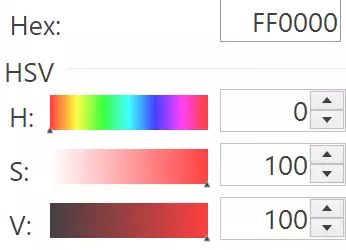
Full red at 100% saturation and 100% value#
Hue is straightforward, it always is the same so no gradient change, we only have to generate it at initialisation. When saturation and value are both 100 we see that hue at 0 corresponds to red #ff0000 as does hue at 360. When hue is moved and saturation and value are both 100 one or more rgb components are always at 255.
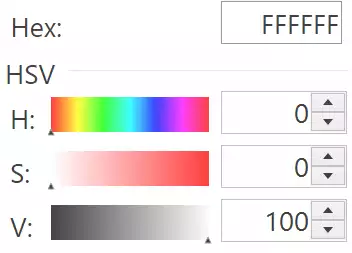
White at 0% saturation and 100% value#
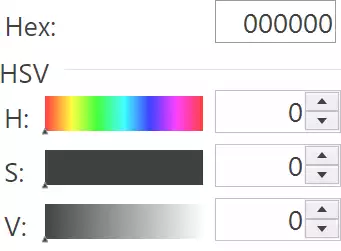
Black at 0% saturation and 0% value#
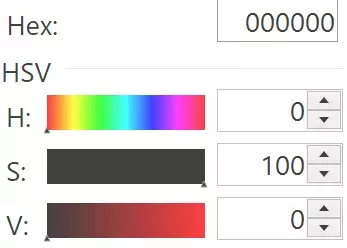
Black at 100% saturation and 0% value#
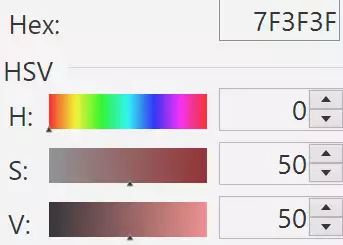
Brown at 50% saturation and 50% value#
Using similar analogies developed from rgb, we can deduce that the saturation gradient is influenced by both hue and value in the manner that the start colour is (h,0,v) and finishes at (h,100,v). Likewise the value gradient can be drawn from (h,v,0) finishing at (h,v,100).
Converting HSV to RGB and Back Again#
If we were being pedantic our upper limits would be 359 and 99, rather than 360 and 100.
Using the conversions, as found in colorsys, only the converted start and finish values are required to make the gradient in rgb. That means intermediate values need not be converted from hsv to hash. The conversions are made with normalised values (0 to 1) therefore it is useful to include normalisation and denormalisation at the input and output in our function.
Working with the Validation#
When working with spinbox entry areas there is a similar situation to just plain entry, but when these are linked to tk variables additional constraints are created. Firstly even though we can have an empty entry that continues to validate, the tk variable will raise an error if we are using an IntVar or DoubleVar. Also the output of a themed Scale is not restrained to produce integers. Some seat of the pants changes are required to prevent errors, so do not allow an empty entry part, changes have to be made with a part entry input which can be prefixed as necessary.
When validating use the current input, rather than the text if we can. This prevents a completely empty editing area.
It would be better if the upper size limit is imported and reuse the
validation code, since all the code is otherwise exactly the same. This has
been done by inserting the upper limit in the spinbox call to the register
function. The validate command accepts just the number, but cannot have
an attribute such as upper=360.
After all that we should have a script that looks like 02all3colours.py.
Show/Hide Code 08basichsv.py
""" Construction three gradients in hsv using PPM image
    spinbox validation
    working with modified Scale

Parameters
----------
None

Results
-------
None
"""

from tkinter import Tk, Canvas, Label, IntVar, Frame
from tkinter.ttk import LabelFrame, Scale, Style, Spinbox
from PIL import Image, ImageDraw, ImageTk
from colourTools import draw_gradient, \
       hsv_to_rgb, hue_gradient

def sb_okay(text, input_, upper):  # '%P','%S'
    """Validation for colour components

    Parameters
    ----------
    text : str
        text if accepted
    input_ : str
        current input
    upper : int
        upper limit

    Returns
    -------
    boolean
    """

    if 0 < len(text) < 4:
        if input_.isdigit():
            return bool(0 <= int(text) <= int(upper))
        return False
    return False


class TtkScale(Scale):
    """Class to draw themed Scale widget

    Parameters
    ----------
    parent : str
        parent widget
    from_ : int
        start of scale
    to : int
        end of scale
    length : int
        length in pixels
    orient : str
        orientation
    variable : str
        tk variable
    digits : int
        length variable when converted to string
    tickinterval : float or int
        how many digits show up in tick interval
    sliderlength : int
        what it says
    command : str
        procedure called when slider moves
    """

    def __init__(self, parent, from_=0, to=255, length=300, orient='horizontal',
                 variable=0, digits=None, tickinterval=None, sliderlength=16,
                 command=None):  #, resolution=1
        self.from_ = from_
        self.to = to
        self.variable = variable

        super().__init__(parent, length=length + sliderlength, orient=orient,
                         variable=variable, from_=from_, to=to, command=command)

        self.digits = digits
        self.length = length

        self.build(parent, from_, to, sliderlength, tickinterval)

    def build(self, parent, from_, to, sliderlength, tickinterval):
        """Create ticks

        Parameters
        ----------
        parent : str
            parent widget
        from_ : int
            start of scale
        to : int
            end of scale
        length : int
            length in pixels
        tickinterval : float or int

        """

        sc_range = to - from_

        if tickinterval:
            for i in range(from_, to + 2, tickinterval):
                item = Label(parent, text=i, bg='#EFFEFF')
                item.place(in_=self, bordermode='outside',
                           relx=sliderlength / sc_range / 2 + i /
                           sc_range * (1 - sliderlength / sc_range),
                           rely=1, anchor='n')


class HsvSelect:
    """Class to construct hsv gradients

    Parameters
    ----------
    fr0 : str
        parent widget

    Returns
    -------
    None
    """

    def __init__(self, fr0, enlargement):
        self.fr0 = fr0
        self.e = enlargement

        self.hvar = IntVar()
        self.svar = IntVar()
        self.vvar = IntVar()

        self.scale_l = 300 * self.e
        self.canvas_w = self.scale_l
        self.canvas_h = 26 * self.e
        self.cursor_w = 16 * self.e

        self.build()

        self.hvar.set(0)
        self.svar.set(100)
        self.vvar.set(100)

    def hhandle(self, evt=None):
        """command callback for hue

        Parameters
        ----------
        None

        Results
        -------
        None
        """
        hue = self.hvar.get()
        self.hvar.set(int(0.5 + hue))
        sat = self.svar.get()
        value = self.vvar.get()
        from_colour = hsv_to_rgb(*(hue, 0, value))
        to_colour = hsv_to_rgb(*(hue, 100, value))
        draw_gradient(self.scan, from_colour, to_colour,
                      width=self.canvas_w, height=self.canvas_h)
        from_colour = hsv_to_rgb(*(hue, sat, 0))
        to_colour = hsv_to_rgb(*(hue, sat, 100))
        draw_gradient(self.vcan, from_colour, to_colour,
                      width=self.canvas_w, height=self.canvas_h)

    def shandle(self, evt=None):
        """command callback for saturation

        Parameters
        ----------
        None

        Results
        -------
        None
        """

        hue = self.hvar.get()
        sat = self.svar.get()
        self.svar.set(int(0.5 + sat))
        value = self.vvar.get()
        from_colour = hsv_to_rgb(*(hue, 0, value))
        to_colour = hsv_to_rgb(*(hue, 100, value))
        draw_gradient(self.scan, from_colour, to_colour,
                      width=self.canvas_w, height=self.canvas_h)
        from_colour = hsv_to_rgb(*(hue, sat, 0))
        to_colour = hsv_to_rgb(*(hue, sat, 100))
        draw_gradient(self.vcan, from_colour, to_colour,
                      width=self.canvas_w, height=self.canvas_h)

    def vhandle(self, evt=None):
        """command callback for value

        Parameters
        ----------
        None

        Results
        -------
        None
        """

        hue = self.hvar.get()
        sat = self.svar.get()
        value = self.vvar.get()
        self.vvar.set(int(0.5 + value))
        from_colour = hsv_to_rgb(*(hue, 0, value))
        to_colour = hsv_to_rgb(*(hue, 100, value))
        draw_gradient(self.scan, from_colour, to_colour,
                      width=self.canvas_w, height=self.canvas_h)
        from_colour = hsv_to_rgb(*(hue, sat, 0))
        to_colour = hsv_to_rgb(*(hue, sat, 100))
        draw_gradient(self.vcan, from_colour, to_colour,
                      width=self.canvas_w, height=self.canvas_h)

    def build(self):
        """widget construction

        Parameters
        ----------
        None

        Results
        -------
        None
        """

        fr4 = LabelFrame(self.fr0, text='hsv')
        fr4.grid(column=2, row=0)

        hl = Label(fr4, text='hue  ')
        hl.grid(column=0, row=0, sticky='s')

        self.hcan = Canvas(fr4, width=self.canvas_w, height=self.canvas_h, bd=0,
                           highlightthickness=0)
        self.hcan.grid(column=1, row=0, sticky='s')

        hsc = TtkScale(fr4, from_=0, to=360, variable=self.hvar,
                       orient='horizontal', length=self.scale_l,
                       command=self.hhandle, tickinterval=30)
        hsc.grid(column=1, row=1, sticky='nw')

        vcmdsb = root.register(sb_okay)

        hsb = Spinbox(fr4, from_=0, to=360, textvariable=self.hvar, validate='key',
                      validatecommand=(vcmdsb, '%P', '%S', 360),
                      command=self.hhandle, width=5)
        hsb.grid(column=2, row=1, sticky='nw')
        hsb.bind('<KeyRelease>', self.checksbh)

        hel = Label(fr4, height=1)
        hel.grid(column=2, row=2)

        sl = Label(fr4, text='sat  ')
        sl.grid(column=0, row=3)

        self.scan = Canvas(fr4, width=self.canvas_w, height=self.canvas_h, bd=0,
                           highlightthickness=0)
        self.scan.grid(column=1, row=3, sticky='s')

        ssc = TtkScale(fr4, from_=0, to=100, variable=self.svar, orient='horizontal',
                       length=self.scale_l, command=self.shandle, tickinterval=10)
        ssc.grid(column=1, row=4, sticky='nw')

        ssb = Spinbox(fr4, from_=0, to=100, textvariable=self.svar, validate='key',
                      validatecommand=(vcmdsb, '%P', '%S', 100),
                      command=self.shandle, width=5)
        ssb.grid(column=2, row=4, sticky='nw')
        ssb.bind('<KeyRelease>', self.checksb100)

        sel = Label(fr4, height=1)
        sel.grid(column=2, row=5)

        vl = Label(fr4, text='value')
        vl.grid(column=0, row=6, sticky='s')

        self.vcan = Canvas(fr4, width=self.canvas_w, height=self.canvas_h, bd=0,
                           highlightthickness=0)
        self.vcan.grid(column=1, row=6, sticky='n')

        vsc = TtkScale(fr4, from_=0, to=100, variable=self.vvar, orient='horizontal',
                       length=self.scale_l, command=self.vhandle, tickinterval=10)
        vsc.grid(column=1, row=7, sticky='nw')

        vsb = Spinbox(fr4, from_=0, to=100, textvariable=self.vvar, validate='key',
                      validatecommand=(vcmdsb, '%P', '%S', 100),
                      command=self.vhandle, width=5)
        vsb.grid(column=2, row=7, sticky='nw')
        vsb.bind('<KeyRelease>', self.checksb100)

        vel = Label(fr4, height=1)
        vel.grid(column=2, row=8)

        # assume initial setting 0,100,100 hsv
        to_colour = hsv_to_rgb(*(0, 100, 100))

        hue_gradient(self.hcan, width=self.canvas_w, height=self.canvas_h)
        draw_gradient(self.scan, (255, 255, 255), to_colour,
                      width=self.canvas_w, height=self.canvas_h)
        draw_gradient(self.vcan, (0, 0, 0), to_colour,
                      width=self.canvas_w, height=self.canvas_h)

    def checksbh(self, _evt):
        """Procedure called by hue spinbox

        Parameters
        ----------
        evt : str
            bind handles

        Results
        -------
        None
        """

        hue = self.hvar.get()
        sat = self.svar.get()
        value = self.vvar.get()
        from_colour = hsv_to_rgb(*(hue, 0, value))
        to_colour = hsv_to_rgb(*(hue, 100, value))
        draw_gradient(self.scan, from_colour, to_colour,
                      width=self.canvas_w, height=self.canvas_h)
        from_colour = hsv_to_rgb(*(hue, sat, 0))
        to_colour = hsv_to_rgb(*(hue, sat, 100))
        draw_gradient(self.vcan, from_colour, to_colour,
                      width=self.canvas_w, height=self.canvas_h)

    def checksb100(self, _evt):
        """Procedure called by sat,v spinboxes

        Parameters
        ----------
        evt : str
            bind handles

        Results
        -------
        None
        """

        hue = self.hvar.get()
        sat = self.svar.get()
        value = self.vvar.get()
        from_colour = hsv_to_rgb(*(hue, 0, value))
        to_colour = hsv_to_rgb(*(hue, 100, value))
        draw_gradient(self.scan, from_colour, to_colour,
                      width=self.canvas_w, height=self.canvas_h)
        from_colour = hsv_to_rgb(*(hue, sat, 0))
        to_colour = hsv_to_rgb(*(hue, sat, 100))
        draw_gradient(self.vcan, from_colour, to_colour,
                      width=self.canvas_w, height=self.canvas_h)


if __name__ == "__main__":
    root = Tk()
    winsys = root.tk.call("tk", "windowingsystem")
    BASELINE = 1.33398982438864281 if winsys != 'aqua' else 1.000492368291482
    scaling = root.tk.call("tk", "scaling")
    enlargement = e = int(scaling / BASELINE + 0.5)

    img = Image.new("RGBA", (16*e, 10*e), '#00000000')
    trough = ImageTk.PhotoImage(img)

    # constants for creating upward pointing arrow
    WIDTH = 17*e
    HEIGHT = 17*e
    OFFSET = 5*e
    ST0 = WIDTH // 2, HEIGHT - 1 - OFFSET
    LIGHT = 'GreenYellow'
    MEDIUM = 'LawnGreen'
    DARK = '#5D9B90'

    # normal state
    im = Image.new("RGBA", (WIDTH, HEIGHT), '#00000000')
    rdraw = ImageDraw.Draw(im)
    rdraw.polygon([ST0[0], ST0[1], 0, HEIGHT - 1,
                   WIDTH - 1, HEIGHT - 1], fill=LIGHT)
    rdraw.polygon([ST0[0], ST0[1], ST0[0], 0, 0, HEIGHT - 1], fill=MEDIUM)
    rdraw.polygon([ST0[0], ST0[1], WIDTH - 1,
                   HEIGHT - 1, ST0[0], 0], fill=DARK)
    slider = ImageTk.PhotoImage(im)

    # pressed state
    imp = Image.new("RGBA", (WIDTH, HEIGHT), '#00000000')
    draw = ImageDraw.Draw(imp)
    draw.polygon([ST0[0], ST0[1], 0, HEIGHT - 1,
                  WIDTH - 1, HEIGHT - 1], fill=LIGHT)
    draw.polygon([ST0[0], ST0[1], ST0[0], 0, 0, HEIGHT - 1], fill=DARK)
    draw.polygon([ST0[0], ST0[1], WIDTH - 1,
                  HEIGHT - 1, ST0[0], 0], fill=MEDIUM)
    sliderp = ImageTk.PhotoImage(imp)

    style = Style()
    style.theme_settings('default', {
        'Horizontal.Scale.trough': {"element create":
                                    ('image', trough,
                                     {'border': 0, 'sticky': 'wes'})},
        'Horizontal.Scale.slider': {"element create":
                                    ('image', slider,
                                     ('pressed', sliderp),
                                     {'border': 3, 'sticky': 'n'})}})

    style.theme_use('default')
    style.configure('TSpinbox', arrowsize=10*e)
    fra0 = Frame(root)
    fra0.grid(row=0, column=0, sticky='nsew')
    HsvSelect(fra0, enlargement)
    root.mainloop()
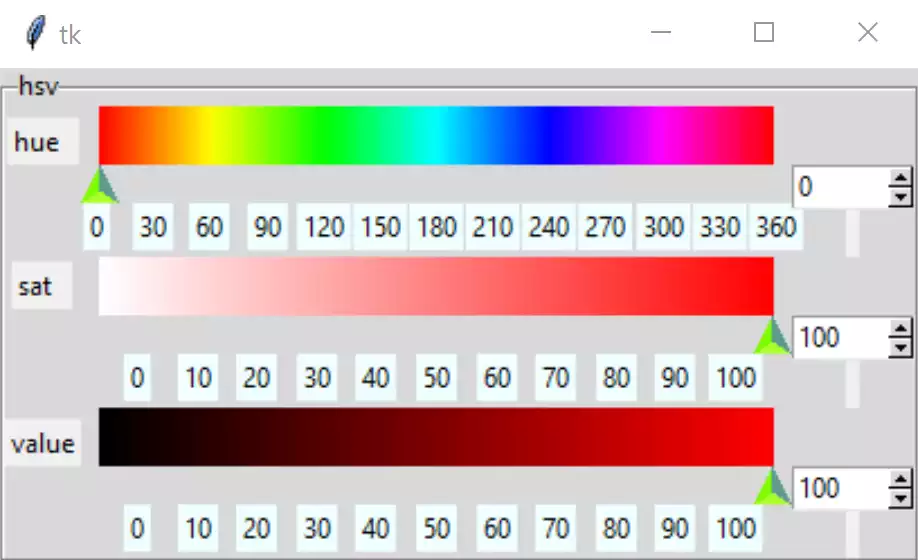
The basic hsv colour picker#