

Enabling Keyboard Selection#
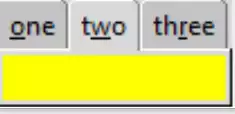
Enabling Key board Selection#
If we wish to enable tab selection using key bindings, first
enable_traversal this allows tab traversal by <Control> <Tab> for
forward and <Shift> <Control> <Tab> for reverse direction.
Specific tabs can be called by altering the add clauses to show which letter
is to be underlined and made into a binding. So we can use the first
letter o (counted as 0) of one, the second letter of two
which is w and third letter of three which is
r. While modifiying the clause add additional space around the text:
nb.add(page1, text = 'one', underline=0, padding=2)
nb.add(page2, text = 'two', underline=1, padding=2)
nb.add(page3, text = 'three', underline=2, padding=2)
nb.enable_traversal()
See how the tab name has the relevant hot-key letter underlined, now by pressing <alt> <w> we activate the second tab and so on.
Show/Hide Code 02nb_bind.py
"""Basic notebook with 3 tabs, tab binding  """

from tkinter import Tk, Frame, font
from tkinter.ttk import Notebook, Style

root = Tk()
st1 = Style()
st1.theme_use('default')

test_size = font.Font(family="Times", size=12, weight="bold").measure('Test')
mult = int(test_size / 30)

nb1 = Notebook(root)
page1 = Frame(root, background='red', height=20*mult)
page2 = Frame(root, background='yellow', height=20*mult)
page3 = Frame(root, background='alice blue', height=20*mult)
nb1.grid(row=0, column=0)
nb1.add(page1, text='one', underline=0, padding=2)
nb1.add(page2, text='two', underline=1, padding=2)
nb1.add(page3, text='three', underline=2, padding=2)
nb1.enable_traversal()

root.mainloop()