

Binding to Notebook#
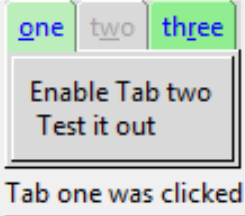
Binding to Tabs is enabled by a Tk Script#
When binding to the notebook we normally require a tab specific bind, nothing obvious appears in the tkinter documentation. As with many programming problems I am indebted to stackoverflow "furas" in this answer Bind to a Tab.
Normally when binding there is a distint widget or its component available,
and there is no real problem. Alternatively a specialised bind has been
developed, such as <<NotebookTabChanged>> which has been shown already.
However the tabs are not so readily accessible unless a Tk script is applied,
this allows the programmer to distinguish which tab has been clicked.
Bind the notebook as normal, then in the event function run the following Tk script:
clicked_tab = nb.tk.call(nb._w, "identify", "tab", event.x, event.y)
Using the keywords identify and tab the tab is identified and can be
tied into normal activities within the Python script. The normal event values
x and y give the cursor position, and it would be difficult to
distinguish which tab was being pressed.
Show/Hide Code 06nb_tag_bind.py
"""Basic notebook with 3 tabs, binding, disabled state, height and
    width adjustments, import treewiew with selection, tab events
  """

from tkinter import Tk, Frame, StringVar, font, Label
from tkinter.ttk import Notebook, Button, Style
import sys
sys.path.insert(1, '../treeview/')
from tree_function import Tree

root = Tk()
st1 = Style()
st1.theme_use('default')
st1.configure(
    'green.TNotebook.Tab',
    background='light green',
    foreground='blue')
st1.map('green.TNotebook.Tab', background=[
        ('disabled', '#d9d9d9'), ('selected', '#bceebc')])

test_size = font.Font(family="Times", size=12, weight="bold").measure('Test')
mult = int(test_size / 30)

def tab_changed(event):
    """notebook handler changes width and height after a tab is selected

    Parameters
    ----------
    event : str
        bind event
    """
    event.widget.update_idletasks()
    tc1 = event.widget.nametowidget(event.widget.select())
    event.widget.configure(
        height=tc1.winfo_reqheight(),
        width=tc1.winfo_reqwidth())

def on_click(event):
    clicked_tab = nb1.tk.call(nb1._w, "identify", "tab", event.x, event.y)
    if clicked_tab == 0:
        clicked_tab = 'one'
    if clicked_tab == 1:
        clicked_tab = 'two'
    if clicked_tab == 2:
        clicked_tab = 'three'

    lbl1['text'] = 'Tab '+clicked_tab+' was clicked'

nb1 = Notebook(root, style='green.TNotebook')
nb1.bind("<<NotebookTabChanged>>", tab_changed)
nb1.grid(row=0, column=0)
nb1.enable_traversal()

lbl1 = Label(root, text='ready')
lbl1.grid(row=5, column=0)
nb1.bind('<Button-1>', on_click)

# first page
page1 = Frame(root, background='red', height=70*mult)

enabler = Button(page1, text='Enable Tab two\n Test it out',
                 command=lambda: nb1.tab(1, state='normal'))
enabler.pack(ipadx=5, ipady=5)

nb1.add(page1, text='one', underline=0, padding=2)

# second page
page2 = Frame(root, background='yellow', height=20*mult)

CSV_FILE = '../../csv_data/test.csv'
CSV_DELIMITER = ';'
OUT_VAR = StringVar()
OUT_VAR.set("First make your selection in page two")
tree = Tree(page2, CSV_FILE, OUT_VAR, CSV_DELIMITER)

nb1.add(page2, text='two', underline=1, padding=2, state='disabled')

# third page
page3 = Frame(root, background='alice blue', height=120*mult)

lbl = Label(
    page3,
    text='waiting',
    textvariable=OUT_VAR,
    bg='#AFDBFF',
    height=10*mult)
lbl.grid(column=0, row=1, sticky='e', ipadx=5)

nb1.add(page3, text='three', underline=2, padding=2)

root.mainloop()