

Adjusting Width and Height#
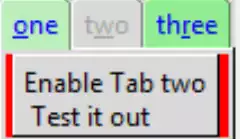
From the last script it can be seen that all the tabs are the same size,
which would be usuitable in many instances. In order to change the size
of the panel contents we have a problem as none of the frames within the tabs
can be changed by the layout manager. We need to use the notebook's built in
virtual event <<NotebookTabChanged>> bound to a function:
def tab_changed(event):
    tc1 = event.widget.nametowidget(event.widget.select())
    event.widget.configure(
        height=t.winfo_reqheight(),
        width=t.winfo_reqwidth())

    ...........
nb1.bind("<<NotebookTabChanged>>", tab_changed)
If we run the above we see that the size of the panel content changes, but only after a tab has been clicked. On opening our application the button in Page1 is not to be seen, it only appears after the first tab has been selected. This is not what we want, so update the widget's idletasks at the beginning of the function tab_changed:
def tab_changed(event):
    event.widget.update_idletasks()
Show/Hide Code 04nb_adjust.py
"""Basic notebook with 3 tabs, binding, disabled state, height and
    width adjustments
  """

from tkinter import Tk, Frame, font
from tkinter.ttk import Notebook, Button, Style

root = Tk()
st1 = Style()
st1.theme_use('default')
st1.configure(
    'green.TNotebook.Tab',
    background='light green',
    foreground='blue')
st1.map('green.TNotebook.Tab', background=[
        ('disabled', '#d9d9d9'), ('selected', '#bceebc')])

test_size = font.Font(family="Times", size=12, weight="bold").measure('Test')
mult = int(test_size / 30)

def tab_changed(event):
    """notebook handler changes width and height after a tab is selected

    Parameters
    ----------
    event : str
        bind event
    """
    event.widget.update_idletasks()
    tc1 = event.widget.nametowidget(event.widget.select())
    event.widget.configure(
        height=tc1.winfo_reqheight(),
        width=tc1.winfo_reqwidth())


nb1 = Notebook(root, style='green.TNotebook')
nb1.bind("<<NotebookTabChanged>>", tab_changed)
page1 = Frame(root, height=20*mult) # background='red',
page2 = Frame(root, background='yellow', height=20*mult)
page3 = Frame(root, background='alice blue', height=20*mult)
nb1.grid(row=0, column=0)
nb1.add(page1, text='one', underline=0, padding=2)
nb1.add(page2, text='two', underline=1, padding=2, state='disabled')
nb1.add(page3, text='three', underline=2, padding=2)
nb1.enable_traversal()

enabler = Button(page1, text='Enable Tab two\n Test it out',
                 command=lambda: nb1.tab(1, state='normal'))
enabler.pack()

root.mainloop()
The full effect of the size adjustment becomes really apparent once we have loaded data, which we should see in the next section.