

Run Scale as Class#
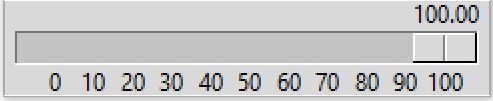
Horizontal ttk Scale as class#
Slider shown at maximum travel on a 0 to 100 range.
In order to load an external module the script needs to be either a function or class, class suits our needs better because we can use inheritance and the script can use more than one method. Base the class on the 10ttk_range_calibrate.py calibration script. This changes the Scale length by first estimating the range size, rather than change the window size and adjusting the Scale length that way.
Inheritance from ttk Scale#
All the existing options available on the ttk Scale become available, without extra programming. Any options with their default values need to be in the normal list that follows the __init__ statement, then repeated as a self variable. The super statement repeats all the ttk variables, after the super statement equate the remaining variables to self variables:
class  TtkScale(Scale):
    def __init__(self, parent, length, from_=0, to=255, orient='horizontal',
                variable=0, digits=None, tickinterval=None, sliderlength=32,
                command=None, style=None, showvalue=True, resolution=1):

    self.from_ = from_
    self.to = to
    self.variable = variable
    self.length = length
    self.command = command
    self.parent = parent

    super().__init__(parent, length=length, from_=from_, to=to, orient=orient,
                    variable=variable, command=command, style=style)

    self.digits = digits
    self.tickinterval = tickinterval
    self.showvalue = showvalue
    self.resolution = resolution
    self.sliderlength = sliderlength
When determining the cursor position for resolution it is easier to work
in actual x position rather than a relative position, so add a
conversion method. Base it on convert_to_relx, just multiply rel_max and
rel_min by the Scale length len_val.
There were no other major changes compared to the calibration script other than changing over to a class.
Show/Hide Code 11ttk_horiz_scale_class.py
from tkinter import Tk, font
from tkinter.ttk import Style, Scale, Label, Frame
import numpy as np

class  TtkScale(Scale):
    def __init__(self, parent, length=0, from_=0, to=255, orient='horizontal',
                variable=0, digits=None, tickinterval=None, sliderlength=32,
                 command=None, style=None, showvalue=True, resolution=1):

        self.from_ = from_
        self.to = to
        self.variable = variable
        self.length = length
        self.command = command
        self.parent = parent

        super().__init__(parent, length=length, from_=from_, to=to, orient=orient,
                        variable=variable, command=command, style=style)

        self.digits = digits
        self.tickinterval = tickinterval
        self.showvalue = showvalue
        self.resolution = resolution
        self.sliderlength = sliderlength

        # set sliderlength
        st = Style(self)
        self.bw_val = bw_val = st.lookup('Horizontal.Scale.trough','borderwidth')

        if showvalue:
            self.configure(command=self.display_value)

        def_font = font.nametofont('TkDefaultFont')
        # if from_ more than to swap values
        if from_ < to:
            pass
        else:
            from_, to = to, from_

        data = np.arange(from_, (to+1 if tickinterval >=1 else to+tickinterval),
                        tickinterval)
        self.data = data = np.round(data) #np.round(data,1)
        range_vals = tuple(data)
        len_rvs = len(range_vals)

        vals_size = [def_font.measure(str(i)) for i in range_vals]
        data_size = sum(vals_size)
        space_size = len_rvs * def_font.measure('0')
        sizes = data_size + space_size
        min_len = (sizes if sizes % 50 == 0 else sizes + 50 - sizes % 50)
        self.len_val = len_val = min_len if length < min_len else length
        self.configure(length=len_val)

        self.rel_min = rel_min = (sliderlength / 2 + bw_val) / len_val
        self.rel_max = rel_max = 1 - (sliderlength /2 - bw_val) / len_val
        if range_vals[-1] == to:
            pass
        else:
            max_rv = range_vals[-1]
            self.mult_x = mult_x = ((max_rv - from_)*rel_max/(to - from_))

        self.bind("<Button-1>", self.resolve)

        self.build(from_, to, rel_min, rel_max, range_vals, len_rvs)

    def build(self, from_, to, rel_min, rel_max, range_vals, len_rvs):

        for i, rv in enumerate(range_vals):
            item = Label(self.parent, text=rv)
            item.place(in_=self, bordermode='outside',
                relx=(rel_min + i / (len_rvs - 1) *
                ((rel_max if range_vals[-1] == to else self.mult_x) - rel_min)) ,
                rely=1, anchor='n')

        if self.showvalue:
            self.disp_lab = Label(self.parent, text=self.get())
            rel_x = self.convert_to_relx(float(self.get()))
            self.disp_lab.place(in_=self, bordermode='outside',
                relx=rel_x, rely=0, anchor='s')

    def convert_to_relx(self, curr_val):
        return ((curr_val - self.from_) * (self.rel_max - self.rel_min) /
                (self.to - self.from_) + self.rel_min)

    def convert_to_actx(self, curr_val):
        x_max = self.rel_max * self.len_val
        x_min = self.rel_min * self.len_val
        return ((curr_val - self.from_) * (x_max - x_min) /
                (self.to - self.from_) + x_min)

    def display_value(self, value):
        # position (in pixel) of the center of the slider
        rel_x = self.convert_to_relx(float(value))
        self.disp_lab.config(text=value) # text=""
        self.disp_lab.place_configure(relx=rel_x)
        digits = self.digits
        self.disp_lab.configure(text=f'{float(value):.{dig_val}f}')
        # if your python is not 3.6 or above use the following 2 lines
        #   instead of the line above
        #my_precision = '{:.{}f}'.format
        #self.disp_lab.configure(text=my_precision(float(value), digits))

    def resolve(self, evt):
        resolution = self.resolution
        if resolution < 1 or self.tickinterval < 1:
            pass
        else:
            value = self.get()
            curr_x = self.convert_to_actx(value)
            if evt.x < curr_x - self.sliderlength / 2:
                self.set(value - resolution + 1)
            elif evt.x > curr_x + self.sliderlength / 2:
                self.set(value + resolution - 1)

if __name__ == "__main__":
    root = Tk()

    len_val = 400
    from_val = 0
    to_val = 100
    tick_val = 10
    dig_val = 0 #dig_val = 2
    res_val = 5

    style = Style()
    style.theme_use('default')
    style.configure('my.Horizontal.TScale', sliderlength=32)

    fr = Frame(root)
    fr.pack(fill='x')

    ttks = TtkScale(fr, from_=from_val, to=to_val,
                    tickinterval=tick_val, digits=dig_val,
                    style='my.Horizontal.TScale', resolution=res_val)
    ttks.pack(fill='x', padx=5, pady=15)

    root.mainloop()