

Current Value ttk.Scales#
Command Option#
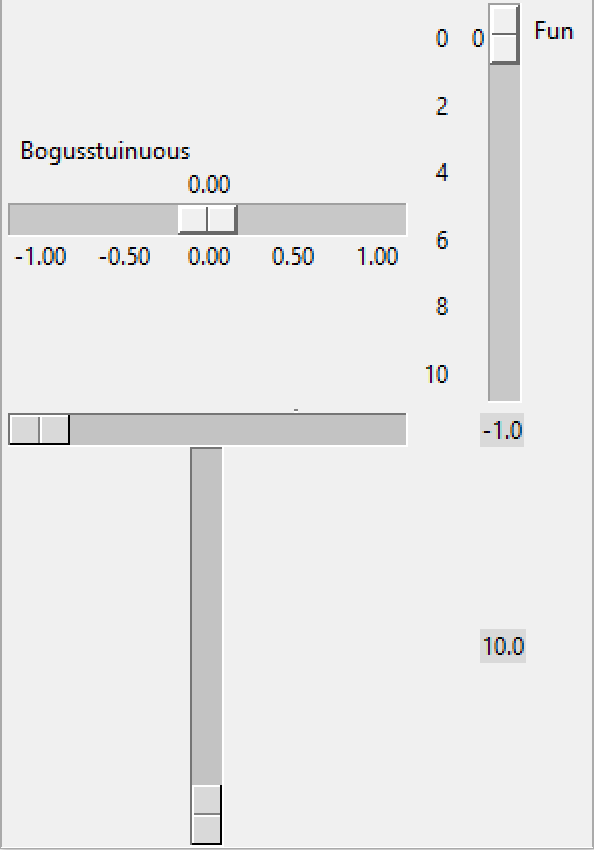
Adding Current Value#
Using command to show current values.
Some parts of these scripts are common to both vertical and horizontal scales.
The example 01ttk_tkinter.py can be used as a basis with which to start. The
most obvious shortcoming is that there is no value shown for the cursor
position. Use the method get() to obtain this value and place it in a
Label. The problem with this method is that as it stands it only gives the
first position of the cursor. If a button is used to query the scale then
the current cursor position will be shown. Compared to the tkinter option
this method is not dynamic enough. Our problem lies with the command sequence,
so get() is doing its job, but the Scale needs to be first redrawn then the
Label text updated before get() returns the correct answer. We can use
the command option, then update the Label from the relevant function.
Show/Hide Code 02ttk_tkinter_value.py
import tkinter as tk
import tkinter.ttk as ttk

def selh(val):
    labh.config(text=round(float(val)+0.0049,2))

def selv(val):
    labv.config(text=round(float(val)+0.0049,2))

root = tk.Tk()
s = ttk.Style()
s.theme_use('default')

sch = tk.Scale(root, from_=-1.0, to=1.0, label='Bogusstuinuous', orient='horizontal',
            resolution=0.02, showvalue=1, tickinterval=0.5, digits=3,
            length=200)
sch.grid()

scv = tk.Scale(root, from_=-0, to=10, label='Fun', orient='vertical',
            resolution=1, showvalue=1, tickinterval=2,
            length=200)
scv.grid(row=0, column=1)

sep = ttk.Separator(root, orient='horizontal')
sep.grid(row=1, column=0, columnspan=2)

scth = ttk.Scale(root, from_=-1.0, to=1.0, length=200, command=selh)
scth.grid(row=2, column=0)

labh = ttk.Label(root, text=str(scth.get()))
labh.grid(row=2, column=1)

sctv = ttk.Scale(root, from_=0, to=10, length=200, orient='vertical', command=selv)
sctv.grid(row=3, column=0)

labv = ttk.Label(root, text=str(sctv.get()))
labv.grid(row=3, column=1)

root.mainloop()
The simplest method of displaying the current value is to place the result in a Label. Later on in Colour Picker a Spinbox is used, which allows the slider to position itself according to the Spinbox entry and not just positioned by the cursor, in this case a FloatVar or IntVar is used. It is also possible to position the current value just above the slider.