

Adjusting the Window#
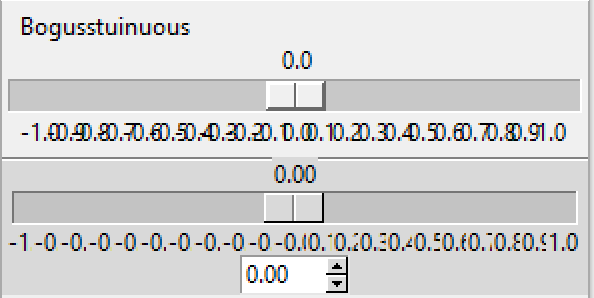
Before the length is adjusted#
Using adjustable window size.
If we properly select the layout manager options then the Scale will change its length as the window size is altered. Check what happens when the window is expanded sideways. The displayed value seems to react reasonably, but the range values do not adjust so well, in particular look at the highest and lowest values, as the window expands so the placement becomes less accurate. We need to sense that the window size is changing and redraw the range with new length sizes. If the length is adjusted from the script then our current calculations are good enough.
If we bind to the event Configure this seems to fit the bill.
Configure
The user changed the size of a widget, for example by dragging a corner or side of the window.
As the slider moves only the displayed value changes, whereas when the window is adjusted both the displayed value and the range values change in position. If the changes are made without a dwell time anywhere the previous values are overwritten and do not stay on the screen, however if there is a dwell time between the movement and new writing then the old value remains.
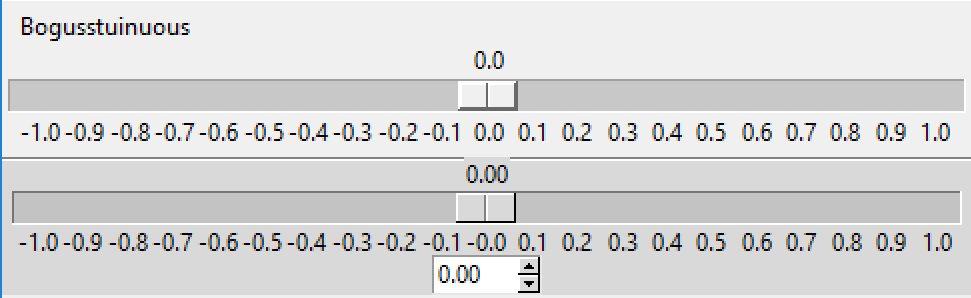
After the length is adjusted#
Using adjustable window size and binding to configure.
The Scale length is altered by the window sizing, all other values remain constant, so when recalculating the new Scale length must be found:
len_val = scth['length']
or:
len_val = scth.cget(length)
Show/Hide Code 08ttk_tkinter_update_size.py
import tkinter as tk
from tkinter import font
import tkinter.ttk as ttk
import numpy as np

from_val = -1
to_val = 1
len_val = 500
res_val = 0.10
tick_val = 0.10
dig_val = 2
bw_val = 1 # trough border width
slider_val = 36
sc_range = abs(to_val - from_val) # scale range


def selh(val):
    sbh.config(text=round(float(scth.get())+0.0049,2))

def place_ticks(evt):
    len_val = scth['length']
    rel_min = ((slider_val - from_size) / 2 + bw_val) / len_val
    rel_max = 1 - ((slider_val - to_size )/ 2 - bw_val) / len_val
    data = np.arange(from_val, to_val+tick_val, tick_val)
    data = np.round(data,1)
    range_vals = tuple(data)
    len_rvs = len(range_vals)

    for i, rv in enumerate(range_vals):
        rel_x=(rel_min + i / (len_rvs - 1) * (rel_max - rel_min))
        item.place_configure(relx=rel_x)

root = tk.Tk()
root.geometry(str(len_val+150)+"x200+500+500")
s = ttk.Style()
s.theme_use('default')

fr = ttk.Frame(root)
fr.pack(fill='x')

def_font = font.nametofont('TkDefaultFont')
from_size = def_font.measure(from_val)
to_size = def_font.measure(to_val)

sch = tk.Scale(fr, from_=from_val, to=to_val, label='Bogusstuinuous', orient='horizontal',
            resolution=res_val, showvalue=1, tickinterval=tick_val, digits=dig_val,
            length=len_val)
sch.pack(fill='x')

sep = ttk.Separator(fr, orient='horizontal')
sep.pack(fill='x')

def convert_to_relx(curr_val):
    return ((curr_val - from_val) * (rel_max - rel_min) / (to_val - from_val) \
            + rel_min)

def display_value(value):
    # position (in pixel) of the center of the slider
    rel_x = convert_to_relx(float(value))
    disp_lab.place_configure(relx=rel_x)
    disp_lab.configure(text=f'{float(value):.{dig_val}f}')

slider = tk.StringVar()
slider.set('0.00')

scth = ttk.Scale(fr, from_=from_val, to=to_val, length=len_val,
        command=display_value, variable=slider)
scth.pack(fill='x', padx=5, pady=15)

scth.bind('<Configure>', place_ticks)

rel_min = ((slider_val - from_size) / 2 + bw_val) / len_val
rel_max = 1 - ((slider_val - to_size) / 2 - bw_val) / len_val

# using numpy arange instead of range so tick intervals less than 1 can be used
data = np.arange(from_val, to_val+tick_val, tick_val)
data = np.round(data,1)
range_vals = tuple(data)
len_rvs = len(range_vals)

for i, rv in enumerate(range_vals):
    item = ttk.Label(fr, text=rv)
    item.place(in_=scth, bordermode='outside',
                relx=(rel_min + i / (len_rvs - 1) * (rel_max - rel_min)) ,
                rely=1, anchor='n')

disp_lab = ttk.Label(fr)
disp_lab.place(in_=scth, bordermode='outside',
                relx=0.5, rely=0, anchor='s')
display_value(scth.get())

sbh = ttk.Spinbox(fr, from_=from_val, to=to_val, textvariable=slider,
                  width=5, increment=res_val)
sbh.pack()

root.mainloop()