

Calibration#
Slider Length#
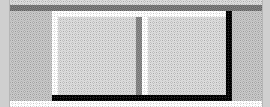
Slider from ttk Scale using default theme#
Slider border shows highlights and shadow as does the central line.
The default theme sliderlength should be an even number,
because the central line is 2 pixels wide, whilst the border
width is 1 pixel wide. The measurements are taken from the left outside edge
to the outside right edge for slider length, and the centre is taken as the
edge between the shadow and highlight, or the right edge of the dark line.

Finding ttk Scale length at minimum slider position.#
Before calibrating the range use this script to find the slider length. All we are doing is displaying a horizontal scale which will have the slider in its minimum position, there is a bind to the release of the mouse click:
sc.bind('<ButtonRelease-1>', start_s)
Position the slider at its minimum position, carefully
release the left hand mouse button, which will generate some output. The
bind function returns the position of the cursor release as evt.x and
evt.y which are relative to the Scale local position (since the bind was
made on the
Scale sc). Given our known x, y position we can interrogate the Scale and find
out which component 'slider' or 'trough' we are at, if it is on the
slider then the function will run. The function deduces the slider
x-position , then when the identify function finds the trough the first
while loop stops. The function then starts a new
while loop, this time increasing the x-value until the trough is once
again identified.
Look at the print output, the first part is the position moving to the leftmost slider border, until the trough is reached. Thereafter the x-position increases until the rightmost border is found and the trough is identified again.
The output from the second while loop will show something like:
X 0 comp trough
1 slider
2 slider
....
29 slider
30 slider
31 trough
X 31 comp trough theme default
The default slider is 30 pixels long (inclusive count). The slider was at its minimum travel extent so the trough is at 0 x-value (the border width was 1). Try another theme, such as alt, clam and classic, an answer ought to be obtained. On a windows box vista and xpnative do not react as expected, whereas winnative gives an answer, also expect that ttkthemes do not produce results, although here one can look up the images used in their construction and so find the slider length.
When calibrating with various themes the safest method is to save your
answers for slider length and border width values in dictionaries, rather
than ask through style.lookup() since a default value, used
to protect later calculations arising from null value errors,
will invariably be wrong.
For border width do not try:
self.bw_val = bw_val = st.lookup(('Horizontal'
        if self.orient=='horizontal' else 'Vertical') +'.Scale.trough',
                'borderwidth', default=1)
far better:
theme_bw = {'alt': 0, 'clam': 1, 'classic': 2, 'default': 1,
                'lime': 6, 'winnative': 0}
.....
theme_used = style.theme_use()
if theme_used in ('alt', 'clam', 'classic', 'default', 'lime', 'winnative'):
    bw_val = theme_bw[theme_used]
and do something similar for the slider length.
Using a program with a good magnifier it is simple to see the border width youself. Some quirks may also be seen, such as the vista theme has a border with a vertical scale which does not show on the horizontal scale. The vista slider at minimum travel moves into half the border, while at maximum travel it is adjacent to the inner trough border.
Tip
If the trough is not rectangular the border width is best determined by checking out the theme's initialisation module that gives the Scale's border dimension.
If you can adjust the calibration to within a pixel, using measured slider lengths and border widths, then that is brilliant.
Show/Hide Code 10_slider_size.py
from tkinter import Tk
from tkinter.ttk import Style, Scale

root = Tk()
root.geometry("+500+300")
st = Style()
# print(st.theme_names())
# ('winnative', 'clam', 'alt', 'default', 'classic', 'vista', 'xpnative')
# 9, 30, 9, 30, 30, ?, ? about half the width of vista
theme = 'default'
st.theme_use('default')

def start_s(evt):
    # find slider width

    X = evt.x
    Y = evt.y

    comp = sc.identify(X,Y)
    print(X,Y, 'X,Y')
    print(sc.identify(X,Y)) # -->slider or trough

    if comp == 'slider':
        while str(comp) == 'slider':
            X -= 1
            comp = sc.identify(X,Y)
            print(X, comp)

        print('X', X, 'comp', sc.identify(X,Y))
        comp = 'slider'

        while str(comp) == 'slider':
            X += 1
            comp = sc.identify(X,Y)
            print(X, comp)

        print('X', X, 'comp', sc.identify(X,Y), 'theme', theme)


sc = Scale(root, from_=0, to =100, length = 200)
sc.grid(padx=10, pady=10)

sc.bind('<ButtonRelease-1>', start_s)

root.mainloop()
Calibrate the Range#
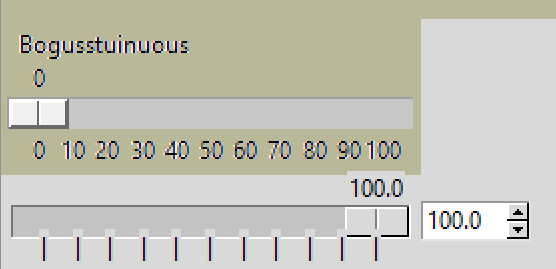
Calibrating ttk Scale at maximum slider travel on a 0 to 100 range#
Vertical lines instead of values have been inserted at the tickinterval.
Help the trial and error method by using a calibration script which uses a Scale that has a range and display value already installed. The calibration technique relies on creating real ticks using the vertical line | symbol instead of the actual range values. The line height is adjusted by changing the rely from 1 to 0.7 so that the vertical line almost meets the centre of the slider on the range values:
item = ttk.Label(fr, text=rv) # text='|'
change to:
item = ttk.Label(fr, text='|') # text=rv
also from:
rely=1, anchor='n') # rely=0.7
to:
rely=0.7, anchor='n') # rely=1
First try to calibrate the range at the from_ position where only the
trough borderwidth slider width and size of the line are involved. Use the
slider length obtained in the previous section if possible. Then
calibrate at the to position. The to position involves the Scale length
which is being changed to accommodate the value range sizes so make sure that
the changes are reflected in your calculations.
The script parts that should be changed are enclosed in a line of hashes.
A tkinter Scale works with the same settings as the ttk Scale so that one can
see what the Scale looks like when the adjustments are correct. The
calibration script has a few differences to the previous examples mainly that
the actual x values are used as opposed to relative x, which helps in
adjustments.
Show/Hide Code 10ttk_range_calibrate.py
import tkinter as tk
from tkinter import font
import tkinter.ttk as ttk
import numpy as np
import ctypes

# changed geometry and scale padding

ctypes.windll.shcore.SetProcessDpiAwareness(1)

###############################################
from_val = 0   # from_
to_val = 100      # to
tick_val = 10   # tickinterval
res_val = 5    # resolution
dig_val = 1     # digits
bw_val = 1      # trough border width
slider_val = 32 # sliderlength
#################################################

root = tk.Tk()
ORIGINAL_DPI = 96
current_dpi = root.winfo_fpixels('1i')
SCALE = current_dpi / ORIGINAL_DPI
# when current_dpi is 192 SCALE becomes 2.0
root.tk.call('tk', 'scaling', SCALE)

def_font = font.nametofont('TkDefaultFont')
# using numpy arange instead of range so tick intervals less than 1 can be used
data = np.arange(from_val, (to_val+1 if tick_val >=1 else to_val+tick_val), tick_val) # tick_val
data = np.round(data,1)
range_vals = tuple(data)

vals_size = [def_font.measure(str(i)) for i in range_vals]
data_size = sum(vals_size)
len_rvs = len(range_vals)
space_size = len_rvs * def_font.measure('0')
sizes = data_size + space_size
len_val = (sizes if sizes % 50 == 0 else sizes + 50 - sizes % 50)

theme_sl = {'alt': 9, 'clam': 30, 'classic': 30, 'default': 30,
                    'lime': 9, 'winnative': 9}

theme_bw = {'alt': 0, 'clam': 1, 'classic': 2, 'default': 1,
                    'lime': 6, 'winnative': 0}

root.geometry(str(len_val+200)+"x250+500+500")
s = ttk.Style()
##################
s.theme_use('alt')
##################

theme_used = s.theme_use()
if theme_used in ('alt', 'clam', 'classic', 'default', 'lime', 'winnative'):
    bw_val = theme_bw[theme_used]
    slider_val = theme_sl[theme_used]
else:
    bw_val = 1

fr = ttk.Frame(root)
fr.pack(fill='x', expand=1)

def show_x(val):
    print('sch.get()',sch.get(),'val', val.x)

sch = tk.Scale(fr, from_=from_val, to=to_val, label='Bogusstuinuous', orient='horizontal',
            resolution=res_val, showvalue=1, tickinterval=tick_val, digits=dig_val,
            length=len_val)
sch.grid(sticky='ew', padx=10, pady=5)
sch.bind("<ButtonRelease-1>", show_x)

def resolve(evt):
    if res_val < 1 or tick_val < 1:
        pass
    else:
        value = scth.get()
        curr_x = convert_to_actx(value)
        if evt.x < curr_x - slider_val / 2:
            scth.set(value - res_val + 1)
        elif evt.x > curr_x + slider_val / 2:
            scth.set(value + res_val - 1)

def convert_to_actx(curr_val):
    return ((curr_val - from_val) * (x_max - x_min) / (to_val - from_val) \
                + x_min)

def display_value(value):
    # position (in pixel) of the center of the slider
    act_x = convert_to_actx(float(value))
    disp_lab.place_configure(x=act_x)
    disp_lab.configure(text=f'{float(value):.{dig_val}f}')

act_var = tk.StringVar()
act_var.set('0.00')

scth = ttk.Scale(fr, from_=from_val, to=to_val, length=len_val,
        command=display_value, variable=act_var, style='my.Horizontal.TScale')
scth.grid(row=2, column=0, sticky='ew', padx=15, pady=25)
scth.bind("<Button-1>", resolve)

x_min = slider_val // 2 + bw_val
x_max = len_val - slider_val // 2 - bw_val
if range_vals[-1] == to_val:
    pass
else:
    max_rv = range_vals[-1]
    mult_x = ((max_rv-from_val)*x_max/(to_val-from_val))

for i, rv in enumerate(range_vals):
    ################################################
    item = ttk.Label(fr, text='|') # rv text='|'
    ################################################
    item.place(in_=scth, bordermode='outside',
                x=(x_min + i / (len_rvs - 1) *
                ((x_max if range_vals[-1] == to_val else mult_x) - x_min)),
                ################################
                rely=0.7, anchor='n') # rely=1
                ################################

disp_lab = ttk.Label(fr)
act_x = convert_to_actx(float(scth.get()))
disp_lab.place(in_=scth, bordermode='outside',
                x=act_x, rely=0, anchor='s')
display_value(scth.get())

sbh = ttk.Spinbox(fr, from_=from_val, to=to_val, textvariable=act_var,
                  width=5, increment=res_val)
sbh.grid(row=2, column=1, sticky='ew')

root.mainloop()