

Making a YIQ Colour Picker#
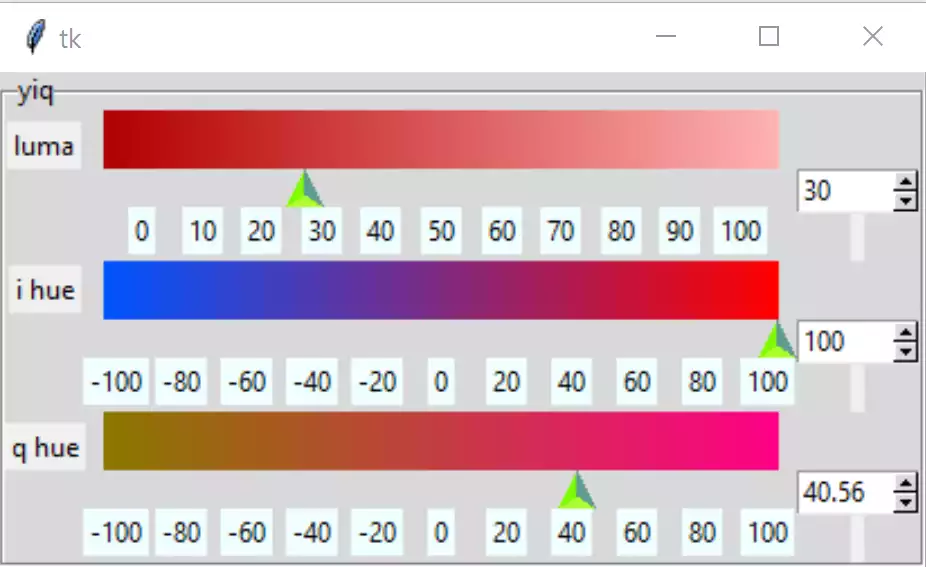
Basic YIQ#
According to Wikipedia the component Y gives the brightness or luma information, the I and Q components together describe the hue or chrominance. Y can have values 0 to 1, whereas I and Q vary between ±0.5957 and ±0.5226 respectively. The shown colour space lies between -1 and 1, so it is in reality scaled up.
Using a similar system to HSV if the IQ components are laid out on a colour space we can use a ring to show our selection. Bear in mind YIQ reacts more like rgb, in that all 3 components affect the other gradients. As Y becomes smaller it becomes darker, but it only achieves black when the other two are zero.
We need a conversion between YIQ and RGB and back again. The limits for I and Q lie at ±0.599 and ±0.5251 respectively, colorsys uses these limits. Purloining colorsys' equations we have normalised/denormalised inputs and outputs, start by scaling the I and Q values to ±1 (later on changed to ±100). Base the YIQ basic format on the HSV basic script.
First remove the function hsv_to_rgb and insert yiq_to_rgb. The generate_gradient function is crucial for all three gradients, it uses rgb start and finishing colours then creates the gradient in rgb.
|
|
|

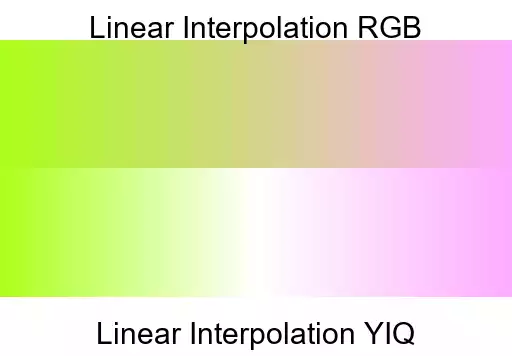

The rgb gradients are generally greyer across the centre, YIQ gradients are more colourful. First of all use the rgb interpolation, if this is not good enough, particularly when using the colour space, then change to YIQ interpolation.
Continuing with the changes to 08basichsv.py, change the references of HSV to YIQ within HsvSelect - now YiqSelect. Make red show after initialisation, remember that our colour space goes from -1 to 1 therefore adjust the I and Q values. Within the handle functions integers are no longer needed.
The function to validate the spinboxes requires editing, since we need to add lower limits, and the input is a float. Testing this caused problems with an empty spinbox as a DoubleVar could not accept an empty input, changing back to StringVar satisfied this error but required a change to all the read values, as they had to be converted to floats. The validation prevented a negative sign being the first part of the spinbox until a number had been formed then it could be changed to a negative number.
The ttk.spinbox kept the increment property, but ttk scale does not have an equivalent property. The scale ticks are not showing properly, so a bit of spadework will be required. If we leave the scales at 0 to 1 and -1 to 1 then we need to redesign our ticks and invent a resolution function, since the numbers are arbitrary, let's change them to 0 to 100 and -100 to 100, while still using normalised values for calculation purposes.
Looking at build, within YIQSelect, there are a lot of similar looking widgets which are ripe to apply a multiple list approach, which should reduce the size appreciably. The handle functions are almost the same, apart from not needing the gradient for the selected component. If we allow all the gradients to be redrawn then we simplify the code. See what the effect is when rgba is joined with YIQ.
The approach when using a loop over lists is that widgets that are referenced
elsewhere require their own list. Widgets, such as static labels, are built
in the loop but not specially saved saved in a list. The themed scale could
also be treated in this way, but spinboxes required their own list due to
binding. Some options remained constant others had to be changed
according to the loop number and an attribute list. Saved widgets can then
be referenced in the program as a numbered access to that list. Say we had
a list of rgba canvases self.rgbcans, if we wished to update the green
canvas we needed to refer to self.rgbcans[1] as it is the second canvas
in our list.
Show/Hide Code 01basicyiqlist.py
""" Construction three gradients in yiq using PPM image
    spinbox validation, working with modified Scale
"""

from tkinter import Tk, Canvas, Label, Frame, StringVar
from tkinter.ttk import LabelFrame, Scale, Style, Spinbox
from PIL import Image, ImageDraw, ImageTk
from yiqTools import draw_gradient, yiq_to_rgb, yiq_okay


class TtkScale(Scale):
    """Class to draw themed Scale widget

    Parameters
    ----------
    parent : str
        parent widget
    from_ : int
        start of scale
    to : int
        end of scale
    length : int
        length in pixels
    orient : str
        orientation
    variable : str
        tk variable
    digits : int
        length variable when converted to string
    tickinterval : float or int
        how many digits show up in tick interval
    sliderlength : int
        what it says
    command : str
        procedure called when slider moves
    """

    def __init__(self, parent, from_=0, to=255, length=300, orient='horizontal',
                 variable=0, digits=None, tickinterval=None, sliderlength=16,
                 command=None, resolution=0.0001):
        self.from_ = from_
        self.to = to
        self.variable = variable

        super().__init__(parent, length=length + sliderlength, orient=orient,
                         variable=variable, from_=from_, to=to, command=command)

        self.digits = digits
        self.length = length

        self.build(parent, from_, to, sliderlength, tickinterval, length)

    def build(self, parent, from_, to, sliderlength, tickinterval, length):
        """Create ticks

        Parameters
        ----------
        parent : str
            parent widget
        from_ : int
            start of scale
        to : int
            end of scale
        length : int
            length in pixels
        tickinterval : float or int

        """

        sc_range = to - from_

        if tickinterval:
            for i in range(from_, to + 2, tickinterval):
                item = Label(parent, text=i, bg='#EFFEFF')
                j = (i if from_ > 0 else i - from_)
                item.place(in_=self, bordermode='outside',
                           relx=sliderlength / length / 2 +
                           j / sc_range * (1 - sliderlength / length),
                           rely=1, anchor='n')


class YiqSelect:
    """Class to construct yiq gradients

    Parameters
    ----------
    fr0 : str
        parent widget
    """

    def __init__(self, fr0, enlargement):
        self.fr0 = fr0
        self.e = enlargement

        self.yvar = StringVar()
        self.ivar = StringVar()
        self.qvar = StringVar()

        self.scale_l = 300*self.e
        self.sliderlength = 16*self.e
        self.canvas_w = self.scale_l-self.sliderlength
        self.canvas_h = 26*self.e
        self.canvas_b = 30*self.e

        self.build()

        self.yvar.set(30)
        self.ivar.set(100)
        self.qvar.set(40.56)

    def yiqhandle(self, evt=None):
        """command callback for y, i or q"""

        y = float(self.yvar.get())
        i = float(self.ivar.get())
        q = float(self.qvar.get())
        from_colour = yiq_to_rgb(*(0, i, q))
        to_colour = yiq_to_rgb(*(100, i, q))
        draw_gradient(self.cans[0], from_colour, to_colour,
                      width=self.canvas_w, height=self.canvas_h)
        from_colour = yiq_to_rgb(*(y, -100, q))
        to_colour = yiq_to_rgb(*(y, 100, q))
        draw_gradient(self.cans[1], from_colour, to_colour,
                      width=self.canvas_w, height=self.canvas_h)
        from_colour = yiq_to_rgb(*(y, i, -100))
        to_colour = yiq_to_rgb(*(y, i, 100))
        draw_gradient(self.cans[2], from_colour, to_colour,
                      width=self.canvas_w, height=self.canvas_h)

    def build(self):
        """widget construction"""

        fr4 = LabelFrame(self.fr0, text='yiq')
        fr4.grid(column=2, row=0)
        vcmdyiq = root.register(yiq_okay)

        self.cans = []
        sboxes = []
        comps = ['y', 'i', 'q']
        names = ['luma', 'i hue', 'q hue']
        tkvars = [self.yvar, self.ivar, self.qvar]
        froms = [0, -100, -100]
        ticks = [10, 20, 20]

        for ix, comp in enumerate(comps):
            Label(fr4, text=names[ix]).grid(row=3*ix, column=0)
            Label(fr4, height=1).grid(row=2+3*ix, column=2)
            self.cans.append(Canvas(fr4, width=self.canvas_w, height=self.canvas_h,
                bd=0, highlightthickness=0))
            self.cans[ix].grid(row=3*ix, column=1)
            TtkScale(fr4, from_=froms[ix], to=100, variable=tkvars[ix],
                orient='horizontal', length=self.scale_l, command=self.yiqhandle,
                tickinterval=ticks[ix]).grid(row=1+3*ix, column=1, sticky='nw')
            sboxes.append(Spinbox(fr4, from_=froms[ix], to=100, textvariable=tkvars[ix],
                validatecommand=(vcmdyiq, '%d', '%P', '%S', froms[ix], 100),
                validate='key', command=self.yiqhandle, width=5,
                increment=1))
            sboxes[ix].grid(row=1+3*ix, column=2, sticky='nw')
            sboxes[ix].bind('<KeyRelease>', self.checksyiq)


        # assume initial setting 0,100,100 hsv
        to_colour = yiq_to_rgb(*(30, 100.0, 40.56))
        # print(self.canvas_w)
        draw_gradient(self.cans[0], yiq_to_rgb(0.0, 100.0, 40.56),
                      yiq_to_rgb(100, 100, 40.56),
                      width=self.canvas_w, height=self.canvas_h)
        draw_gradient(self.cans[1], yiq_to_rgb(30, -100.0, 40.56), to_colour,
                      width=self.canvas_w, height=self.canvas_h)
        draw_gradient(self.cans[2], yiq_to_rgb(30, 100, -100),
                      yiq_to_rgb(30, 100, 100),
                      width=self.canvas_w, height=self.canvas_h)

    def checksyiq(self, evt):
        """Procedure called by yiq spinboxes

        Parameters
        ----------
        evt : str
            bind handles
        """

        y = float(self.yvar.get())
        i = float(self.ivar.get())
        q = float(self.qvar.get())
        from_colour = yiq_to_rgb(*(0, i, q))
        to_colour = yiq_to_rgb(*(100, i, q))
        draw_gradient(self.cans[0], from_colour, to_colour,
                      width=self.canvas_w, height=self.canvas_h)
        from_colour = yiq_to_rgb(*(y, -100, q))
        to_colour = yiq_to_rgb(*(y, 100, q))
        draw_gradient(self.cans[1], from_colour, to_colour,
                      width=self.canvas_w, height=self.canvas_h)
        from_colour = yiq_to_rgb(*(y, i, -100))
        to_colour = yiq_to_rgb(*(y, i, 100))
        draw_gradient(self.cans[2], from_colour, to_colour,
                      width=self.canvas_w, height=self.canvas_h)


if __name__ == "__main__":
    root = Tk()
    winsys = root.tk.call("tk", "windowingsystem")
    BASELINE = 1.33398982438864281 if winsys != 'aqua' else 1.000492368291482
    scaling = root.tk.call("tk", "scaling")
    enlargement = e = int(scaling / BASELINE + 0.5)

    img = Image.new("RGBA", (16*e, 10*e), '#00000000')
    trough = ImageTk.PhotoImage(img)

    # constants for creating upward pointing arrow
    WIDTH = 17*e
    HEIGHT = 17*e
    OFFSET = 5*e
    ST0 = WIDTH // 2, HEIGHT - 1 - OFFSET
    LIGHT = 'GreenYellow'
    MEDIUM = 'LawnGreen'
    DARK = '#5D9B90'

    # normal state
    im = Image.new("RGBA", (WIDTH, HEIGHT), '#00000000')
    rdraw = ImageDraw.Draw(im)
    rdraw.polygon([ST0[0], ST0[1], 0, HEIGHT - 1,
                   WIDTH - 1, HEIGHT - 1], fill=LIGHT)
    rdraw.polygon([ST0[0], ST0[1], ST0[0], 0, 0, HEIGHT - 1], fill=MEDIUM)
    rdraw.polygon([ST0[0], ST0[1], WIDTH - 1,
                   HEIGHT - 1, ST0[0], 0], fill=DARK)
    slider = ImageTk.PhotoImage(im)

    # pressed state
    imp = Image.new("RGBA", (WIDTH, HEIGHT), '#00000000')
    draw = ImageDraw.Draw(imp)
    draw.polygon([ST0[0], ST0[1], 0, HEIGHT - 1,
                  WIDTH - 1, HEIGHT - 1], fill=LIGHT)
    draw.polygon([ST0[0], ST0[1], ST0[0], 0, 0, HEIGHT - 1], fill=DARK)
    draw.polygon([ST0[0], ST0[1], WIDTH - 1,
                  HEIGHT - 1, ST0[0], 0], fill=MEDIUM)
    sliderp = ImageTk.PhotoImage(imp)

    style = Style()
    style.theme_settings('default', {
        'Horizontal.Scale.trough': {"element create":
                                    ('image', trough,
                                     {'border': 0, 'sticky': 'wes'})},
        'Horizontal.Scale.slider': {"element create":
                                    ('image', slider,
                                     ('pressed', sliderp),
                                     {'border': 3, 'sticky': 'n'})}})

    style.theme_use('default')
    style.configure('TSpinbox', arrowsize=10*e)
    fr = Frame(root)
    fr.grid(row=0, column=0, sticky='nsew')
    YiqSelect(fr, enlargement)
    root.mainloop()