

Adding a Colour Space#

YIQ Colour Space, Y constant 50#
The hsv colour wheel was easily determined from the fact that hue at 100% value and 100% saturation corresponded to all the primary, secondary and tertiary colours. In the yiq colour space the primary colours depend upon all three components. But we do know that the hue changes only with the I and Q components, therefore it makes sense to use I and Q as our variables and fix Y, somewhat arbitrarily, on 50%.
Like the colour wheel there is no real need for a scale, it will show up on the gradients. In Wikipedia the y axis was flipped so that the axis follows mathematical convention with increasing y going vertically upwards.
Show/Hide Code 02yiq_colour_space.py
""" Construction yiq colour space

Parameters
----------
None

Results
-------
image
"""

from PIL import Image
from tkinter import Tk
from yiqTools import yiq_to_rgb


root = Tk()
winsys = root.tk.call("tk", "windowingsystem")
BASELINE = 1.33398982438864281 if winsys != 'aqua' else 1.000492368291482
scaling = root.tk.call("tk", "scaling")
enlargement = e = int(scaling / BASELINE + 0.5)

im = Image.new("RGB", (301*e,301*e), "#FFFFFF")
centre = im.size[0] // 2, im.size[1] // 2
pix = im.load()

for x in range(im.width):
    for y in range(im.height):
        i=(x-centre[0])*2/3
        q=(y-centre[1])*2/3
        pix[x,y]=yiq_to_rgb(50,i,q)

im.save('../../figures/colour_space'+str(e)+'.png')
Now change 01basicyiq.py into 03yiqspaceadded.py whilst importing the image created from 02yiq_colourspace.py. Add the function for a circle, insert the canvas for the colour space, together with its cursor - include the activeoutline option. See that it all fits together.
Now start making the cursor interactive. As we are dealing with a square colour space there is no requirement for special functions to convert x,y to I,Q and back again. When calling the cursor function door_bell, keep the Y component at the current value, rather than 50 (which was used to draw the space). Now add the binds for the cursor and their functions.
Change the bind functions to reflect cartesian coordinates. Ensure the cursor stays inside the canvas, convert the x and y coordinates to the I and Q values.
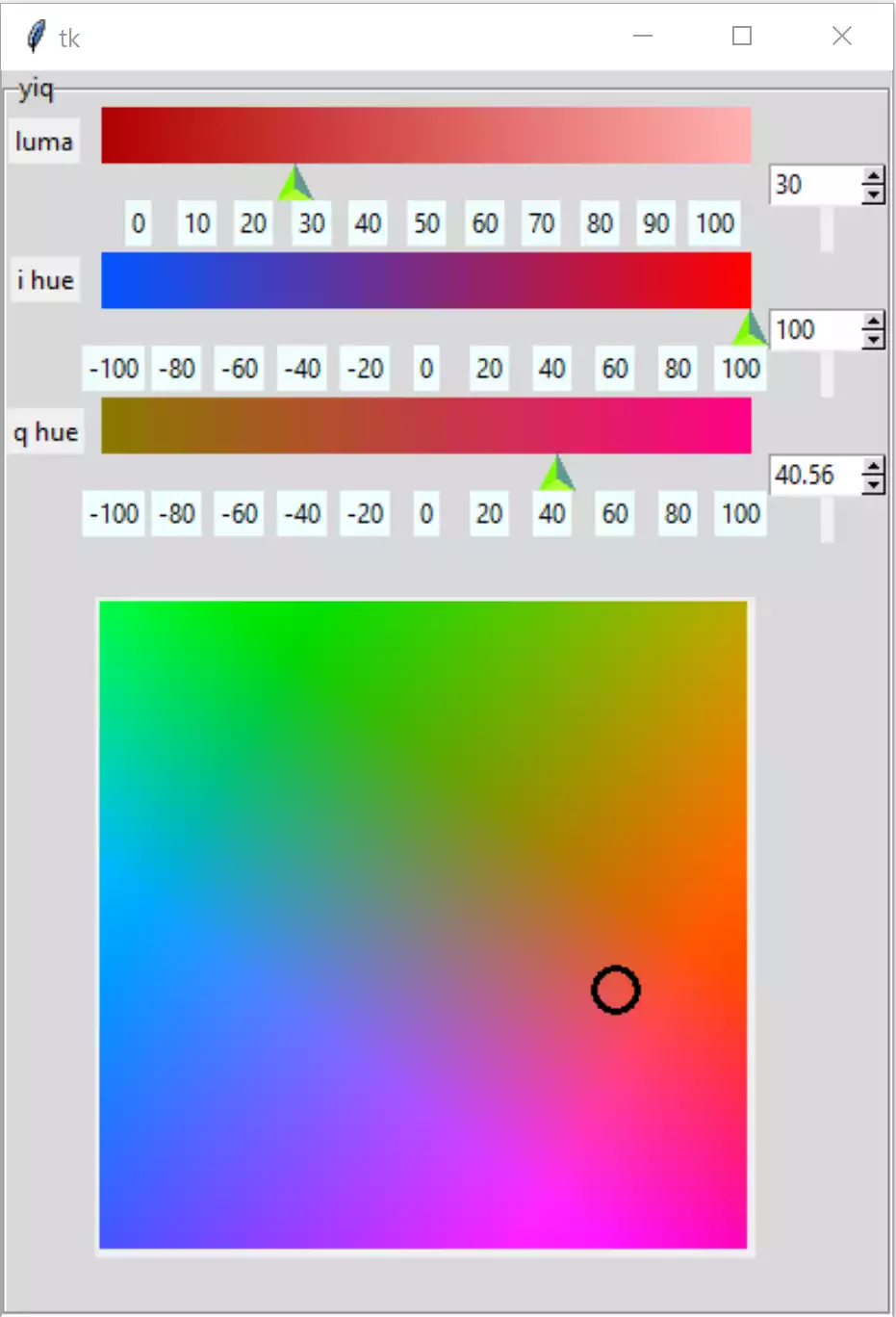
Colour Space and Cursor Inserted - Showing Red#
Show/Hide Code 03yiqspaceaddedlist.py
""" Construction three gradients in yiq using PPM image
    spinbox validation, working with modified Scale and
    colour space
"""

from tkinter import Tk, Canvas, Label, Frame, PhotoImage, StringVar
from tkinter.ttk import LabelFrame, Scale, Style, Spinbox
from PIL import Image, ImageDraw, ImageTk
from yiqTools import  circle, yiq_to_rgb, draw_gradient, yiq_okay


class TtkScale(Scale):
    """Class to draw themed Scale widget

    Parameters
    ----------
    parent : str
        parent widget
    from_ : int
        start of scale
    to : int
        end of scale
    length : int
        length in pixels
    orient : str
        orientation
    variable : str
        tk variable
    digits : int
        length variable when converted to string
    tickinterval : float or int
        how many digits show up in tick interval
    sliderlength : int
        what it says
    command : str
        procedure called when slider moves
    """

    def __init__(self, parent, from_=0, to=255, length=300, orient='horizontal',
                 variable=0, digits=None, tickinterval=None, sliderlength=16,
                 command=None):
        self.from_ = from_
        self.to = to
        self.variable = variable

        super().__init__(parent, length=length + sliderlength, orient=orient,
                         variable=variable, from_=from_, to=to, command=command)

        self.digits = digits
        self.length = length

        self.build(parent, from_, to, sliderlength, tickinterval, length)

    def build(self, parent, from_, to, sliderlength, tickinterval, length):
        """Create ticks

        Parameters
        ----------
        parent : str
            parent widget
        from_ : int
            start of scale
        to : int
            end of scale
        length : int
            length in pixels
        tickinterval : float or int

        """

        sc_range = to - from_

        if tickinterval:
            for i in range(from_, to + 2, tickinterval):
                item = Label(parent, text=i, bg='#EFFEFF')
                j = (i if from_ > 0 else i - from_)
                item.place(in_=self, bordermode='outside',
                           relx=sliderlength / length / 2 +
                           j / sc_range * (1 - sliderlength / length),
                           rely=1, anchor='n')


class YiqSelect:
    """Class to construct yiq gradients

    Parameters
    ----------
    fr0 : str
        parent widget

    """

    def __init__(self, fr0, enlargement):
        self.fr0 = fr0
        self.e = enlargement

        self.yvar = StringVar()
        self.ivar = StringVar()
        self.qvar = StringVar()

        self.scale_l = 300*self.e
        self.sliderlength = 16*self.e
        self.canvas_w = self.scale_l-self.sliderlength
        self.canvas_h = 26*self.e
        self.cursor_w = 16*self.e
        self.canvas_b = 30*self.e

        self.space = 301*self.e
        self.ring_radius = 10*self.e
        self.ring_width = 3*self.e

        self.yvar.set(30)
        self.ivar.set(100)
        self.qvar.set(40.56)

        self.build()

    def yiqhandle(self, evt=None):
        """command callback for y, i or q"""

        y = float(self.yvar.get())
        i = float(self.ivar.get())
        q = float(self.qvar.get())
        from_colour = yiq_to_rgb(*(0, i, q))
        to_colour = yiq_to_rgb(*(100, i, q))
        draw_gradient(self.cans[0], from_colour, to_colour,
                      width=self.canvas_w, height=self.canvas_h)
        from_colour = yiq_to_rgb(*(y, -100, q))
        to_colour = yiq_to_rgb(*(y, 100, q))
        draw_gradient(self.cans[1], from_colour, to_colour,
                        width=self.canvas_w, height=self.canvas_h)
        from_colour = yiq_to_rgb(*(y, i, -100))
        to_colour = yiq_to_rgb(*(y, i, 100))
        draw_gradient(self.cans[2], from_colour, to_colour,
                      width=self.canvas_w, height=self.canvas_h)

    def door_bell(self, ring):
        """bind callback from cursor"""

        i, q = ring
        y = float(self.yvar.get())
        # yiq = (y, i, q)
        from_colour = yiq_to_rgb(*(y, 0, q))
        to_colour = yiq_to_rgb(*(y, 100, q))
        draw_gradient(self.cans[1], from_colour, to_colour,
                      width=self.canvas_w, height=self.canvas_h)
        from_colour = yiq_to_rgb(*(y, i, 0))
        to_colour = yiq_to_rgb(*(y, i, 100))
        draw_gradient(self.cans[2], from_colour, to_colour,
                      width=self.canvas_w, height=self.canvas_h)

    def build(self):
        """widget construction"""

        fr4 = LabelFrame(self.fr0, text='yiq')
        fr4.grid(column=2, row=0)
        vcmdyiq = root.register(yiq_okay)

        self.cans = []
        sboxes = []
        comps = ['y', 'i', 'q']
        names = ['luma', 'i hue', 'q hue']
        tkvars = [self.yvar, self.ivar, self.qvar]
        froms = [0, -100, -100]
        ticks = [10, 20, 20]

        for ix, comp in enumerate(comps):
            Label(fr4, text=names[ix]).grid(row=3*ix, column=0)
            Label(fr4, height=1).grid(row=2+3*ix, column=2)
            self.cans.append(Canvas(fr4, width=self.canvas_w, height=self.canvas_h,
                bd=0, highlightthickness=0))
            self.cans[ix].grid(row=3*ix, column=1)
            TtkScale(fr4, from_=froms[ix], to=100, variable=tkvars[ix],
                orient='horizontal', length=self.scale_l, command=self.yiqhandle,
                tickinterval=ticks[ix]).grid(row=1+3*ix, column=1, sticky='nw')
            sboxes.append(Spinbox(fr4, from_=froms[ix], to=100, textvariable=tkvars[ix],
                validatecommand=(vcmdyiq, '%d', '%P', '%S', froms[ix], 100),
                validate='key', command=self.yiqhandle, width=5,
                increment=1))
            sboxes[ix].grid(row=1+3*ix, column=2, sticky='nw')
            sboxes[ix].bind('<KeyRelease>', self.checksyiq)

        # assume initial setting 0,100,100 hsv
        to_colour = yiq_to_rgb(*(30, 100.0, 40.56))
        # print(self.canvas_w)
        draw_gradient(self.cans[0], yiq_to_rgb(0.0, 100.0, 40.56),
                      yiq_to_rgb(100, 100, 40.56),
                      width=self.canvas_w, height=self.canvas_h)
        draw_gradient(self.cans[1], yiq_to_rgb(30, -100.0, 40.56), to_colour,
                      width=self.canvas_w, height=self.canvas_h)
        draw_gradient(self.cans[2], yiq_to_rgb(30, 100, -100),
                      yiq_to_rgb(30, 100, 100),
                      width=self.canvas_w, height=self.canvas_h)

        self.can_yiq = can_yiq = Canvas(fr4, width=self.space, height=self.space)
        can_yiq.grid(column=1, row=9, pady=25, sticky='n')
        self.yiqGamut = PhotoImage(file='../../figures/colour_space'+str(self.e)+'.png')
        can_yiq.create_image(0, 0, anchor='nw', image=self.yiqGamut)
        self.ring = circle(can_yiq, 300.0*self.e, 210.84*self.e, self.ring_radius,
                           width=self.ring_width,
                           activeoutline='#555555', tags='ring')  # 240, 181

        can_yiq.bind('<Button-1>', self.move_ring)
        can_yiq.tag_bind('ring', '<B1-Motion>', self.move_ring)

    def move_ring(self, event):
        """Procedure called when mouse clicked or dragged in colour wheel

        Parameters
        ----------
        evt : str
            bind handle

        Returns
        -------
        calls handle for cursor
        """

        X = event.x
        Y = event.y
        ring_radius = self.ring_radius
        space = self.space

        # check whether inside space
        X = min(max(X, 0), space)
        Y = min(max(Y, 0), space)

        for search in self.can_yiq.find_withtag("ring"):
            self.can_yiq.coords(
                search,
                X - ring_radius,
                Y - ring_radius,
                X + ring_radius,
                Y + ring_radius)

        i = (X - space // 2) * 2 / 3 / self.e
        q = (Y - space // 2) * 2 / 3 / self.e
        #print(X,Y,space,'X,Y,space')
        #print(i,q, 'i,q')
        self.ivar.set(i)
        self.qvar.set(q)
        ring = i, q
        self.door_bell(ring)

    def checksyiq(self, evt):
        """Procedure called by yiq spinboxes

        Parameters
        ----------
        evt : str
            bind handles

        """

        y = float(self.yvar.get())
        i = float(self.ivar.get())
        q = float(self.qvar.get())
        from_colour = yiq_to_rgb(*(0, i, q))
        to_colour = yiq_to_rgb(*(100, i, q))
        draw_gradient(self.cans[0], from_colour, to_colour,
                      width=self.canvas_w, height=self.canvas_h)
        from_colour = yiq_to_rgb(*(y, -100, q))
        to_colour = yiq_to_rgb(*(y, 100, q))
        draw_gradient(self.cans[1], from_colour, to_colour,
                      width=self.canvas_w, height=self.canvas_h)
        from_colour = yiq_to_rgb(*(y, i, -100))
        to_colour = yiq_to_rgb(*(y, i, 100))
        draw_gradient(self.cans[2], from_colour, to_colour,
                      width=self.canvas_w, height=self.canvas_h)

if __name__ == "__main__":
    root = Tk()
    winsys = root.tk.call("tk", "windowingsystem")
    BASELINE = 1.33398982438864281 if winsys != 'aqua' else 1.000492368291482
    scaling = root.tk.call("tk", "scaling")
    enlargement = e = int(scaling / BASELINE + 0.5)

    img = Image.new("RGBA", (16*e, 10*e), '#00000000')
    trough = ImageTk.PhotoImage(img)

    # constants for creating upward pointing arrow
    WIDTH = 17*e
    HEIGHT = 17*e
    OFFSET = 5*e
    ST0 = WIDTH // 2, HEIGHT - 1 - OFFSET
    LIGHT = 'GreenYellow'
    MEDIUM = 'LawnGreen'
    DARK = '#5D9B90'

    # normal state
    im = Image.new("RGBA", (WIDTH, HEIGHT), '#00000000')
    rdraw = ImageDraw.Draw(im)
    rdraw.polygon([ST0[0], ST0[1], 0, HEIGHT - 1,
                   WIDTH - 1, HEIGHT - 1], fill=LIGHT)
    rdraw.polygon([ST0[0], ST0[1], ST0[0], 0, 0, HEIGHT - 1], fill=MEDIUM)
    rdraw.polygon([ST0[0], ST0[1], WIDTH - 1,
                   HEIGHT - 1, ST0[0], 0], fill=DARK)
    slider = ImageTk.PhotoImage(im)

    # pressed state
    imp = Image.new("RGBA", (WIDTH, HEIGHT), '#00000000')
    draw = ImageDraw.Draw(imp)
    draw.polygon([ST0[0], ST0[1], 0, HEIGHT - 1,
                  WIDTH - 1, HEIGHT - 1], fill=LIGHT)
    draw.polygon([ST0[0], ST0[1], ST0[0], 0, 0, HEIGHT - 1], fill=DARK)
    draw.polygon([ST0[0], ST0[1], WIDTH - 1,
                  HEIGHT - 1, ST0[0], 0], fill=MEDIUM)
    sliderp = ImageTk.PhotoImage(imp)

    style = Style()
    style.theme_settings('default', {
        'Horizontal.Scale.trough': {"element create":
                                    ('image', trough,
                                     {'border': 0, 'sticky': 'wes'})},
        'Horizontal.Scale.slider': {"element create":
                                    ('image', slider,
                                     ('pressed', sliderp),
                                     {'border': 3, 'sticky': 'n'})}})

    style.theme_use('default')
    style.configure('TSpinbox', arrowsize=10*e)
    fr = Frame(root)
    fr.grid(row=0, column=0, sticky='nsew')
    YiqSelect(fr, enlargement)
    root.mainloop()
Note
Check on the Gradient Appearance
Move the scale cursors around and look at the gradients. If they look too grey now is the time to change them to become yiq gradients.