

Entry Layouts#
Layout String#
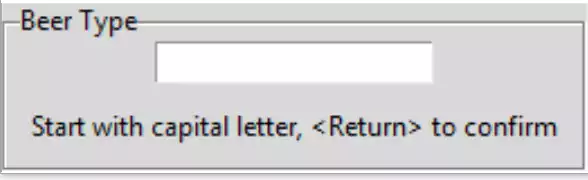
The Entry widget is going to be placed within a Labelframe that will contain labels for user information and two optional labels for limits. This allows us to use it as a standalone class or function, which can be used as an enhanced entry. We need to know when the user is finished with input, which can be tied into an event such as the Return key.
Import the extra widgets StringVar, Labelframe and Label. Set up the Labelframe with the text giving the entry a title. Create the function end_input that is bound to the Return key, use a simple length check to ensure the input has been made. The callback function remains unaltered. Tie the StringVar to the entry widget and give the entry focus. Add a message label with a starting text, this will be altered by the event function.
Run the program trying a full length input and a short input:
from tkinter import Tk, font, StringVar
from tkinter.ttk import Entry, Style, Label, Labelframe
....
LF_TEXT = 'Beer Type'
lf0 = Labelframe(root, text=LF_TEXT)
lf0.grid(column=0, row=0)

def end_input(evt):
print('evt', entsv.get())
if len(entsv.get()) > 5:
    mess_lbl['text'] = "That's OK"
else:
    mess_lbl['text'] = "Should be at least 6 characters long"
......
entsv = StringVar()
ent0 = Entry(lf0, validate='key', validatecommand=(vcmd, '%P', '%S'),
             textvariable=entsv)
ent0.bind("<Return>", endinput)
ent0.grid(row=1, column=0, padx=10)
ent0.focus()

mess_lbl = Label(lf0, text='Start with capital letter, <Return> to confirm')
mess_lbl.grid(row=2, column=0, pady=10, padx=10)
Show/Hide Code 06layout_string.py
"""entry for string with layout"""
from tkinter import Tk, StringVar
from tkinter.ttk import Entry, Style, Label, Labelframe

root = Tk()
style = Style()
style.theme_use('default')

LF_TEXT = 'Beer Type'
lf0 = Labelframe(root, text=LF_TEXT)
lf0.grid(column=0, row=0)

def end_input(evt):
    """limit on string

    Parameters
    ----------
    evt : str
        bind handle

    Returns
    -------
    None
    """
    print('evt', entsv.get())
    if len(entsv.get()) > 5:
        mess_lbl['text'] = "That's OK"
    else:
        mess_lbl['text'] = "Should be at least 6 characters long"

def is_okay(text, inp, index):
    """ validation function

    Parameters
    ----------
    text : str
        text if allowed
    input : str
        current input

    Returns
    -------
    boolean
    """
    print(text)
    index = int(index)
    if text.isupper() and index == 0:
        return True
    if input in (",", ".", "'", " ") and index > 0:
        return True
    if inp.isalnum() and index > 0:
        return True
    if text == "":
        return True
    else:
        return False

vcmd = root.register(is_okay)

entsv = StringVar()
ent0 = Entry(lf0, validate='key', validatecommand=(vcmd, '%P', '%S', '%i'),
             textvariable=entsv)
ent0.bind("<Return>", end_input)
ent0.grid(row=1, column=0, padx=10)
ent0.focus()

mess_lbl = Label(lf0, text='Start with capital letter, <Return> to confirm')
mess_lbl.grid(row=2, column=0, pady=10, padx=10)

root.mainloop()
Layout Integer#
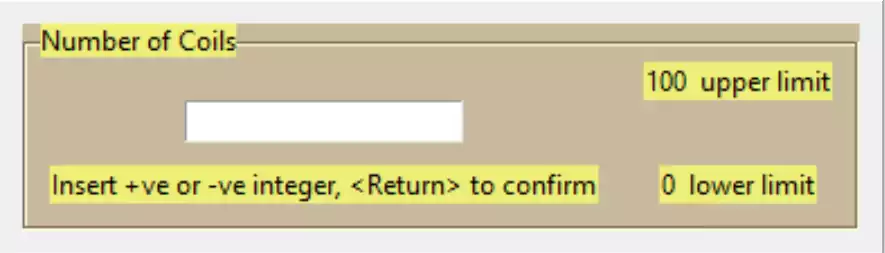
In concept it is similar to our string layout, but now the widget title may contain units (as appropriate), upper and lower limits may be present that affect the logic of the event function. First define the lower limits, then alter the event function to confirm the value and show when the limit has been exceeded. The rest of the script is the same as 04entry_negative_integers.py Float Entry
L_LIMIT = 0
U_LIMIT = 100

def end_input(evt):
    print('evt',ensv.get())
    if L_LIMIT < int(ensv.get()) < U_LIMIT:
        mess_lbl['text'] = "That's OK"
    elif L_LIMIT >= int(ensv.get()):
        mess_lbl['text'] = "Input below lower limit"
    else:
        mess_lbl['text'] = "Input above upper limit"
This works but the user has no idea of limits, so the limits will be shown in two separate labels, (just after the limit definition):
ulab = Label(lf0, text=str(U_LIMIT)+"  upper limit")
ulab.grid(row=0, column=1, padx=10)
llab = Label(lf0, text=str(L_LIMIT)+"  lower limit")
llab.grid(row=2, column=1, padx=10)
The enhanced widget looks rather grey with black lettering, colour it up a bit. Make the labelframe pale brown and the labels pale yellow:
s.configure('brown.TLabelframe',background='#C9B99B')
s.configure('brown.TLabelframe.Label',background='#EDEF77')
s.configure('brown.TLabel',background='#EDEF77')
....
lf0 = Labelframe(root, text=lftext, style='brown.TLabelframe')
...
ulab = Label(lf0, text=str(U_LIMIT)+"  upper limit", style='brown.TLabel')
...
llab = Label(lf0, text=str(L_LIMIT)+"  lower limit", style='brown.TLabel')
...
mess_lbl = Label(lf0,text='Start with capital letter, <Return> to confirm', style='brown.TLabel')
It should be relatively easy to add warning colours to the limits, trigger these when the limit is exceeded. Keep the warning colour there until the Return event, when we can reset the warning colours before retesting:
s.configure('lowr.TLabel', background='lightblue')
s.configure('upr.TLabel', background='red')
....
def end_input(evt):
    print('evt',ensv.get())
    ulab['style'] = 'brown.TLabel'
    llab['style'] = 'brown.TLabel'
    if L_LIMIT < int(ensv.get()) < U_LIMIT:
        mess_lbl['text'] = "That's OK"
    elif L_LIMIT >= int(ensv.get()):
        mess_lbl['text'] = "Input below lower limit"
        llab['style'] = 'lowr.TLabel'
    else:
        mess_lbl['text'] = "Input above upper limit"
        ulab['style'] = 'upr.TLabel'
That seems to function properly and gives the user a good feedback to the user.
Show/Hide Code 07layout_integer.py
"""String layout that determines the finish of input from a Return event.
    the integer is checked against limits before confirming that all is OK

"""
from tkinter import Tk, StringVar
from tkinter.ttk import Entry, Style, Label, Labelframe

root = Tk()
style = Style()
style.theme_use('default')

style.configure('brown.TLabelframe', background='#C9B99B')
style.configure('brown.TLabelframe.Label', background='#EDEF77')
style.configure('brown.TLabel', background='#EDEF77')
style.configure('lowr.TLabel', background='lightblue')
style.configure('upr.TLabel', background='red')

LFTEXT = 'Number of Coils'
lf0 = Labelframe(root, text=LFTEXT, style='brown.TLabelframe')
lf0.pack(padx=10, pady=10)
L_LIMIT = 0
U_LIMIT = 100

ulab = Label(lf0, text=str(U_LIMIT)+"  upper limit", style='brown.TLabel')
ulab.grid(row=0, column=1, padx=10)
llab = Label(lf0, text=str(L_LIMIT)+"  lower limit", style='brown.TLabel')
llab.grid(row=2, column=1, padx=10)


def end_input(evt):
    """limit on integer

    Parameters
    ----------
    evt : str
        bind handle

    Returns
    -------
    None
    """
    print('evt', entsv.get())
    ulab['style'] = 'brown.TLabel'
    llab['style'] = 'brown.TLabel'
    if L_LIMIT < int(entsv.get()) < U_LIMIT:
        mess_lbl['text'] = "That's OK"
    elif L_LIMIT >= int(entsv.get()):
        mess_lbl['text'] = "Input below lower limit"
        llab['style'] = 'lowr.TLabel'
    else:
        mess_lbl['text'] = "Input above upper limit"
        ulab['style'] = 'upr.TLabel'

def is_okay(text):
    """ validation function

    Parameters
    ----------
    text : str
        text if allowed

    Returns
    -------
    boolean
    """
    print(text)
    if text in("", "-"):
        return True
    try:
        int(text)
    except ValueError:
        return False
    return True

vcmd = root.register(is_okay)

entsv = StringVar()
ent0 = Entry(lf0, validate='key', validatecommand=(vcmd, '%P'), textvariable=entsv)
ent0.bind("<Return>", end_input)
ent0.grid(row=1, column=0, padx=10)
ent0.focus()

mess_lbl = Label(lf0, text='Insert +ve or -ve integer, <Return> to confirm',
                style='brown.TLabel')
mess_lbl.grid(row=2, column=0, pady=10, padx=10)

root.mainloop()
Layout Float#
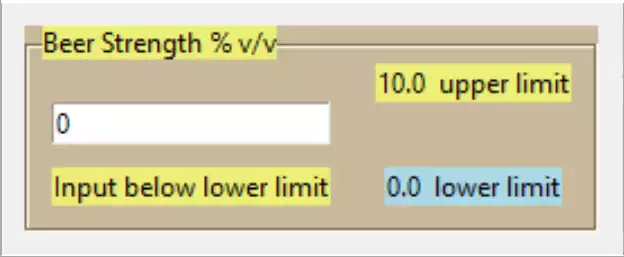
Float Entry, Lower Limit Activated#
Use most of the new construct from 07layout_integer.py, only needing to change to float and copying the feedback function from 05entry_float.py entry-float
if L_LIMIT < float(ensv.get()) < U_LIMIT:
...
elif L_LIMIT > float(ensv.get()):
...
def isOkay(text):
    print(text)
    if text in ("", "-", ".", "-."):
        return True
    try:
        float(text)
    except ValueError:
        return False
    return True
Show/Hide Code 08layout_float.py
"""Float layout that determines the finish of input from a Return event.
the float is checked against limits before confirming that all is OK

"""

from tkinter import Tk, StringVar
from tkinter.ttk import Entry, Style, Label, Labelframe

root = Tk()
style = Style()
style.theme_use('default')

style.configure('brown.TLabelframe', background='#C9B99B')
style.configure('brown.TLabelframe.Label', background='#EDEF77')
style.configure('brown.TLabel', background='#EDEF77')
style.configure('lowr.TLabel', background='lightblue')
style.configure('upr.TLabel', background='red')

LFTEXT = 'Beer Strength % v/v'
lf0 = Labelframe(root, text=LFTEXT, style='brown.TLabelframe')
lf0.pack(padx=10, pady=10)
L_LIMIT = 0.0
U_LIMIT = 10.0

ulab = Label(lf0, text=str(U_LIMIT)+"  upper limit", style='brown.TLabel')
ulab.grid(row=0, column=1, padx=10)
llab = Label(lf0, text=str(L_LIMIT)+"  lower limit", style='brown.TLabel')
llab.grid(row=2, column=1, padx=10)


def end_input(evt):
    """limit on float

    Parameters
    ----------
    evt : str
        bind handle

    Returns
    -------
    None
    """
    print('evt', entsv.get())
    ulab['style'] = 'brown.TLabel'
    llab['style'] = 'brown.TLabel'
    if L_LIMIT < float(entsv.get()) < U_LIMIT:
        mess_lbl['text'] = "That's OK"
    elif L_LIMIT >= float(entsv.get()):
        mess_lbl['text'] = "Input below lower limit"
        llab['style'] = 'lowr.TLabel'
    else:
        mess_lbl['text'] = "Input above upper limit"
        ulab['style'] = 'upr.TLabel'

def is_okay(text):
    """ validation function

    Parameters
    ----------
    text : str
        text if allowed

    Returns
    -------
    boolean
    """
    print(text)
    if text in ("", "-", ".", "-."):
        return True
    try:
        float(text)
    except ValueError:
        return False
    return True

vcmd = root.register(is_okay)

entsv = StringVar()
ent0 = Entry(lf0, validate='key', validatecommand=(vcmd, '%P'),
           textvariable=entsv)
ent0.bind("<Return>", end_input)
ent0.grid(row=1, column=0, padx=10)
ent0.focus()

mess_lbl = Label(lf0, text='Insert +ve or -ve float, <Return> to confirm',
                style='brown.TLabel')
mess_lbl.grid(row=2, column=0, pady=10, padx=10)

root.mainloop()