

Class or Function?#
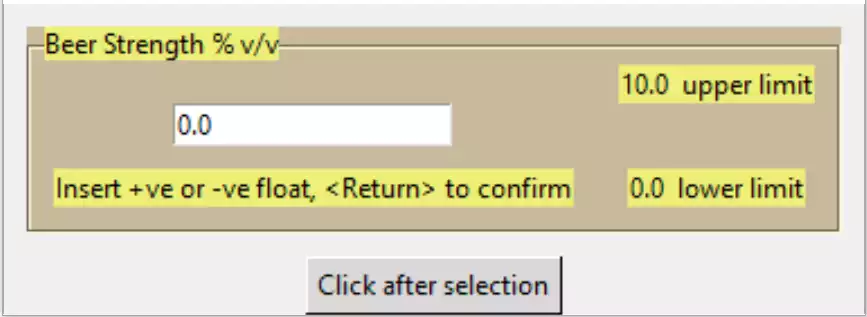
That works well, so now we can decide whether to make it into a function or class. Since the script is fairly small and uncomplicated create three separate functions, however as an exercise convert all three to a class, using the principles of Sammy the Shark From now on the validation function will also be made less verbose, after each change ensure that the function still works as expected.
The function can be made in a similar fashion to tree_function.py, check out how to obtain the output after the input is finished:
from tkinter import Tk, font, StringVar, DoubleVar
....
def entry_float(parent,lf_text,l_limit,u_limit, mess_text, out_var):

......
mess_lbl['text'] = "That's OK"
ov = out_var.set(float(ensv.get()))
....
if __name__ == "__main__":
    root = Tk()
    fra0 = Frame(root)
    fra0.grid()
    LFTEXT = 'Beer Strength % v/v'
    LLIMIT = 0.0
    ULIMIT = 10.0
    out_var1 = DoubleVar()
    MESSTEXT = 'Insert +ve or -ve float, <Return> to confirm'

    entry_float(fra0,LFTEXT,LLIMIT,ULIMIT, MESSTEXT, out_var1)

    b2 = Button(root, text='Click after selection',
                command=lambda:print(out_var1.get()))
    b2.grid(row=1, column=0)
    root.mainloop()
Create a DoubleVar outside the widget, put its handle on the widget calling arguments, then set the outside variable from within the program. The value can then be picked up by a button and printed out.
Show/Hide Code 09float_function.py
"""
Float function for entry, tried using a named tuple to stop pylint
    complaining about too many variables - still complaining
"""
from tkinter import Tk, DoubleVar
from tkinter.ttk import Entry, Style, Label, Labelframe, Frame, Button

def entry_float(parent,lf_text,l_limit,u_limit, mess_text, out_var):
    """Float layout for entry

    Parameters
    ----------
    parent : str
        parent handle
    lf_text : str
        text on LabelFrame
    l_limit : float
        lower limit
    u_limit : float
        upper limit
    mess_text : str
        message
    out_var : float
        tkvar handle

    Returns
    -------
    float
    """
    st1 = Style()
    st1.theme_use('default')

    st1.configure('brown.TLabelframe', background='#C9B99B')
    st1.configure('brown.TLabelframe.Label', background='#EDEF77')
    st1.configure('brown.TLabel', background='#EDEF77')
    st1.configure('lowr.TLabel', background='lightblue')
    st1.configure('upr.TLabel', background='red')

    lf0 = Labelframe(parent, text=lf_text, style='brown.TLabelframe')
    lf0.grid(row=0, column=0, padx=10, pady=10)

    ulab = Label(lf0, text=str(u_limit)+"  upper limit", style='brown.TLabel')
    ulab.grid(row=0, column=1, padx=10)
    llab = Label(lf0, text=str(l_limit)+"  lower limit", style='brown.TLabel')
    llab.grid(row=2, column=1, padx=10)

    def end_input(_evt):
        """limit on float

        Parameters
        ----------
        evt : str
            bind handle

        Returns
        -------
        None
        """
        ulab['style'] = 'brown.TLabel'
        llab['style'] = 'brown.TLabel'
        if l_limit < entsv.get() < u_limit:
            messlbl['text'] = "That's OK"
            out_var.set(entsv.get())
        elif l_limit >= entsv.get():
            messlbl['text'] = "Input below lower limit"
            llab['style'] = 'lowr.TLabel'
        else:
            messlbl['text'] = "Input above upper limit"
            ulab['style'] = 'upr.TLabel'

    def is_okay(text):
        """ validation function

        Parameters
        ----------
        text : str
            text if allowed

        Returns
        -------
        boolean
        """
        if text in ("", "-", ".", "-."):
            return True
        try:
            float(text)
        except ValueError:
            return False
        return True

    vcmd = lf0.register(is_okay)

    entsv = DoubleVar()
    ent0 = Entry(lf0, validate='key', validatecommand=(vcmd, '%P'),
                textvariable=entsv)
    ent0.bind("<Return>", end_input)
    ent0.grid(row=1, column=0, padx=10)
    ent0.focus()

    messlbl = Label(lf0, text=mess_text, style='brown.TLabel')
    messlbl.grid(row=2, column=0, pady=10, padx=10)

if __name__ == "__main__":
    root = Tk()
    fra0 = Frame(root)
    fra0.grid()
    LFTEXT = 'Beer Strength % v/v'
    LLIMIT = 0.0
    ULIMIT = 10.0
    out_var1 = DoubleVar()
    MESSTEXT = 'Insert +ve or -ve float, <Return> to confirm'

    entry_float(fra0,LFTEXT,LLIMIT,ULIMIT, MESSTEXT, out_var1)

    b2 = Button(root, text='Click after selection',
                command=lambda: print(out_var1.get()))
    b2.grid(row=1, column=0)
    root.mainloop()
Similar changes can be made with 06layout_string.py and 07layout_integer.
Show/Hide Code 10string_function.py
"""
String function for entry
"""
from tkinter import Tk, StringVar
from tkinter.ttk import Entry, Style, Label, Labelframe, Button, Frame

def entry_string(parent, lf_text, mess_text, out_var):
    """String layout for entry
        06layout_string converted to a function

    Parameters
    ----------
    parent : str
        parent handle
    lf_text : str
        text on LabelFrame
    mess_text : str
        message
    out_var : float
        tkvar handle

    Returns
    -------
    string
    """
    st1 = Style()
    st1.theme_use('default')

    st1.configure('brown.TLabelframe', background='#C9B99B')
    st1.configure('brown.TLabelframe.Label', background='#EDEF77')
    st1.configure('brown.TLabel', background='#EDEF77')

    lf0 = Labelframe(parent, text=lf_text, style='brown.TLabelframe')
    lf0.grid(column=0, row=0, padx=10, pady=10)

    def end_input(_evt):
        """limit on string

        Parameters
        ----------
        evt : str
            bind handle

        Returns
        -------
        None
        """
        if len(entsv.get()) > 5:
            mee_lbl['text'] = "That's OK"
            out_var.set(entsv.get())
        else:
            mee_lbl['text'] = "Should be at least 6 characters long"

    def is_okay(text, input, index):
        """ validation function

        Parameters
        ----------
        text : str
            text if allowed
        input : str
            current inputut
        index : str
            indexex

        Returns
        -------
        boolean
        """
        index = int(index)
        print(index)
        if (input.isalnum() or input in (",", ".", "'", " ")) and index > 0:
            return True
        else:
            return bool((text.isupper() or text == "") and index == 0)

    vcmd = lf0.register(is_okay)

    entsv = StringVar()
    ent0 = Entry(lf0, validate='key', textvariable=entsv,
                 validatecommand=(vcmd, '%P', '%S', '%i'))
    ent0.bind("<Return>", end_input)
    ent0.grid(row=1, column=0, padx=10)
    ent0.focus()

    mee_lbl = Label(lf0, text=mess_text, style='brown.TLabel')
    mee_lbl.grid(row=2, column=0, pady=10, padx=10)

if __name__ == "__main__":
    root = Tk()
    fra0 = Frame(root)
    fra0.grid()
    LFTEXT = 'Beer Type'
    out_var1 = StringVar()
    MESSTEXT = 'Start with capital letter, use at least 6 characters '\
            '<Return> to confirm'
    entry_string(fra0, LFTEXT, MESSTEXT, out_var1)
    b2 = Button(root, text='Click after selection',
                command=lambda: print(out_var1.get()))
    b2.grid(row=2, column=0)
    root.mainloop()
Show/Hide Code 11integer_function.py
"""Enhanced Integer Entry as a function, after pylint"""

from tkinter import Tk, IntVar
from tkinter.ttk import Entry, Style, Label, Labelframe, Button, Frame

def entry_integer(parent, lftext, llimit, ulimit, messtext, out_var):
    """Integer layout for entry

    Parameters
    ----------
    parent : str
        parent handle
    lftext : str
        text on LabelFrame
    llimit : int
        lower limit
    ulimit : int
        upper limit
    messtext : str
        message
    out_var : int
        tkvar handle

    Returns
    -------
    integer
    """
    st1 = Style()
    st1.theme_use('default')

    st1.configure('brown.TLabelframe', background='#C9B99B')
    st1.configure('brown.TLabelframe.Label', background='#EDEF77')
    st1.configure('brown.TLabel', background='#EDEF77')
    st1.configure('lowr.TLabel', background='lightblue')
    st1.configure('upr.TLabel', background='red')

    lf0 = Labelframe(parent, text=lftext, style='brown.TLabelframe')
    lf0.grid(row=0, column=0, padx=10, pady=10)

    ulab = Label(lf0, text=str(ulimit)+"  upper limit", style='brown.TLabel')
    ulab.grid(row=0, column=1, padx=10)
    llab = Label(lf0, text=str(llimit)+"  lower limit", style='brown.TLabel')
    llab.grid(row=2, column=1, padx=10)

    def end_input(_evt):
        """limit on integer

        Parameters
        ----------
        evt : str
            bind handle

        Returns
        -------
        None
        """
        print('evt', entsv.get())
        ulab['style'] = 'brown.TLabel'
        llab['style'] = 'brown.TLabel'
        if llimit < int(entsv.get()) < ulimit:
            mee_lbl['text'] = "That's OK"
            out_var.set(int(entsv.get()))
        elif llimit >= int(entsv.get()):
            mee_lbl['text'] = "Input below lower limit"
            llab['style'] = 'lowr.TLabel'
        else:
            mee_lbl['text'] = "Input above upper limit"
            ulab['style'] = 'upr.TLabel'

    def is_okay(text):
        """ validation function

        Parameters
        ----------
        text : str
            text if allowed

        Returns
        -------
        boolean
        """
        print(text)
        if text in("", "-"):
            return True
        try:
            int(text)
        except ValueError:
            return False
        return True

    vcmd = lf0.register(is_okay)

    entsv = IntVar()
    ent0 = Entry(lf0, validate='key', validatecommand=(vcmd, '%P'),
                 textvariable=entsv)
    ent0.bind("<Return>", end_input)
    ent0.grid(row=1, column=0, padx=10)
    ent0.focus()

    mee_lbl = Label(lf0, text=messtext, style='brown.TLabel')
    mee_lbl.grid(row=2, column=0, pady=10, padx=10)

if __name__ == "__main__":
    root = Tk()
    fra0 = Frame(root)
    fra0.grid(row=0, column=0)
    LF_TEXT = 'Number of Coils'
    L_LIMIT = 0
    U_LIMIT = 100
    out_var1 = IntVar()
    MESS_TEXT = 'Insert +ve or -ve integer, <Return> to confirm'
    entry_integer(fra0, LF_TEXT, L_LIMIT, U_LIMIT, MESS_TEXT, out_var1)
    b2 = Button(root, text='Click after selection',
                command=lambda: print(out_var1.get()))
    b2.grid(row=1, column=0)
    root.mainloop()
Entry Class#
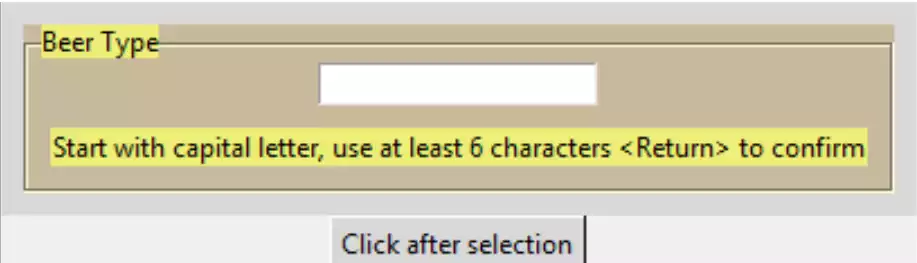
Using the three functions build up into a class. As the string function is slightly simpler we can start with this then build upon this with the other two functions.
Change 10string_function.py into a class. Group the clauses by their common task and make into a method. The __init__ function contains the interchange variables and style clauses. The labelframe and feedback label can be grouped as one method, the entry becomes another method. As the StringVar entsv will change according to entry type put this in the init function, rename entsv to out_var as this will be used to communicate with the calling program:
class StringEntry:
    def __init__(self, parent,lf_text,mess_text):
        self.parent = parent
        self.lf_text = lf_text
        self.mess_text = mess_text

        self.out_var = StringVar()
    ....
    if len(self.out_var.get()) > 5:
    .......
    b2 = Button(root, text='Click after selection',
                command=lambda:print(v.out_var.get()))
Remember to include the linking calls to the new methods, then prove it works.
Show/Hide Code entry_class_0.py
"""String class for entry"""
from tkinter import Tk, StringVar
from tkinter.ttk import Entry, Style, Label, Labelframe, Button, Frame

class StringEntry:
    """String class for entry
        06layout_string converted to a class

    Parameters
    ----------
    parent : str
        parent handle
    lf_text : str
        text on LabelFrame
    mess_text : str
        message
    outVar : float
        tkvar handle

    Returns
    -------
    string
    """
    def __init__(self, parent, lf_text, mess_text):
        self.parent = parent
        self.lf_text = lf_text
        self.mess_text = mess_text

        self.out_var = StringVar()

        st1 = Style()
        st1.theme_use('default')

        st1.configure('brown.TLabelframe', background='#C9B99B')
        st1.configure('brown.TLabelframe.Label', background='#EDEF77')
        st1.configure('brown.TLabel', background='#EDEF77')

        self.construct()

    def construct(self):
        """construct of LabelFrame and message

        Parameters
        ----------
        None

        Returns
        -------
        None
        """
        self.lf0 = Labelframe(self.parent, text=self.lf_text,
                              style='brown.TLabelframe')
        self.lf0.grid(column=0, row=0, padx=10, pady=10)
        self.mee_lbl = Label(self.lf0, text=self.mess_text,
                             style='brown.TLabel')
        self.mee_lbl.grid(row=2, column=0, pady=10, padx=10)

        self.make_entry()

    def make_entry(self):
        """construct of Entry

        Parameters
        ----------
        None

        Returns
        -------
        None
        """
        vcmd = self.lf0.register(self.is_okay)

        ent0 = Entry(self.lf0, validatecommand=(vcmd, '%P', '%S', '%i'),
                     validate='key', textvariable=self.out_var)
        ent0.bind("<Return>", self.end_input)
        ent0.grid(row=1, column=0, padx=10)
        ent0.focus()

    def end_input(self, _evt):
        """limit on string

        Parameters
        ----------
        evt : str
            bind handle

        Returns
        -------
        None
        """
        if len(self.out_var.get()) > 5:
            self.mee_lbl['text'] = "That's OK"
        else:
            self.mee_lbl['text'] = "Should be at least 6 characters long"

    def is_okay(self, text, input, index):
        """ validation function

        Parameters
        ----------
        text : str
            text if allowed
        input : str
            current input

        Returns
        -------
        boolean
        """
        #print(text)
        index = int(index)
        print(index)
        if (input.isalnum() or input in (",", ".", "'", " ")) and index > 0:
            return True
        else:
            return bool((text.isupper() or text == "") and index == 0)

if __name__ == "__main__":
    root = Tk()

    fra0 = Frame(root)
    fra0.grid(row=0, column=0)
    LF_TEXT = 'Beer Type'

    MESS_TEXT = 'Start with capital letter, use at least 6 characters '\
        '<Return> to confirm'
    v = StringEntry(fra0, LF_TEXT, MESS_TEXT)

    b2 = Button(root, text='Click after selection',
                command=lambda: print(v.out_var.get()))
    b2.grid(row=2, column=0)
    root.mainloop()
Class with Added Functionality#
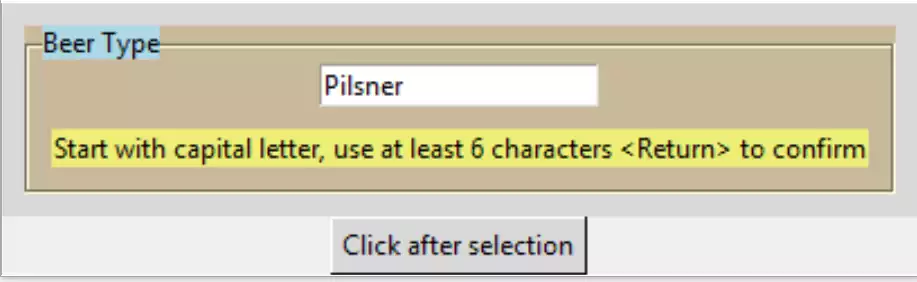
Now include some additional functionality. All these will have default values, so should always be placed at the end of our class attributes. Start with a default input def_text, use the empty character as the defult value as this causes no problem for any of our three types:
def __init__(self, parent, lf_text, mess_text, def_text="", colour='brown',
             mod=False):
....
self.out_var.set(def_inp)
....
DEF_INP = 'Pilsner'
v = StringEntry(fra0, LF_TEXT, MESS_TEXT, DEF_TEXT, COLOUR)
Add some colour coding to the labelframe label. The default colour is the existing brown and yellow combination. The labelframe background remains brown, only the label background is going to be changed to blue, green or pink. Using these in the attribute, some additional style options needs to be generated, with brown as the default:
def __init__(self, parent,lf_text,mess_text,def_inp="",colour='brown'):
....
    self.farbe = farbe = {'blue': 'light blue', 'brown': '#EDEF77',
                          'green': 'light green', 'pink': '#EAAFBF'}

    colour = colour if colour in farbe else 'brown'

    self.colour = colour
    .......
    style.configure(colour+'.TLabelframe',background='#C9B99B')
    style.configure(colour+'.TLabelframe.Label',background=farbe[colour])
    ....
    self.lf0 = Labelframe(self.fr0, text=self.lf_text,
                     style=self.colour+'.TLabelframe')
The widget might be disabled and then enabled by the user. Place a checkbutton in the label position of the labelframe. This is a bit more complicated than either of the other two changes. The message shown in the label part of label frame is now taken over by the checkbutton, as is the background colour.
Use mod as the passed argument with a default argument of False, if we
wish to use the option use True. Add a colour
style for the checkbutton, then within the make_entry function test whether
mod has been selected. Create a new function modify to create
the checkbutton together with the states of the checkbutton (selected or
not) and entry (disabled or not) and the associated checkbutton text. Just
after the checkbutton is created, tie it into the labelframe by using its
label widget option, (this is only called if mod has been selected).
The checkbutton has a command option tied to the function toggle_opt which
toggles the select state of the checkbutton, the disabled state of entry
and the message of the checkbutton:
from tkinter.ttk import Entry, Style, Label, Labelframe, Button, Frame, Checkbutton
....
style.configure(colour+'.TCheckbutton',background=farbe[colour])
....
if self.mod in (True, False):
        self.modify()

def modify(self):
    # entry disabled until checkbox is ticked
    self.cb_opt = Checkbutton(self.lf0, command=self.toggle_opt,
                        style=self.colour+'.TCheckbutton')
    self.lf0['labelwidget'] = self.cb_opt
    if self.mod:
        self.ent0.state(['!disabled'])
        self.cb_opt.state(['!selected'])
        self.cb_opt['text'] = lf_text+' Check to prevent editing '
    else:
        self.ent0.state(['disabled'])
        self.cb_opt.state(['selected'])
        self.cb_opt['text'] = lf_text+' Check to modify '
    #print('mod',self.mod,self.cb_opt.state())

def toggle_opt(self):
    # state of entry controlled
    # by the state of the check button in Option frame label widget
    #print(self.cb_opt.state())
    if self.cb_opt.instate(['selected']):
        print('selected state')
        self.ent0.state(['disabled'])
        self.cb_opt['text'] = lf_text+' Check to modify '
    else:
        print('unselected state')
        self.ent0.state(['!disabled']) # enable option
        self.cb_opt['text'] = lf_text+' Check to prevent editing '
See how this all works together.
Show/Hide Code entry_class_1.py
"""String class for entry, with colour and enabling/disabling choice """
from tkinter import Tk, StringVar
from tkinter.ttk import Entry, Style, Label, Labelframe, Button, Frame, \
                        Checkbutton

class StringEntry:
    """String class for entry
        added colour, change state

    Parameters
    ----------
    parent : str
        parent handle
    lf_text : str
        text on LabelFrame
    mess_text : str
        message
    def_text : str
        default text
    colour : str
        frame colour
    mod : str
        enable or disable state switch

    Returns
    -------
    string
    """
    def __init__(self, parent, lf_text, mess_text, def_text="", colour='brown',
                 mod=False):
        self.parent = parent
        self.lf_text = lf_text
        self.mess_text = mess_text
        self.mod = mod

        self.out_var = StringVar()
        self.out_var.set(def_text)

        self.farbe = farbe = {'blue': 'light blue', 'brown': '#EDEF77',
                              'green': 'light green', 'pink': '#EAAFBF'}

        colour = colour if colour in farbe else 'brown'

        self.colour = colour

        st1 = Style()
        st1.theme_use('default')

        st1.configure(colour+'.TLabelframe', background='#C9B99B')
        st1.configure(colour+'.TLabelframe.Label', background=farbe[colour])
        st1.configure(colour+'.TCheckbutton', background=farbe[colour])
        st1.configure('brown.TLabel', background='#EDEF77')

        self.construct()

    def construct(self):
        """construct of LabelFrame and message

        Parameters
        ----------
        None

        Returns
        -------
        None
        """
        self.lf1 = Labelframe(self.parent, text=self.lf_text,
                              style=self.colour+'.TLabelframe')
        self.lf1.grid(column=0, row=0, padx=10, pady=10)
        self.messlbl = Label(self.lf1, text=self.mess_text, style='brown.TLabel')
        self.messlbl.grid(row=2, column=0, pady=10, padx=10)

        self.make_entry()

    def make_entry(self):
        """construct of Entry

        Parameters
        ----------
        None

        Returns
        -------
        None
        """
        vcmd = self.lf1.register(self.is_okay)

        self.ent1 = ent1 = Entry(self.lf1, validate='key',
                                 validatecommand=(vcmd, '%P', '%S', '%i'),
                                 textvariable=self.out_var)
        ent1.bind("<Return>", self.end_input)
        ent1.grid(row=1, column=0, padx=10)
        ent1.focus()

        if self.mod in (True, False):
            self.modify()

    def modify(self):
        """construct of state switch

        Parameters
        ----------
        None

        Returns
        -------
        None
        """
        lf_text = self.lf_text
        # entry disabled until checkbox is ticked
        self.cb_opt = Checkbutton(self.lf1, command=self.toggle_opt,
                                  style=self.colour+'.TCheckbutton')
        self.lf1['labelwidget'] = self.cb_opt
        if self.mod:
            self.ent1.state(['!disabled'])
            self.cb_opt.state(['!selected'])
            self.cb_opt['text'] = lf_text+' Check to prevent editing '
            self.ent1.focus()
        else:
            self.ent1.state(['disabled'])
            self.cb_opt.state(['selected'])
            self.cb_opt['text'] = lf_text+' Check to modify '

    def toggle_opt(self):
        """state switch logic

        Parameters
        ----------
        None

        Returns
        -------
        None
        """
        lf_text = self.lf_text
#       state of entry controlled
#       by the state of the check button in Option frame label widget
        if self.cb_opt.instate(['selected']):
            print('selected state')
            self.ent1.state(['disabled'])
            self.cb_opt['text'] = lf_text+' Check to modify '
        else:
            print('unselected state')
            self.ent1.state(['!disabled'])  # enable option
            self.cb_opt['text'] = lf_text+' Check to prevent editing '
            self.ent1.focus()

    def end_input(self, _evt):
        """limit on string

        Parameters
        ----------
        evt : str
            bind handle

        Returns
        -------
        None
        """
        if len(self.out_var.get()) > 5:
            self.messlbl['text'] = "That's OK"
        else:
            self.messlbl['text'] = "Should be at least 6 characters long"

    def is_okay(self, text, inp, ind):
        """ validation function

        Parameters
        ----------
        text : str
            text if allowed
        inp : str
            current input

        Returns
        -------
        boolean
        """
        ind = int(ind)
        print(ind)
        if (inp.isalnum() or inp in (",", ".", "'", " ")) and ind > 0:
            return True
        else:
            return bool((text.isupper() or text == "") and ind == 0)

if __name__ == "__main__":
    root = Tk()
    fra0 = Frame(root)
    fra0.grid(row=0, column=0)
    LF_TEXT = 'Beer Type'
    DEF_TEXT = 'Pilsner'
    COLOUR = 'blue'
    MOD = False
    MESS_TEXT = 'Start with capital letter, use at least 6 characters '\
        '<Return> to confirm'
    v = StringEntry(fra0, LF_TEXT, MESS_TEXT, DEF_TEXT, COLOUR, MOD)

    b2 = Button(root, text='Click after selection',
                command=lambda: print(v.out_var.get()))
    b2.grid(row=2, column=0)
    root.mainloop()