

Scaleable Radiobuttons#
Pyscripter unscaled altflex theme |
Spyder scaled altflex theme |
|---|---|
|

|
Drawing the Radiobutton#
Almost everything stated about check buttons can be directly related to radiobuttons. How the states interreact is similar except that radiobuttons have usually only one selection in a group at once, all other radiobuttons are not selected. Normally it makes sense to enable/disable all the radiobutton group at once.
Drawing the widget is easier as all the borders are curved and can be made with pieslices, so scaling is easier. The theme background is used as the image background, requiring one more dictionary. Even though the line/pie colours are largely similar to the checkbutton make a separate dictionary.
As with the check buttons test with an added checkbox to disable/enable one of the radiobuttons. When testing without the states (active, selected) and active the radiobuttons refused to change state from unselected to selected, therfore remember to include these states.
Show/Hide Code create_radiobuttons.py
'''
class has image loss due to garbage collection
alt is problem, drawing based on widget images, allow for scaling
'''

from PIL import Image, ImageDraw, ImageTk
from tkinter import Tk
from tkinter.ttk import Style, Frame, Radiobutton, Label, Checkbutton

from RunStatettk import run_state

# createButtons:
switch = 0

radioimg = {}
# colours from alt

states = ['background', 'active',('active', 'selected'), ('disabled', 'selected'),
             'selected','disabled', ('disabled', 'alternate'), 'alternate',
             'pressed']

rline_colours =  {'selected': {'topleft': "#888888",
                            'botright': 'white',
                            'intopleft': "#414141",
                            'inbotright': "#d9d9d9"},
                'alternate': {'topleft': "#888888",
                            'botright': "#888888",
                            'intopleft': "#414141",
                            'inbotright': "#d9d9d9"},
                'active': {'topleft': "#888888",
                            'botright': 'white',
                            'intopleft': "#414141",
                            'inbotright': "#ececec"},
    ('active', 'selected'): {'topleft': "#888888",
                            'botright': 'white',
                            'intopleft': "#414141",
                            'inbotright': "#ececec"},
                'disabled': {'topleft': "#888888",
                            'botright': None,
                            'intopleft': "#aaaaaa",
                            'inbotright': None},
                'pressed': {'topleft': "#888888",
                            'botright': None,
                            'intopleft': "#414141",
                            'inbotright': None},
                'background': {'topleft': "#888888",
                            'botright': 'white',
                            'intopleft': "#414141",
                            'inbotright': "#d9d9d9"},
   ('disabled', 'alternate'): {'topleft': "#888888",
                            'botright': "#aaaaaa",
                            'intopleft': "#414141",
                            'inbotright': "#d9d9d9"},
   ('disabled', 'selected'): {'topleft': "#888888",
                            'botright': "#aaaaaa",
                            'intopleft': "#414141",
                            'inbotright': None}
                            }

imagebg = {'selected': 'white',
            'alternate': "#aaaaaa", 'active': 'white',
            ('active', 'selected'): 'white',
            'disabled': "#d9d9d9", 'pressed': "#d9d9d9",
            'background': 'white', ('disabled', 'alternate'): "#d9d9d9",
            ('disabled', 'selected'): "#d9d9d9"}

outerbg = {'selected': "#d9d9d9",
            'alternate': "#d9d9d9", 'active': "#ececec",
            ('active', 'selected'): "#ececec",
            'disabled': "#d9d9d9", 'pressed': "#d9d9d9",
            'background': "#d9d9d9", ('disabled', 'alternate'): "#d9d9d9",
            ('disabled', 'selected'): "#d9d9d9"}

def circle(dr, center, radius, fill):
    dr.ellipse((center[0] - radius, center[1] - radius,
                center[0] + radius - 1, center[1] + radius - 1),
               fill=fill, outline=None)

# create pieslice with centre and radius, assume only fill used
def pie(idraw,c,r,fill='#888888',start=180,end=270):
    return idraw.pieslice([c[0]-r,c[1]-r,c[0]+r-1,c[1]+r-1],
                          fill=fill,start=start,end=end)


def rdraw_widgets(scaling):
    width, height = int(12 * scaling), int(12 * scaling)
    b = int(1 * scaling)

    for ix, state in enumerate(states):
        image = Image.new('RGB', (width,height), outerbg[state])
        idraw = ImageDraw.Draw(image)

        pie(idraw, [width//2, height//2], width//2,
            fill=rline_colours[state]['topleft'], start=135, end=315)

        if rline_colours[state]['botright']:
            pie(idraw, [width//2, height//2], width//2,
            fill=rline_colours[state]['botright'], start=315, end=135)

        pie(idraw, [width//2, height//2], width//2-b,
            fill=rline_colours[state]['intopleft'], start=135, end=315)

        if rline_colours[state]['inbotright']:
            pie(idraw, [width//2, height//2], width//2-b,
            fill=rline_colours[state]['inbotright'], start=315, end=135)

        circle(idraw, (width//2, height//2), width//2-2*b,
            fill=imagebg[state])

        if state in ('selected',('disabled','selected'),
                    ('active', 'selected')):
            circle(idraw, (width//2, height//2), 2*b, fill='#a3a3a3' \
                if state == ('disabled','selected') else 'black')

        radioimg[state] = ImageTk.PhotoImage(image)

def show_widgets(fr, scaling):
    st0 = Style()

    st0.theme_create( "altflex", parent="alt", settings={

        'Radiobutton.indicator': {"element create":
                ('image', radioimg['background'],
                ('disabled', 'selected', radioimg[('disabled', 'selected')]),
                ('disabled', radioimg['disabled']),
                ('disabled', 'alternate', radioimg[('disabled', 'alternate')]),
                ('alternate', radioimg['alternate']),
                ('pressed', radioimg['pressed']),
                ('active', 'selected', radioimg[('active', 'selected')]),
                ('selected', radioimg['selected']),
                ('active', radioimg['active']),
                { 'sticky': "w", 'padding':3*scaling})
                }})

    st0.theme_use('altflex')
    st0.map('TRadiobutton', background=[('active',"#ececec")])

    def change():
        global switch
        if switch == 0:
            widg.state(['disabled']) # active
            print(widg.state())
        else:
            widg.state(['!disabled']) # !active
        switch = 1 if switch == 0 else 0

    widg = Radiobutton(fr, text='Cheese' ,width=-8, value=1)
    widg1 = Radiobutton(fr, text='Tomato' ,width=-8, value=2)
    widg.grid(column=0,row=15,sticky='nsew', padx=5, pady=5)
    widg1.grid(column=0,row=16,sticky='nsew', padx=5, pady=5)

    label = Label(root, text='selected', \
            image=radioimg[('selected')], compound='left')
    label.image = radioimg['selected']
    label.grid(column=0,row=17,sticky='nsew', padx=5, pady=5)

    c = Checkbutton(root, text='disabled', command=change)
    c.grid(column=0, row=18, pady=5)
    run_state(fr,widg,widg1)

if __name__ == "__main__":
    root = Tk()
    winsys = root.tk.call("tk", "windowingsystem")
    BASELINE = 1.33398982438864281 if winsys != 'aqua' else 1.000492368291482
    scaling = root.tk.call("tk", "scaling")
    dpi_scaling = int(scaling / BASELINE + 0.5)
    fr0 = Frame(root)
    fr0.grid(column=0,row=0,sticky='nsew')
    rdraw_widgets(dpi_scaling)
    show_widgets(fr0, dpi_scaling)

    root.mainloop()
Show/Hide Code RunStatettk.py
from tkinter import Tk, StringVar
from tkinter.ttk import Frame, Radiobutton, Checkbutton, Separator, Style

class run_state():
    def __init__(self, fr, widg, widg1=None):
        ''' Used to enable state change

        Creates radio buttons showing states
        Creates check button with "Enabled", useful for testing
            check and radio buttons

        Args:
            fr: frame reference in calling program
            widg: widget reference
            widg1: optional widget
        '''
        self.fr = fr
        self.widg = widg
        self.widg1 = widg1

        # Create radio buttons which will display widget states
        states = ['active', ('active', 'selected'),'alternate', 'background',
                  'disabled', ('disabled', 'alternate'), 'focus', 'invalid',
                  'pressed', 'readonly', ('disabled', 'selected'), 'selected']

        self.rb = []
        self.state_val = StringVar()
        for iy, state in enumerate(states):
            st_rb = Radiobutton(fr, value=state, text=state,
                variable=self.state_val, command=self.change_state)
            st_rb.grid(column=0,row=iy+2,padx=5,pady=5, sticky='nw')
            self.rb.append(st_rb)
        sep = Separator(fr, orient='h')
        sep.grid(column=0,row=14,sticky='ew')

    def change_state(self):
        ''' used to enable state change'''
        newstate = self.state_val.get()
        oldstate = self.widg.state()
        # Check and Radio buttons start with alternate state
        # prefix oldstate with !
        oldst = [f"!{s}" for s in oldstate]
        # convert tuple to string
        oldst = " ".join(oldst)
        self.widg.state([oldst])
        # if newstate is compound run each part separately
        if ' ' in newstate:
            newstate, nstate = newstate.split()
            self.widg.state([newstate])
            self.widg.state([nstate])
        else:
            self.widg.state([newstate])

if __name__ == '__main__':
    root = Tk()
    st0 = Style()
    st0.theme_use('alt')
    fr1 = Frame()
    fr1.grid(column=0,row=0,sticky='nsew')

    Widg = Checkbutton(fr1,text='Checkbutton')
    Widg.grid(column=0,row=15)
    Widg1 = Checkbutton(fr1,text='Another one')
    Widg1.grid(column=0,row=16)
    run_state(fr1,Widg,Widg1)
    root.mainloop()
Prove the radiobuttons with a similar script to that with checkbuttons. When
everything works as required almalgamate the check and radiobutton scripts.
So far we have proved the concept, now to change the almalgamated script
into a standalone module. Use one main function install, with a
subsidiary function _load_images, place the dictionaries checkimg,
radioimg in the global space before the two functions, add two more
dictionaries checkimage and radioimage into the global space. Bring the
scaling part from the main to the install function. The drawings will now
store the PIL information into checkimage and radioimage dictionaries, then
just before the altflex theme is created, call up _load_images, this will
convert the PIL information to tkinter readable images and store in checkimg
and radioimg.
Show/Hide Code altflex.py
from PIL import Image, ImageDraw, ImageTk
from tkinter import Tk
from tkinter.ttk import Style, Frame, Checkbutton

checkimg = {}
radioimg = {}
checkimage = {}
radioimage = {}

states = ['background', 'active', ('disabled', 'selected'), ('active', 'selected'),
             'selected','disabled', ('disabled', 'alternate'), 'alternate',
             'pressed']

def _load_images():
    for iz, state in enumerate(states):
        checkimg[state] = ImageTk.PhotoImage(checkimage[state])
        radioimg[state] = ImageTk.PhotoImage(radioimage[state])

def install():

    root = Tk()

    winsys = root.tk.call("tk", "windowingsystem")
    BASELINE = 1.33398982438864281 if winsys != 'aqua' else 1.000492368291482
    scaling = root.tk.call("tk", "scaling")
    dpi_scaling = int(scaling / BASELINE + 0.5)
    root.destroy()

    chline_colours = {'selected': {'topleft': "#888888",
                            'botright': None,
                            'intopleft': "#414141",
                            'inbotright': "#d9d9d9"},
                'alternate': {'topleft': "#888888",
                            'botright': "#888888",
                            'intopleft': "#414141",
                            'inbotright': "#d9d9d9"},
                'active': {'topleft': "#888888",
                            'botright': 'white',
                            'intopleft': "#414141",
                            'inbotright': "#ececec"},
        ('active', 'selected'): {'topleft': "#888888",
                            'botright': 'white',
                            'intopleft': "#414141",
                            'inbotright': "#ececec"},
                'disabled': {'topleft': "#888888",
                            'botright': None,
                            'intopleft': "#aaaaaa",
                            'inbotright': None},
                'pressed': {'topleft': "#888888",
                            'botright': None,
                            'intopleft': "#414141",
                            'inbotright': None},
                'background': {'topleft': "#888888",
                            'botright': 'white',
                            'intopleft': "#414141",
                            'inbotright': "#d9d9d9"},
        ('disabled', 'alternate'): {'topleft': "#888888",
                            'botright': "#aaaaaa",
                            'intopleft': "#414141",
                            'inbotright': None},
        ('disabled', 'selected'): {'topleft': "#888888",
                            'botright': None,
                            'intopleft': "#aaaaaa",
                            'inbotright': None}
                            }

    rline_colours =  {'selected': {'topleft': "#888888",
                            'botright': 'white',
                            'intopleft': "#414141",
                            'inbotright': "#d9d9d9"},
                'alternate': {'topleft': "#888888",
                            'botright': "#888888",
                            'intopleft': "#414141",
                            'inbotright': "#d9d9d9"},
                'active': {'topleft': "#888888",
                            'botright': 'white',
                            'intopleft': "#414141",
                            'inbotright': "#ececec"},
        ('active', 'selected'): {'topleft': "#888888",
                            'botright': 'white',
                            'intopleft': "#414141",
                            'inbotright': "#ececec"},
                'disabled': {'topleft': "#888888",
                            'botright': None,
                            'intopleft': "#aaaaaa",
                            'inbotright': None},
                'pressed': {'topleft': "#888888",
                            'botright': None,
                            'intopleft': "#414141",
                            'inbotright': None},
                'background': {'topleft': "#888888",
                            'botright': 'white',
                            'intopleft': "#414141",
                            'inbotright': "#d9d9d9"},
        ('disabled', 'alternate'): {'topleft': "#888888",
                            'botright': "#aaaaaa",
                            'intopleft': "#414141",
                            'inbotright': "#d9d9d9"},
        ('disabled', 'selected'): {'topleft': "#888888",
                            'botright': "#aaaaaa",
                            'intopleft': "#414141",
                            'inbotright': None}
                            }

    imagebg = {'selected': 'white', 'alternate': "#aaaaaa",
        'active': 'white', 'disabled': "#d9d9d9", 'pressed': "#d9d9d9",
        'background': 'white', ('disabled', 'alternate'): "#d9d9d9",
        ('disabled', 'selected'): "#d9d9d9", ('active', 'selected'): 'white'}

    outerbg = {'selected': "#d9d9d9",
            'alternate': "#d9d9d9", 'active': "#ececec",
            ('active', 'selected'): "#ececec",
            'disabled': "#d9d9d9", 'pressed': "#d9d9d9",
            'background': "#d9d9d9", ('disabled', 'alternate'): "#d9d9d9",
            ('disabled', 'selected'): "#d9d9d9"}

    def circle(dr, center, radius, fill):
        dr.ellipse((center[0] - radius, center[1] - radius,
                center[0] + radius - 1, center[1] + radius - 1),
               fill=fill, outline=None)

    # create pieslice with centre and radius, assume only fill used
    def pie(idraw,c,r,fill='#888888',start=180,end=270):
        return idraw.pieslice([c[0]-r,c[1]-r,c[0]+r-1,c[1]+r-1],
                          fill=fill,start=start,end=end)


    width, height = int(15*dpi_scaling), int(15*dpi_scaling)
    b = int(1*dpi_scaling)

    for ix, state in enumerate(states):
        image = Image.new('RGB', (width,height), imagebg[state])
        idraw = ImageDraw.Draw(image)

        idraw.line([(0,(b-1)//2), (width-b-1,(b-1)//2)], width=b,
            fill=chline_colours[state]['topleft'])
        idraw.line([((b-1)//2,0), ((b-1)//2,height-b-1)], width=b,
            fill=chline_colours[state]['topleft'])

        if chline_colours[state]['botright']:
            idraw.line([(0,height-1-b//2), (width-1,height-1-b//2)], width=b,
                fill=chline_colours[state]['botright'])
            idraw.line([(width-1-b//2,0), (width-1-b//2,height-1)], width=b,
                fill=chline_colours[state]['botright'])

        idraw.line([(b,b+(b-1)//2), (width-2*b-1,b+(b-1)//2)], width=b,
            fill=chline_colours[state]['intopleft'])
        idraw.line([(b+(b-1)//2,b), (b+(b-1)//2,height-2*b-1)], width=b,
            fill=chline_colours[state]['intopleft'])

        if chline_colours[state]['inbotright']:
            idraw.line([(b,height-1-b//2-b), (width-b-1,height-1-b//2-b)], width=b,
                fill=chline_colours[state]['inbotright'])
            idraw.line([(width-1-b//2-b,b), (width-1-b//2-b,height-b-1)], width=b,
                fill=chline_colours[state]['inbotright'])

        if state in ('selected',('disabled','selected')):
            # tick
            idraw.line([4*b, 6*b, 4*b, 9*b],
                fill='black' if state == 'selected' else '#a3a3a3', width=b)
            idraw.line([5*b, 7*b, 5*b, 10*b],
                fill='black' if state == 'selected' else '#a3a3a3', width=b)
            idraw.line([6*b, 8*b, 6*b, 11*b],
                fill='black' if state == 'selected' else '#a3a3a3', width=b)
            idraw.line([7*b, 7*b, 7*b, 10*b],
                fill='black' if state == 'selected' else '#a3a3a3', width=b)
            idraw.line([8*b, 6*b, 8*b, 9*b],
                fill='black' if state == 'selected' else '#a3a3a3', width=b)
            idraw.line([9*b, 5*b, 9*b, 8*b],
                fill='black' if state == 'selected' else '#a3a3a3', width=b)
            idraw.line([10*b, 4*b, 10*b, 7*b],
                fill='black' if state == 'selected' else '#a3a3a3', width=b)

        checkimage[state] = image

    width, height = int(12 * dpi_scaling), int(12 * dpi_scaling)
    b = int(1 * dpi_scaling)

    for ix, state in enumerate(states):
        image = Image.new('RGB', (width,height), outerbg[state])
        idraw = ImageDraw.Draw(image)

        pie(idraw, [width//2, height//2], width//2,
            fill=rline_colours[state]['topleft'], start=135, end=315)

        if rline_colours[state]['botright']:
            pie(idraw, [width//2, height//2], width//2,
                fill=rline_colours[state]['botright'], start=315, end=135)

        pie(idraw, [width//2, height//2], width//2-b,
            fill=rline_colours[state]['intopleft'], start=135, end=315)

        if rline_colours[state]['inbotright']:
            pie(idraw, [width//2, height//2], width//2-b,
                fill=rline_colours[state]['inbotright'], start=315, end=135)

        circle(idraw, (width//2, height//2), width//2-2*b,
            fill=imagebg[state])

        if state in ('selected',('disabled','selected'), ('active', 'selected')):
            circle(idraw, (width//2, height//2), 2*b, fill='#a3a3a3' \
                if state == ('disabled','selected') else 'black')

        radioimage[state] = image

    _load_images()
    st0 = Style()
    st0.theme_create( "altflex", parent="alt", settings={

        'Checkbutton.indicator': {"element create":
                ('image', checkimg['background'],
                ('disabled', 'selected', checkimg[('disabled', 'selected')]),
                ('disabled', checkimg['disabled']),
                ('pressed', checkimg['pressed']),
                ('disabled', 'alternate', checkimg[('disabled', 'alternate')]),
                ('alternate', checkimg['alternate']),
                ('selected', checkimg['selected']),
                { 'sticky': "w", 'padding':3*dpi_scaling}),
            },

        'Radiobutton.indicator': {"element create":
                ('image', radioimg['background'],
                ('disabled', 'selected', radioimg[('disabled', 'selected')]),
                ('disabled', radioimg['disabled']),
                ('disabled', 'alternate', radioimg[('disabled', 'alternate')]),
                ('alternate', radioimg['alternate']),
                ('pressed', radioimg['pressed']),
                ('active', 'selected', radioimg[('active', 'selected')]),
                ('selected', radioimg['selected']),
                ('active', radioimg['active']),
                { 'sticky': "w", 'padding':3*dpi_scaling})
            },
        'TCheckbutton': {'map': {'background':[('active',"#ececec")]}},
        'TRadiobutton': {'map': {'background':[('active',"#ececec")]}}

                })


if __name__ == "__main__":
    root = Tk()
    fr0 = Frame(root)
    fr0.grid(column=0,row=0,sticky='nsew')
    st = Style()
    install()
    st.theme_use('altflex')
    widg = Checkbutton(fr0, text='Cheese' ,width=-8)
    widg1 = Checkbutton(fr0, text='Tomato' ,width=-8)
    widg.grid(column=0,row=15,sticky='nsew', padx=5, pady=5)
    widg1.grid(column=0,row=16,sticky='nsew', padx=5, pady=5)

    root.mainloop()
To test the altflex theme one needs to import altflex, run altflex.install() then run Style.theme_use('altflex'). The altered widgets can then be tested. Additional alt widgets are automatically included when using the altflex theme and are sized separately as required for dpi awareness.
Show/Hide Code test_altflex.py
from tkinter import Tk
from tkinter.ttk import Style, Frame, Checkbutton, Radiobutton

import altflex

switch = 0

def change():
    global switch
    if switch == 0:
        widg.state(['disabled']) # active
        widg2.state(['disabled'])
        #print(widg.state())
    else:
        widg.state(['!disabled']) # !active
        widg2.state(['!disabled'])
    switch = 1 if switch == 0 else 0

root = Tk()

st = Style()
altflex.install()
st.theme_use('altflex')

fr0 = Frame(root)
fr0.grid(column=0,row=0,sticky='nsew')

widg = Checkbutton(fr0, text='Cheese' ,width=-8)
widg1 = Checkbutton(fr0, text='Tomato' ,width=-8)
widg.grid(column=0,row=15,sticky='nsew', padx=5, pady=5)
widg1.grid(column=0,row=16,sticky='nsew', padx=5, pady=5)

c = Checkbutton(fr0, text='disable/enable\n top checkbutton\n top radiobutton',
    command=change, width=-8)
c.grid(column=0, row=17, pady=5, sticky='nsew')

widg2 = Radiobutton(fr0, text='Ketchup' ,width=-8, value=1)
widg3 = Radiobutton(fr0, text='OK Sauce' ,width=-8, value=2)
widg2.grid(column=0,row=18,sticky='nsew', padx=5, pady=5)
widg3.grid(column=0,row=19,sticky='nsew', padx=5, pady=5)

root.mainloop()
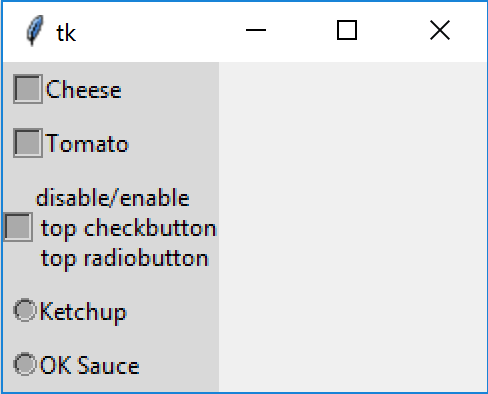
As can be seen from the test script results (figures at the top of the page) Scaleable Radiobuttons the check and radiobuttons match in size just by scaling.